Back forward navigation should be much improved. Most important is that collapse state is now part of navigation locations:
Have an outline with specific expand/collapse state
Start typing in filter field (which will change that state as it filters)
You can now use “Go Back” return to your previous unfiltered expand/collapse state.
I think it’s working well, but let me know if you notice any oddities.
theme-configurable separator colors means you now have color control over the titlebarSeparator, the sidebarSeparators, and the editorBarSeparators through theme file. They’re optional and fall back to the system separator color. (or 50% of the standard separator for case of editorBarSeparators default).
I “think” in the previous version headers were bolded in most of the themes. Now they aren’t. (Perhaps I’m recalling wrong.) At any rate now I’m using the One Light theme as there’s some visual indicator regarding headers vs. non-headers.
In addition, I’m not sure what “Added toggle interface button to toolbar” means. Not sure I see a toolbar per se, or what the “toggle interface” button is supposed to look like. (May be staring me right in the face though!)
I’m using 15.7.3. Definitely all headers were bold before. In the One Light theme at least headers are in an orange color, but also not bold. Nonetheless it’s easy to distinguish headers easily.
… I’ve done more testing. I can no longer make any text bold. However if I apply italics formatting what I now get is italics AND bold.
Ah, now I know what you mean by interface button and toggling! Thanks for the explanation.
I noticed a crash: if you use cmd-\ and select the heading row the cursor is currently on, sometimes the app becomes unresponsive and sometimes it instantly crashes. This is admittedly a dumb thing for me to do: I was trying to understand the function and misinterpreted it as “go to index row.”
I find that if I cmd+shift+F to filter outline, and then ESC my way out of the filter, editor loses focus and the only way to bring the caret back is to click into the outline.
I’m also not quite sure about the back/forward navigation: seems to include practically every move inside filter movements. For example, if I look for /task and say oops, clear filter, //task, Enter 5 times to find correct task, mark done, I then have to Go Back at least 7 times to end up before I made the first mis-typed /task search.
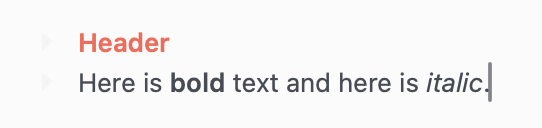
Anyone else seeing this behavior. I just installed 15.7.3 on VM and strong/bold formatting is still working for me in both headers and inline text (as it is on Tahoe too). Here’s what I see when using One Light.
Oh, good lead, I’ll look into that. My intention is that fontWeight does work though, in addition to font traits. I’ll see if I can break things with certain combinations.
Darn, another case I can’t reproduce. I’ve tried in Tahoe and 15.7 VM and in both cases escaping out of the focus field refocuses on editor. This is in 261.
Yeah, I think you are right. I tried to add for each “navigation action”, but when find next match is a navigation action. It already has a built in (Shift-Return) reverse. I’ll remove both those and Find next/prev from navigation history.
I can’t reproduce this one anymore, either. I had 2 outlines, side by side. One (and every other after that) could escape normally back to editor. The other could not. After closing/reopening the file, the problem went away. Will keep an eye out if it happens again.
New release in Bike 2.0 (Preview 262) I think fixes issues in this thread. @mitchellm Please test if this version gives you any different behavior regarding bold text.
Thanks… oh, in Bike > Settings > Appearance did you ever create/modify your own Editor Style? Maybe go to Bike > Extensions folder and temporarily remove all extensions. Then restart Bike.
Wow, this is all very weird. As far as I know I never edited a Style (wouldn’t really know how to). I’ve just now removed all extensions and restarted. It seems the only thing that has changed is I can italicize words without them being bold. But I can’t bold anything … ditto of course for the themes.
When I try to bold (commad-B or as a menu selection) there’s clearly an attempt to select bold (I can see the very quick cursor selection of bold) but nothing happens. So sorry about this.
Ha, it’s my bugs, I’m glad you are reporting them to me! Not sure if it will show up, but can you take a screencast of what you see? When you try to bold. Thanks again!