I noticed that there’s a similar thing if you have a line with a link and then use ⌘+← and ⌘+→, the cursor winds up “inside the link” rather than having affinity for the style before/after.
Use arrow keys to change the cursor’s affinity and override that rule.
The first rule matches the default RTF behavior, as I understand it. The second rule provides a way to override it. (I’m a little confused because, in macOS 27 testing, it looks like RTF/TextEdit treats links differently from other attributes. I’m not sure if that’s always been the case, but it makes sense to me to handle links and other formatting consistently.)
The change to paste behavior broke that logic. The proposed changes would break it further. I don’t think that’s necessarily bad. In the case of paste, the new behavior seemed clearly more useful than the old logic.
But I’d like to make the behavior as consistent as possible. If I only override Command-Arrow, I think things get worse: Command-Arrow would behave one way, while Option-Arrow would behave differently.
So the question I’m thinking about is whether the new rule should be:
Plain arrow-key movements work as they do now.
Document, Paragraph, Line, and Word movements place the caret on the outside edge of the movement, so they don’t take on the attributes of the object they moved over.
In other words, should larger-granularity movements always leave the caret at the edge of the moved-over content, rather than inheriting its attributes?
That’s so interesting. Thank you for writing down how you think about it – I like your distinction between larger-granularity movements and others. That seems intuitive to me in concept, and in a few quick checks. Hard to say fully without living with it for a while.I think you’ve got a much better understanding of the design space than I do.
If I have a .bike file, and I save it as a .md file, it will retain the same root ID? So if I want to link to this new .md file using Copy → Document link, I have to somehow edit the document rootID?
I’m going to change the next release to generate a new id when you duplicate or save as a document.
In the meantime I think it should work to:
Open the Bike file in a plain text editor. Then change the id to something else. In the case of markdown the would mean changing this (in front mater at the top):
"root-id":"something else"
Then, after save, open the file in Bike, and save. When you do the Bike will save the file, but also write out a new xattr value for om.apple.metadata:kMDItemIdentifier which is how Bike finds linked documents. Hope that makes some sense, ask if not.
Was playing with Claude Code updating a Bike document, and ran into a bug where it couldn’t edit the document I asked it to.
Tried reducing it with Claude and it looks like the reason is that my bike mcp was started using an older version (prior to 309). It also looks like I had a bunch of live bike process hanging around from previous releases (since killed!).
A bike mcp server running when Bike updates can’t reach Bike afterwards, and the tools hide the failure
After an update, Bike refuses connections from any bike mcp process that started before it. That process’s executable, the old Helpers/bike, is no longer on disk, so Bike can’t confirm the process is its own CLI. The server keeps running but can’t do anything:
bike_get_outlines and bike_get_editors return [], as if nothing were open.
Every other tool fails with “Bike closed the connection without sending a response.”
Restarting the server fixes it, but nothing tells the user to do that.
Evidence (Bike 2.0 (309), macOS 26.6):
Bike logs this for each attempt from a stale server:
E  [IPCSecurity] proc_pidpath(1684) failed
I  [IPC] Refusing IPC connection: peer is not Bike's embedded CLI
All 8 servers started before the update fail this way. Every server started after it works.
The stale servers also retry every ~5 s indefinitely and leak a socket per failed call.
Suggestions: return an error instead of [], and say why, e.g. “Bike was updated; restart the MCP server”, or have bike mcp exit so the host restarts it.
And one more thing (feel free to disagree, just curious) - in some text editors, like Sublime Text, if you press Cmd+Enter on a line, it’ll create a new line below, and jump you to it. And if you press Cmd+Shift+Enter, it’ll create a new line above, and jump you to it. In Bike, both of these shortcuts currently insert below, and while there is a “Row: Insert Below” action, I don’t see a “Row: Insert Above”. Could there be one, maybe with that shortcut by default?
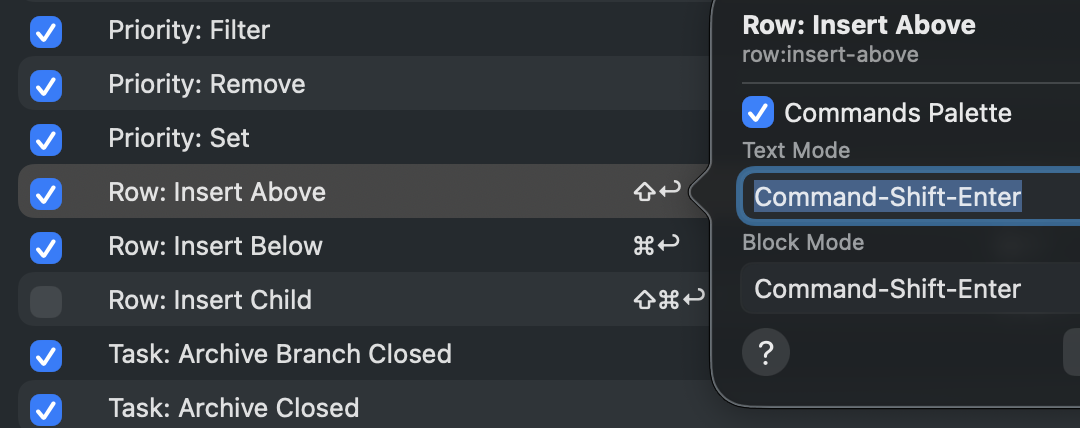
Thanks Jesse! I see the “Insert Above” item now. The shortcut is a bit different from the one I wanted (I was imagining Cmd+Shift+Enter, like Sublime; right now it’s just Shift+Enter) so I’m trying to figure out how to change it. The guide says to Open Settings > Keybindings but I don’t see an option for that in any of the Settings pages - could you point me to it? I might be missing something very obvious but I can’t seem to locate the option in any of the settings pages or app menus.
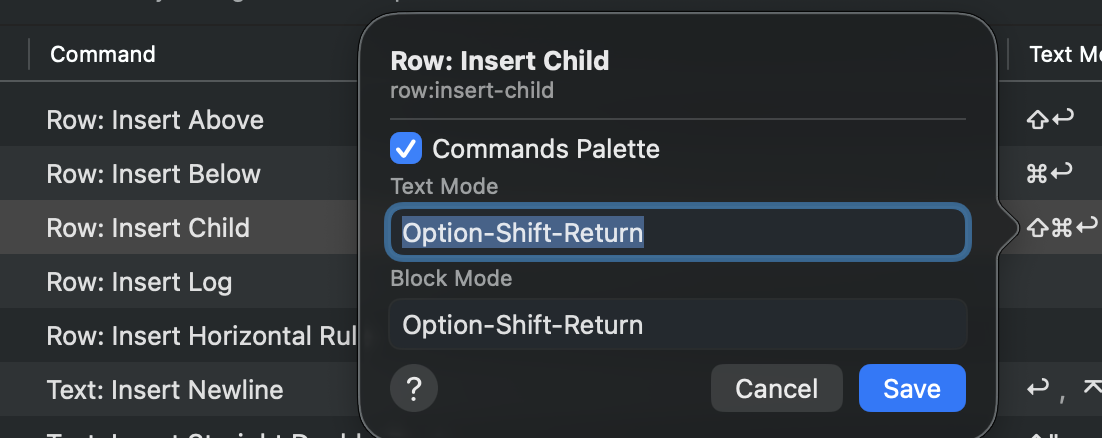
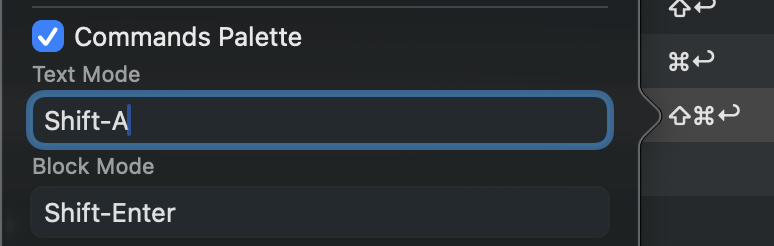
Ah, thanks - looks like that should work, but am having a spot of trouble changing the settings - anything I type here doesn’t seem to reflect in the table. (I needed to change “Insert Child” since it has the shortcut I want to use for “Insert above”. I also didn’t get a warning that the meanings conflicted when editing the “Insert Above” item; maybe it should warn when two actions have the same shortcut in case the user didn’t intend it.)
Oh, I think that’s a display bug for some types of commands in the explorer. But I think the binding that you set should actually work, even though the display in commands explorer isn’t working.
I restarted Bike and Cmd-Shift-Enter still inserts child, though I disabled that one by unchecking it. If I double-click in, I do see the text I set, so the updated preferences did get saved, for both the Insert Above and Inset Child shortcuts.
I wonder if Bike could make it so that this character always appears at the end of the line it attaches to, for aesthetics/space-efficiency? This does reach into the margin, but that might be an acceptable tradeoff (though is a judgement call).
Thanks, bit of a weird case, but I think I have a fix for next release. Basically it will act as if you have copied the entire row.
This is a bit odd, but I think I will leave as is for now. That arrow is using same layout logic as other trailing decorations. Special casing some of them and not others will start to drive me batty
 I noticed that there’s a similar thing if you have a line with a link and then use ⌘+← and ⌘+→, the cursor winds up “inside the link” rather than having affinity for the style before/after.