OK! Be happy to.
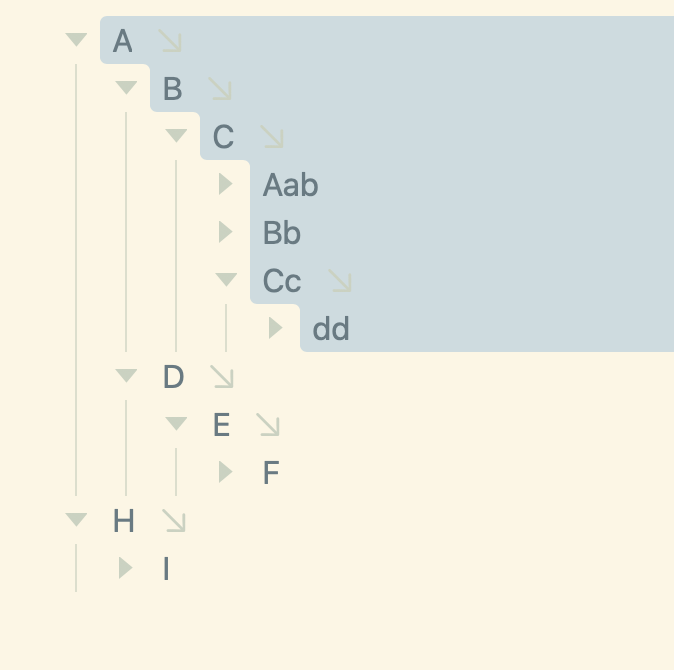
This is expected, I don’t think it’s a change from prev versions, but it is a bit odd.
The reason is that block selection mode always works on full branches. So if you just select “A” in block you’ll copy/move the same content. You can use the command “Edit: Text Copy” to get the behavior you are after in this case.
It seems there is probably a better UI hiding in there somewhere. For example in block selection mode if single row is selected copy branch. But if multiple rows then copy text comes to mind. But I’m worried about repercussions.
If I made that change, which I do think makes sense for copy, then what about the move commands. Logically they might also switch to text based moves… and maybe that’s right, but it’s a big change. Thoughts/feedback welcome.
1 Like
I was not aware of the Text Copy command. That works as expected, thanks!
Hmm. Normally if I copy a selection of text, I expect to see only that part in my pasteboard. Similar story with Cut. What I expect is actually Edit: Text Copy + Row: Text Delete behaviour.
I can see the logic behind the way it works, but I’m not entirely sure it’s what I like from a convenience perspective. I really don’t have any suggestions at this point. There’s so many move/edit commands available in Bike it might be that each user might want to set their own defaults.
I think of these documents as real nested structures (not as flat text in disguise)
If a node is selected, then it seems to me intuitively that (all of) its descendants are already implicitly selected.
A down to dd, without the inclusion of D → E → F below, may be well-defined in a flat list of rows (a text), but seems ill-defined in an outline.
1 Like
@Gorgonzola @complexpoint I wonder if cleanest solution is to go back to Bike 1.x text/tree mode behavior. Except maybe as a flag in settings, instead of a mode you toggle in editor. I think some people just want it to work like text. While others want tree. And there’s probably not a lot of crossover editing that happens.
I would still offer all the commands for you to configure if you did want crossover editing.
The basic design changes would be:
-
Tree mode would work pretty much like default Bike does now. With the exception that block selection would need to select either a single row or full branches.
-
Text mode would selection would work as default Bike does now. Select any range of rows. Default move/copy/etc Operations in this mode would always be the text based ones.
Would that work? Simplify? What am I missing?
Edit And I think some commands even in text mode might still work on outline structure. For example drag and drop. Or maybe Promote/Demote Siblings… which commands exactly should opt out of text mode behavior is a little fuzzy in my mind.
1 Like
I think that sounds promising.
I think what initially confused me to report this not-bug was seeing a selection on screen that was not “respected” on copy-paste. A visual mismatch between what I thought I was copying vs. how tree mode works.
A dedicated tree/text mode in Settings does fix this mismatch, but it’s another decision the user has to make. Also kind of hard to explain to a new user if there’s no visual difference between the two modes. I think this is why Omni draws a container around the tree-based selection (selected rows are in red, blue line is tree that actually gets copied).
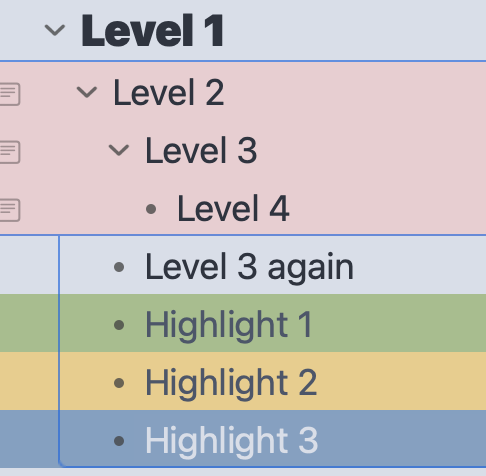
This Changs in Bike 2.0 (Preview 310). Now if you have Settings > General > Move, Copy & Delete > Whole Branches … copy will still copy the whole branch, but the view is also updated to indicate that those non-selected rows are still part of the branch selection. Alternatively if that setting is set to “Selected rows only” then you’ll get what you expected in the first place and only the selected rows are copied.
1 Like