Bike 2.0 (Preview 285)

Edit There’s quite a bit of flakiness in the window titlebar button/menu. Fixed for next release.

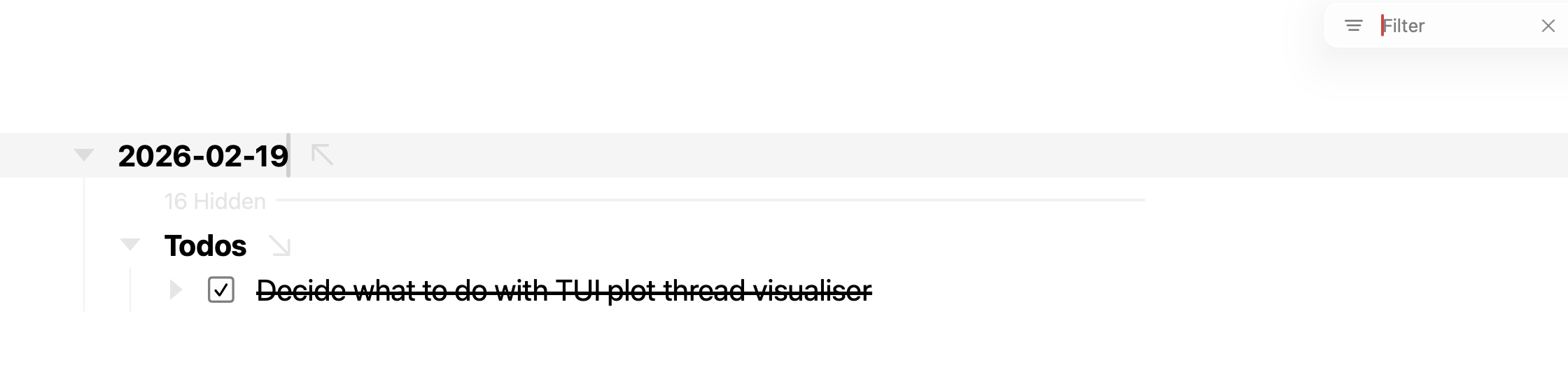
  • Added new filtering behavior
  • Added new newline selection interaction
  • Added new animation behavior for “far” animations
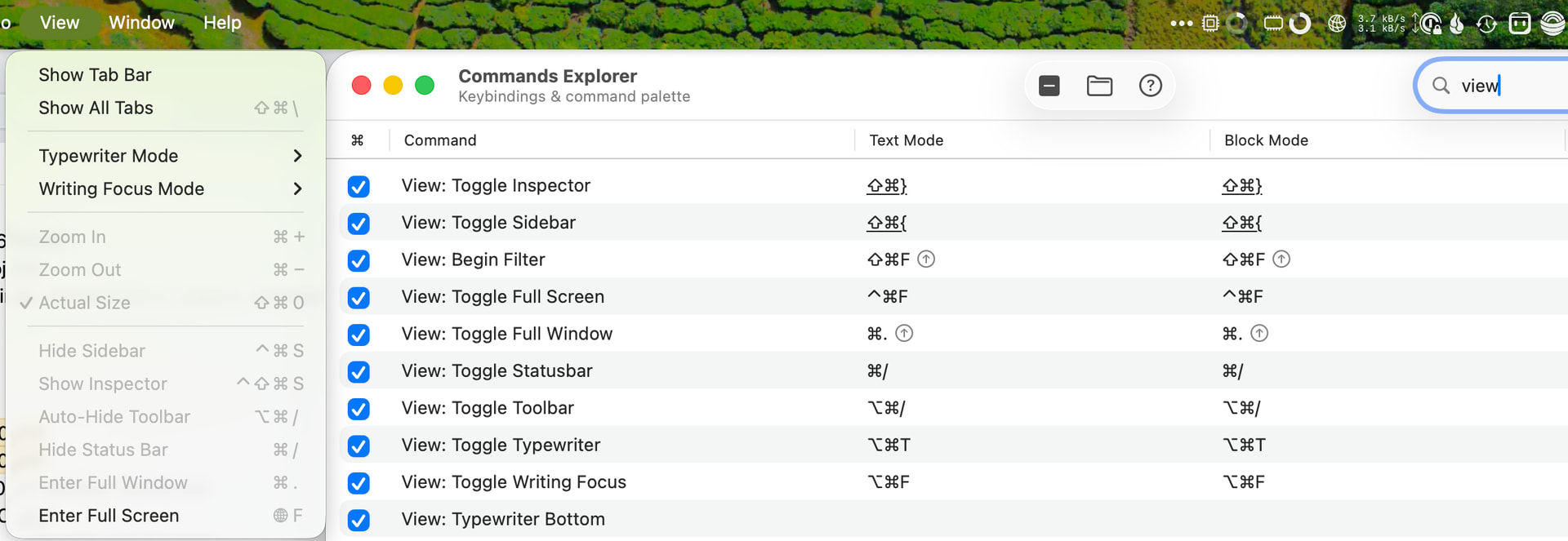
  • Added a “View” menu to the titlebar
  • Added Settings window restore on relaunch
  • Added invisibles dot in text selections
  • Added caret bounce when an editor gains keyboard focus
  • Added Control-Tab focus cycling in the Find and Spell Check panels
  • Added Option-drag on the sidebar/inspector divider to mirror both side pane widths
  • Added View > Auto-Hide Toolbar, shows only when you are filtering
  • Added configurable window titlebar (Interface Explorer > Window Titlebar Buttons)
  • Fixed slow pasting of many rows

Extensions

  • Added bike.session API for DOM extension scripts
  • CLI/automation: observe follows the frontmost outline
  • Added bare function predicates in outline paths, e.g. //* parent()
  • Changed, extensions can only perform commands they have permissions for
  • Added extensions can place default buttons in the UI when declaring commands

Download:

2 Likes

I started on docs… and then went back to coding. Will try docs again next week.

Many more changes than I was expecting at this point, but I think Bike’s a better app for it… though maybe a little less stable, submit those crash reports!

New filtering: TaskPaper style, but better because gaps are easier to see. Thanks for the prompting @zsbenke! It also works for really large documents and small documents. I’ll use the mini-scaled rows for another feature that I have wanted to build.

Edit: Filtering interaction is nicer now too in that when you close filter, or it goes to empty, it takes you back to starting point view with same folds and scroll position.

New selection interaction: Bike is still a block editor, but it’s a little more text editor like because you can now select newlines. If caret is at end of row and you shift-right arrow, or start of row and you shift-left arrow. Then a new line will be selected. I kept wanting to make edits that required this, feels much better to me.

New animations philosophy. Previously I had been trying to animate everything. I really liked the near animations, but the “far” animations often looked a bit glitchy because of missing “whitespace” content and too much stuff zooming and moving. New idea is if I can do a smooth animation, which generally means target location is visible in current viewport, then I do old style fancy animation. On the other hand if target of out of viewport I don’t do any animation of rows, but I bounce the end view. The direction and amount of bounce encodes how far this move was and where you came from. So you get some spacial knowledge, but you don’t have to see a bunch of text zoom by.

When I started the user guide update I immediately saw a screenshot of old Bike where you could have window with no navigation bar… I wanted that option, but filtering is too important to hide. Now with Auto-Hide Toolbar you can have super clean window, but still use filter. I think this is my favorite new feature!

I also cleaned up some other UI that was bothering me. Toggle sidebar buttons are out of titlebar, and instead there is a single popup for accessing them and full window and other view features. (Extension commands can also be added). With that in place I cleaned up editor toolbar, removing the zoom Full Window button.

Extensions

I think bike.session will be very useful and simplify a lot of extensions. It’s a DOM context API that allows you to read/write Bike state, using the same underlying system that Bike’s CLI uses. Previously to get outline state into your DOM views you needed to post messages from app context to dom context. You can still do that, but now you also have options of just reading/write outline/editor state directly without having to do message posting. This new todos example extension shows how to use. It queries for list of not done tasks, and then lists them. And also allows you to check them off. All in not much code.

Send in those bug reports!

3 Likes

Can you speak more to this? I see the newline character selected but what can we then do with it? Backspace/delete seems to then join lines. Extending selection past newline character enters block mode. Are there further options?

I also see some possibly unwanted behaviour with Go Back / Resetting filters, but it’s a scenario I suddenly cannot reproduce. Basically, filter was cleared, but rows were still hidden. Will try to find a way to reproduce this.

I have some custom keybindings to toggle the sidebar and inspector, but they don’t show up in the menu. is this what you want?

OK, might have found it. The key here is to clear the filter, and then Go Back Forward until you end up with a historic filtered state. Here’s what I see with a fresh outline with no Go Back history:

  1. Filter outline.
  2. Clear filter.
  3. Go forward once. You should see outline filtered again with the filter you used in step 1.
  4. Clear filter. Filter clears but outline remains filtered.

On non-fresh outlines, as soon as I hit a filtered state with Go Forward and Clear Filter, I’ll end up with the same result.

EDIT: Great implementation of the hidden rows feature BTW. I love it. //task not @done now provides perfect context.

Not a huge amount more…

But its presence removes a number of editing situations that always annoyed me.

For example:

one
two

If my caret is at start of “two” and I wanted to select “one” I would often Shift-Right Arrow, only to be surprised that (in earlier version of Bike) it would block select “two”. Now it selects the newline, and then continuing selects “one”. Similar with forward extend caret selection from end of row.

I’m curious how it feels to others. Though maybe give yourself a day or two to get used to it if you find it annoying… maybe just have gotten used to Bike’s current behavior. I “think” this new behavior makes logical sense. At least I spent a bunch of time in text editor trying to figure out the things that were annoying me in Bike and came to conclusion that selecting newline was the underlying issue.

No, good catch.

Reproduced the problem first time!

This is looking really nice. A couple questions.

  1. What do you all use filtering for? Is it mainly for doing a quick scan of a document for a certain keyword/query? Or do you use it for navigation as well? Pressing Enter or Shift-Enter go forward/back through matches, and Esc brings me back to original location, which makes me think filtering is just for searching, and not for navigating the cursor to a match.
  2. Is the bike CLI only meant for editing/interacting with files that are already open in a running instance of Bike, or can the CLI be used standalone to edit the outline of a Bike markdown file, even if it’s not open in Bike?

Also, when I run bike --help it gives me


OVERVIEW: Companion CLI for Bike.app

Open, get, and update Bike.app editors and outlines. Commands default to the
frontmost editor and its outline. IMPORTANT: Use `man bike` for high level
orientation.
...

But when I run man bike it says No manual entry for bike

Do you remember how/when you installed the CLI tool?

Early on it didn’t have a man page, so the install process didn’t include it. (The install process is just creating a symlink back into Bike.app)

I “think” if you redo Bike > Install Command Line Tool… you’ll be prompted to update the install?

If not this command line should do it (assuming Bike in in /Applications):

sudo ln -sf "/Applications/Bike.app/Contents/Helpers/bike" /usr/local/bin/bike && \
sudo mkdir -p /usr/local/share/man/man1 && \
sudo ln -sf "/Applications/Bike.app/Contents/Resources/bike.1" /usr/local/share/man/man1/bike.1

I think the most compelling use is view navigation… maybe different navigation then you mean. What I mean is you create a filter and put it in sidebar. Then you can select that filter to get a generated view of your outline–your tasks, or headings, etc. So it’s a generated view location.

Right… in filter view “row matches” are the thing. And Enter, Shift-Enter moves at that granularity. Use Edit > Find to navigate through text range matches.

I am currently highlighting text matches in the filter results, which may or may not be a good idea. I guess that’s what confused you about the navigation behavior to start?

The issue with those highlights is they seem generally useful, but at the same time, they don’t really represent all matches. For example a search like //@done or "pizza" will match both @done rows and rows that contain the text pizza. But they will only show text highlights for the pizza rows.

Suggestions welcome!

Currently it only works for open documents. If needed it could be modified to process outline files directly. Though I think that would really only be suitable for a few of the commands? For example, editor commands don’t make much sense.

Actually maybe this isn’t so complex. What if I just move through highlighted text ranges, but if not present in a matched row, then I block select the entire row?

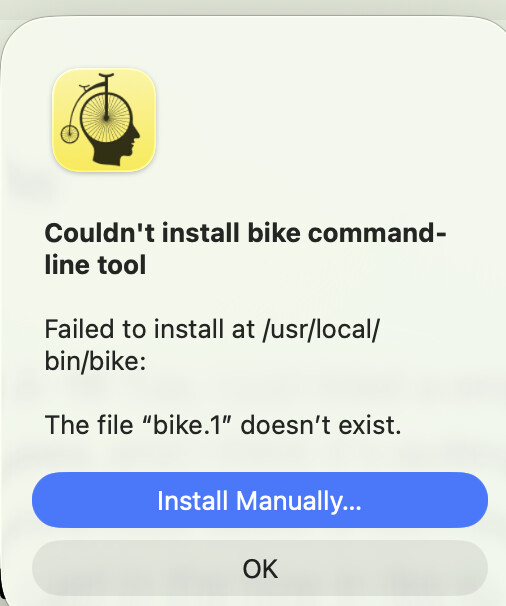
I think I installed it manually via the old command. Clicking “Install CLI” in the new Bike resulted in this error.

However, I just did the manual commands again, and now everything is working for me. Thanks.

Unfortunatly I don’t think there is a fix for this. I need special entitlement key to create these links. But that key only allows me to create new link. Not remove existing, so if you re-install you’ll always see this I think.

Yeah, I think that would be reasonable.

For navigation, let me try to illustrate with this example. Let’s say I do the following sequence of actions.

  1. My cursor is at the top of the file
  2. I use a filter to find a particular row that I was looking for (let’s call this row 100)
  3. I edit some text in that row.
  4. I exit out of the filter
  5. Now my cursor will be back at row 0 (top of file).

I actually haven’t used filters that much, so I don’t really have much of an opinion on how I think it should work. So I just wonder if resetting cursor position is intended and if there’s a reason behind that behavior?

Come to think of it, I think the current behavior of resetting cursor position is probably a sensible default.

For CLI tool, I was thinking of using it from a script or Claude Code, e.g. add an entry to an existing outline, in which case it would potentially be useful not to have the constraint of the file already being open in Bike.

For example, if I have a file called References.bike, where I store links to webpages or PDFs that I want to keep track of as reference material. I could have a script which adds to this file via Bike CLI instead of editing the file directly.

Ah, got it.

So yes, I like the current default of restore view, but I agree it would also be nice to have option to end filter without loosing the current selection. Maybe something like Command-Enter for that case?

Yeah, that would make sense

Am I right in thinking that data-created and data-modified are no longer written out,
in this version, to bike XML pasteboards and files ?

( I see them in a file of 2026-05-27, but not after that date – perhaps I just missed a design change )

Yes, I changed the default so all formats act the same (well not plaintext) with respect to dates:

  • Defaults to no dates written in new docs
  • Change new doc default per format in Settings > Document
  • If a file contains any dates when it is read then it will write dates
1 Like