In the spirit of this kind of HTML idiom
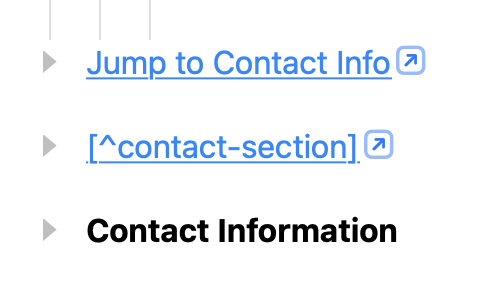
<a href="#contact-section">Jump to Contact Info</a>

<!-- OR, as in Pandoc MD -->

<a href="#contact-section">[^contact-section]</a>

<h2 id="contact-section">Contact Information</h2>
(where href attribute values are #-prefixed ids, pointing elsewhere on the same page)
and with Pandoc export, custom .persistentId labels (and Markdown mapping) in mind, I’ve had fun experimenting with this kind of pattern in build 274
As in:
<li>
  <p><a href="#contact-section">Jump to Contact Info</a></p>
</li>

<li>
  <p><a href="#contact-section">[^contact-section]</a></p>
</li>

<li id="contact-section" data-type="heading">
  <p>Contact Information</p>
</li>
Where the link address, rather than an https:// or bike:// url, is simply a hash-prefix followed by a Row.persistentId.
It seems to work, roughed out in draft extension code.
Draft app/main.ts
import { AppExtensionContext, Row, Selection } from 'bike/app'

type Either<L, R> = { type: "Either"; Left: L } | { type: "Either"; Right: R };
const Left = <L>(x: L): Either<L, never> => ({ type: "Either", Left: x });
const Right = <R>(x: R): Either<never, R> => ({ type: "Either", Right: x });

const bindLR = <L, R>(lr: Either<L, R>) =>
  <R2>(mf: (r: R) => Either<L, R2>): Either<L, R2> =>
    "Left" in lr
      ? Left(lr.Left)
      : mf(lr.Right);


const either = <L, C>(fl: (l: L) => C) =>
  <R>(fr: (r: R) => C) =>
    (e: Either<L, R>): C =>
      "Left" in e
        ? fl(e.Left)
        : fr(e.Right);


const firstInternalLinkInRowLR = (row: Row): Either<string, string> => {
  const text = row.text;
  for (let i = 0; i < text.count; i++) {
    const href = text.attributeAt('a', i);
    if (href && href.startsWith('#')) {
      return Right(href);
    }
  }
  return Left("No #link in first row of block.");
};


export async function activate(context: AppExtensionContext) {
  bike.commands.addCommands({
    commands: {
      'pandoc:jump-to-footnote': (cmdContext) => {
        const { editor, selection } = cmdContext;

        if (!editor || !selection) return false;

        // EITHER a status message,
        return either(
          (message: string) => (
            editor.showStatusMessage(message, 3000),
            false

          )
        )(
          // OR a revealed row, (if a target row found).
          (targetRow: Row) => (
            editor.revealRow(targetRow),
            editor.selectCaret(targetRow, 0),
            true
          )
        )(
          bindLR(
            (editor && selection)
              ? Right(selection)
              : Left("No selection found.")
          )(
            (seln: Selection) => bindLR(
              'text' === seln.type
                ? Right(seln.detail.text.attributeAt('a', 0))
                : 'caret' === seln.type
                  ? (() => {
                    const detail = seln.detail;

                    return Right(
                      seln.row.text.attributeAt(
                        'a', detail.char,
                        detail.runAffinity
                      )
                    );
                  })()
                  : 'block' === seln.type
                    ? firstInternalLinkInRowLR(seln.detail.startRow)
                    : Left(`Selection type not text, caret, or block.`)
            )(
              targetUrl => targetUrl && targetUrl.startsWith('#')
                ? (() => {
                  const targetId = targetUrl.substring(1);
                  const targetRow = editor.outline.getRowById(targetId);

                  return targetRow
                    ? Right(targetRow)
                    : Left(`Target footnote '${targetId}' not found.`);
                })()
                : Left("No #identifier link found.")
            )
          )
        );
      }
    }
  });
}
Draft dom/main.ts
import { Color, defineEditorStyleModifier } from 'bike/style'


defineEditorStyleModifier('footnote-jumper', 'Internal Link Jumper')
  .layer('run-formatting', (_, run) => {

    // Outline path matching runs that have an
    // 'a' (link) attribute starting with a hash (#).
    run('.@a beginswith "#"', (_, runStyle) => {

      runStyle.color = Color.systemBlue();
      runStyle.underline.single = true;


      runStyle.decoration('footnote-click-target', (decoration, layout) => {
        decoration.width = layout.width;
        decoration.height = layout.height;

        // Route clicks to registered command
        decoration.commandName = 'pandoc:jump-to-footnote';

        decoration.zPosition = 10;
      });
    });
  });
A possible extension of the behaviour of standard link-following in Bike ?
(Assuming a bit of UI for assigning a mnemonic persistent id to a target row)
Links like <a href="#contact-section"> already work, of course,
if a .bike file is opened in a browser.