Changed inspector.addItem API to include tab symbol
console.log now shows up in Window > Logs Explorer
Extensions DOM Contexts:
Updated common.css with lots of system styles
Updated common.ts and components.ts adding standard components
For example, use SFSymbol to show system symbol in DOM Context
For examples of new styles and components that extensions can use in DOM Contexts see updated Calendar and Tutorial extensions that are included in the bike-extension-kit.
Not done yet, but this release is staring to feel real. Status bar has items, no more big empty sections in UI. Also latest Calendar extension is much more polished making things feel real at last. Please try it out and let me know what needs work.
I really hate to bug you about this, but autocorrect is still jumping the gun on contractions when I press '. Would be fine if this was default behaviour in other apps as well, but those only correct contractions if I mess up the spelling.
I’ve been avoiding adding because there are so many expand/collapse variants, it starts to make the menu long and confusing. But there probably should be a way to expand/collapse everything without having to select it all first.
Bike 2 does already have:
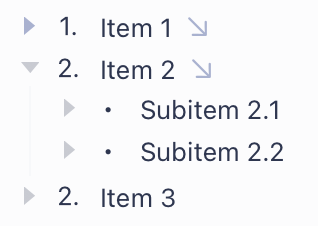
Expand Row (expand selected row)
Expand Row By Level (expand selected branch by level)
Collapse Row (collapse selected row)
Collapse Row By Level (collapse selected branch by level)
What if I also added:
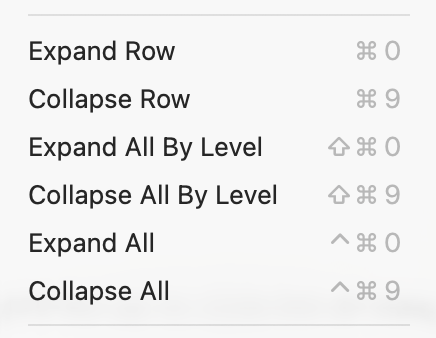
Expand All (expand all rows)
Expand All By Level (expand all branches by level)
Collapse All (collapse all rows)
Collapse All By Level (collapse all branches by level)
In these examples the “By Level” variants would be alternate menu items, not shown in menu until you hold down Option key. And for the “All” cases, I mean in the focused view, not in the entire outline.
Anyone having an issue of custom theme file being automatically deleted after quitting Bike 2?
EDIT: I found the issue or it is an expected behavior, IDK. Any theme file stored in Library/Application Support/Bike/Themes/Extension Themes folder is deleted automatically every time Bike 2 is restarted. Any file stored in Library/Application Support/Bike/Themes remains untouched.
I don’t think that’s easy. The swift markdown lib that I’m using for parsing recognizes ==highlight== syntax, but unfortunately it does not recurse on the content. So it will not recognize bold text that is inside that highlight. This means formatting can be lost when you reload your document.
@jessegrosjean correct me if I’m wrong. ==highlight without bold text== could be rendered without any issues; the problem arises if we have ==highlight **WITH** bold text== ?
Yes, I think that’s it. I investigated a few months ago when I first added markdown. I’m using this package to parse markdown. And then that uses this fork of cmark. I think that’s where the == is being parsed. And also it would be nice if this was all updated (that fork is quite out of date), but not in scope for me at moment.
As you know == is more common for highlighting, so an option in the preferences to use == instead of {mark} could still be useful, as long as users understand the trade-off: bold formatting inside highlighted Markdown would not be rendered. What do you think about this @jessegrosjean ?
Actually my memory was incorrect. Turns out swift-markdown doesn’t support == at all. When I last looked at this I wasn’t using LLMs to do the tedious work. I’ll investigate how hard to enable. I agree it would be nicer to support == for highlight
Bummer…would like to see this implemented at some point, but I can live with the Linter plugin in Obsidian for now. Here’s the regex pattern I use:
\[(.*?)\]\((.*?)\)\{mark\} to find links containing highlighted text (Bike outputs this as [link](url){mark})
\[(.*?)\]\{mark\} for everything else (should cover examples like [content with [nested brackets] or {curly braces} or **bold syntax** or *italic* or any other markdown syntax including [links](likethese.com)]{mark}
While figuring this out, I noticed some hiccups with links:
Type link title into row
Select link title
Invoke formatting palette (cmd+E)
insert link URL
Try to dismiss with cmd+Return
Link entry popup will stay open, but cursor will jump into next line. You can then dismiss popup by clicking Save but that will put link into current line. Dismissing with Return instead of cmd+Return seems to work OK.
I’ve been playing around with Preview 266 and it’s nice. Looking forward to the stable release.
Unfortunately it was a little unstable for me. I think there were a couple time where it seemed it wasn’t saving my changes to the document, and just a minute ago the app completely crashed after I simply pressed the “tab” key to indent several blocks of content.