Pin Row command (⌘Y) - Pin rows to the sidebar for quick access
Add Link to Row - New action to insert a link to any row via fuzzy search
Show Commands - Now includes a more complete list of outliner commands
ChoiceBox API - Fuzzy filtering UI for selecting items from a list. bike.showChoiceBox() API
Themes & Theme API - Lots of additions. Theme files can now set colors and typography for many pre-defined row and run types. You can now do a lot by editing theme.json. See examples in bike-extension-kit/api/theme
Fixed
Sidebar selection logic is more polished
NSOutlineView crash when deleting multiple sidebar items at once
Empty queryParameters no longer adds trailing ? to URLs (broke Hookmark Mail links)
Autocorrect bugs: attribute extraction with substring offsets, race conditions with rapid keystrokes (I think! Let me know)
Changed
ChoiceBox UI is now a more standard flat list without preferences
Sidebar API: addAction changed to addLocation, signature also changed
I think the theme system is now “done” without any more big upcoming changes. The goal was to allow lots of theme flexibility by editing a .json file, instead of needing to dig into javascript and styles. This release adds ability to target many predefined elements (row, and text runs) and apply color and text styling.
If you are a bike style dev, I have also added some API to make it easy to apply a users theme. Basically in each of your rules that matches a themes target (such as heading) you should apply the theme first, and then make any custom changes after. Look at Bike’s default theme in the bike-extension-kit to see the pattern.
I also made some big changes to the “ChoiceBox” in this release. Previously I tried to innovate and add hierarchy to the Choice Box UI. My design had some good points, but I’ve come to the conclusion that a flat list really is most suitable for a fuzzy select UI. Showing the hierarchy looked nice before search started, but once search was happening it created all sorts of oddities. And as a result I added preferences. Except I could never remember/understand what the preferences actually did… to complex. I hope this simpler design works for you too!
I still have a fair amount to do for 2.0, but Bike 2 is starting to feel like a “real” app to me. Please start treating it like something that I’ll release soon, and let me know what you think needs improvement before I do release it. Thanks!
Sorry for any confusion, I just realized I never pushed changes to extension kit! So if you’ve been puzzling through the kit to see the new changes… they were not there. Should be updated now.
One small annoyance for me: In Bike 1, when pasting links, I could select some text, paste the link – and the selected text was taken as link title instead of the original link title. I really liked that behavior and would love to see it in Bike 2!
Hmm, I’m getting a crash whenever I try to add a heading to a specific row in a document… It’s a bikemd document.
Typing # + space gave me the crash. I then tried to create the heading in a different row, and it worked fine. However, if I then moved it to where I wanted it, the app crashed again!
Are you getting the reports if I hit “Open again”?
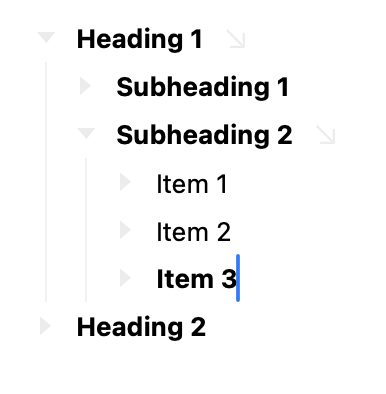
I’m consistently getting a bug when I want to create a Subheading 3 in a structure like this:
Heading 1
Subheading 1
Subheading 2
Item 1
Item 2
Heading 2
For instance, if I create an Item 3 and make it a heading, it works fine. But if I move it to become Subheading 3, things crashes. A regular item works fine!
(Looking forward to checking out the new theming!)
This is in 259? There were some crashes I knew about in prev previews, but I can’t seem to reproduce this in 259.
No I don’t think I see any from you. The reports aren’t sent automatically, they open in your email program, and then you send from Mail.app. So if you are not seeing/doing that then I’m not getting report.
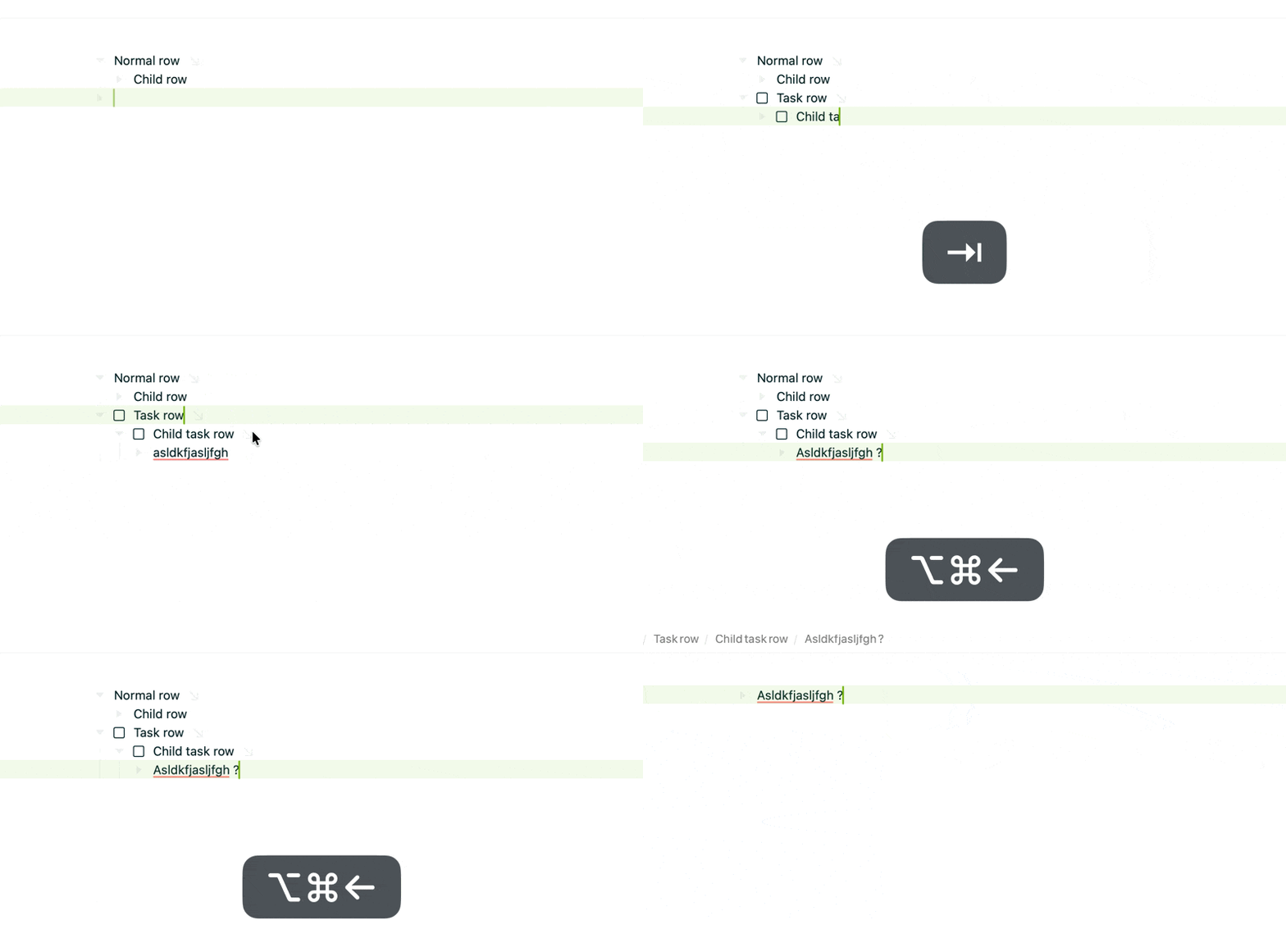
Here’s what I’m trying (I can put Item 3 at any indentation level and seems OK):
When moving items using (Maintain Level) out of view, viewport doesn’t follow
I feel like Bike 1 had snappier animations for row movements and never lost sight of an item moving, while Bike 2.0 does (I have animations set to 2x speed)
There are some weird things happening with Focus arrows and special row types: it appears to lead to the last ancestor. Also it seems that rows without children don’t get a (un)Focus arrow when zoomed in, which makes it confusing to get back out.
Starting a new document doesn’t put caret into first row
When deleting all rows, I get a “Create row” button, which feels a little strange-expecting to see empty row (work in progress?)
This is a bit weird, but I think I’ll probably keep for now, it simplifies a lot of special cases. I have added an icon for next release that indicates you can create row with Return or by clicking the button.
Is it all row movements or just some? For me basic up/down movements seem close to instantaneous when at 2x speed. I do see a problem case when in Filtered view, the “zoom in selected row” animation is too slow. Maybe there are other cases I’m missing, or are basic move up/down animations in a simple list also too slow for you?
What app are you copying the URL from before pasting? I can’t seem to find an app that associates the name with URL for copy, only for drag and drop from Safari.
Edit Never mind… just found I could copy from Safari text in web page
I’m retracting this comment. I think the reason animations felt snappier in 1.0 was because there was a difference in rendering that involved some flickering, and that made it feel faster to my eyes. But now testing side-by-side on 120hz display, 2.0 clearly does things better and at least as accurate.
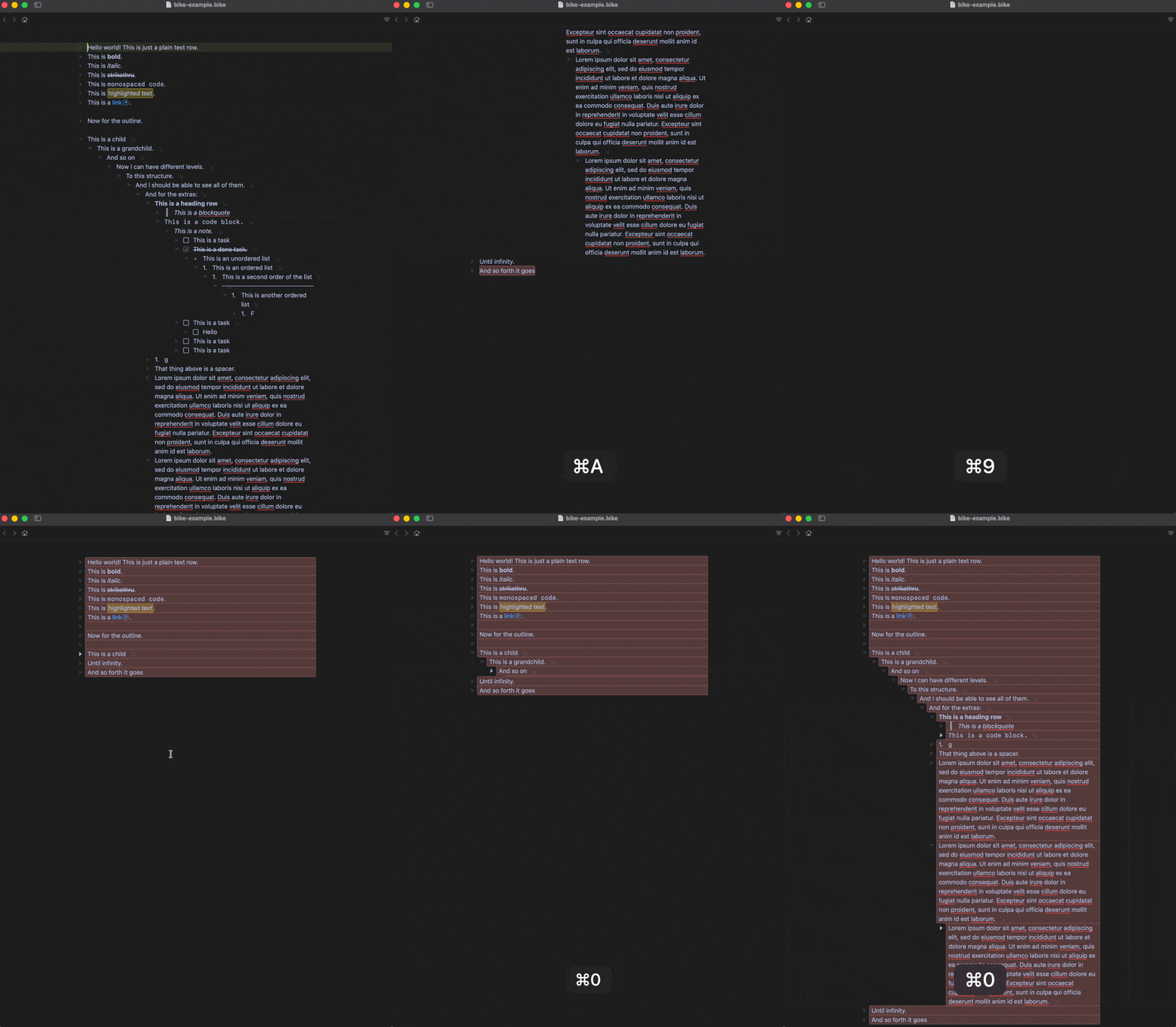
EDIT: I will add another feedback point to the list, related to things moving out of viewport:
Create large document with indented children
Scroll to the end
cmd+a select all
cmd+9 to Collapse row
All rows should collapse, but everything moves out of view if collapsed view is short: