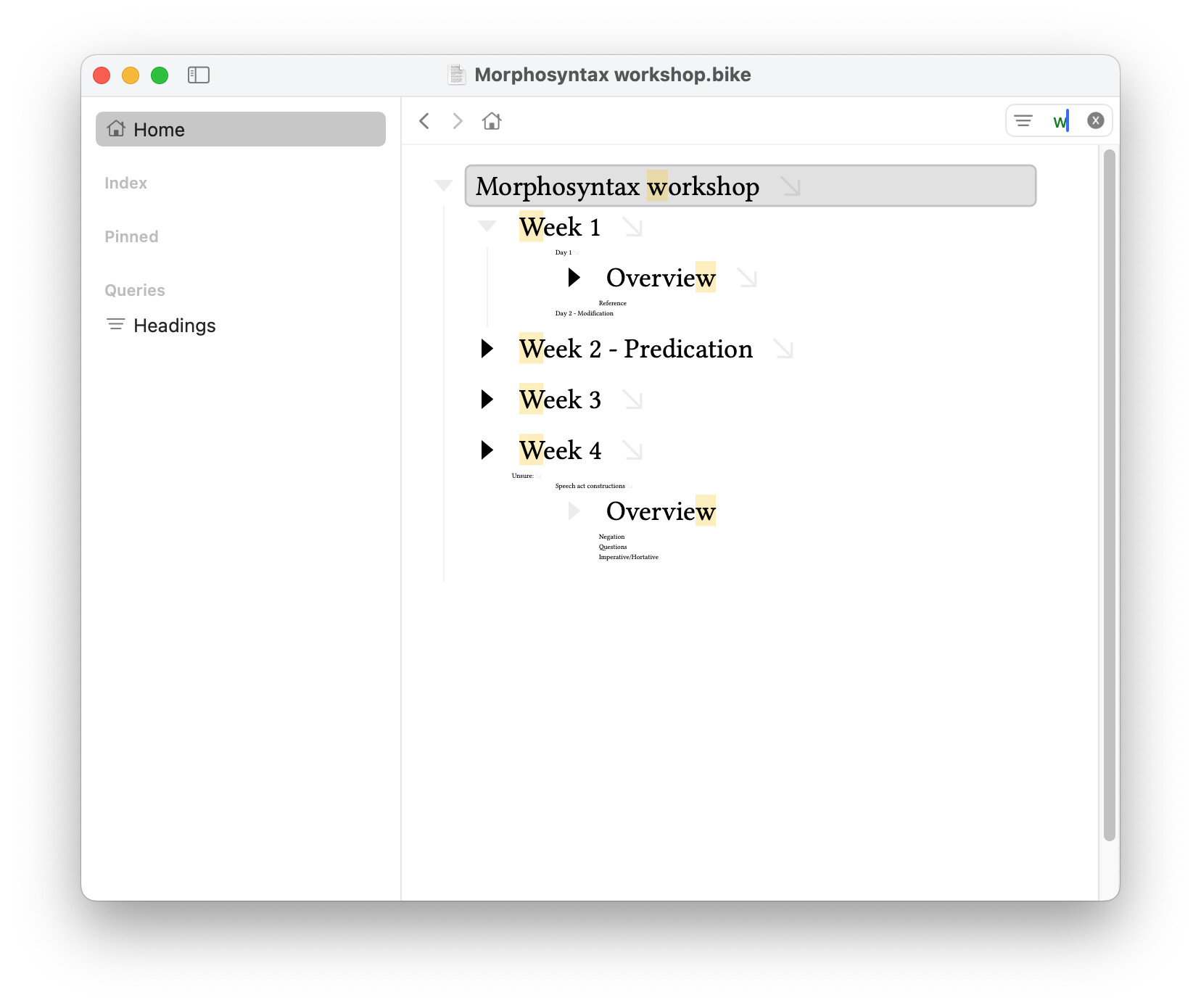
This is intended. The idea is to show your match results in context. You can also use Command-F for standard find and replace that doesn’t shrink non-matching rows. This zoom behavior is configured though the javascript stylesheet, so it is configurable, but it’s a pretty core part of the design.
Bike 260 feedback; might find a bit more as I use:
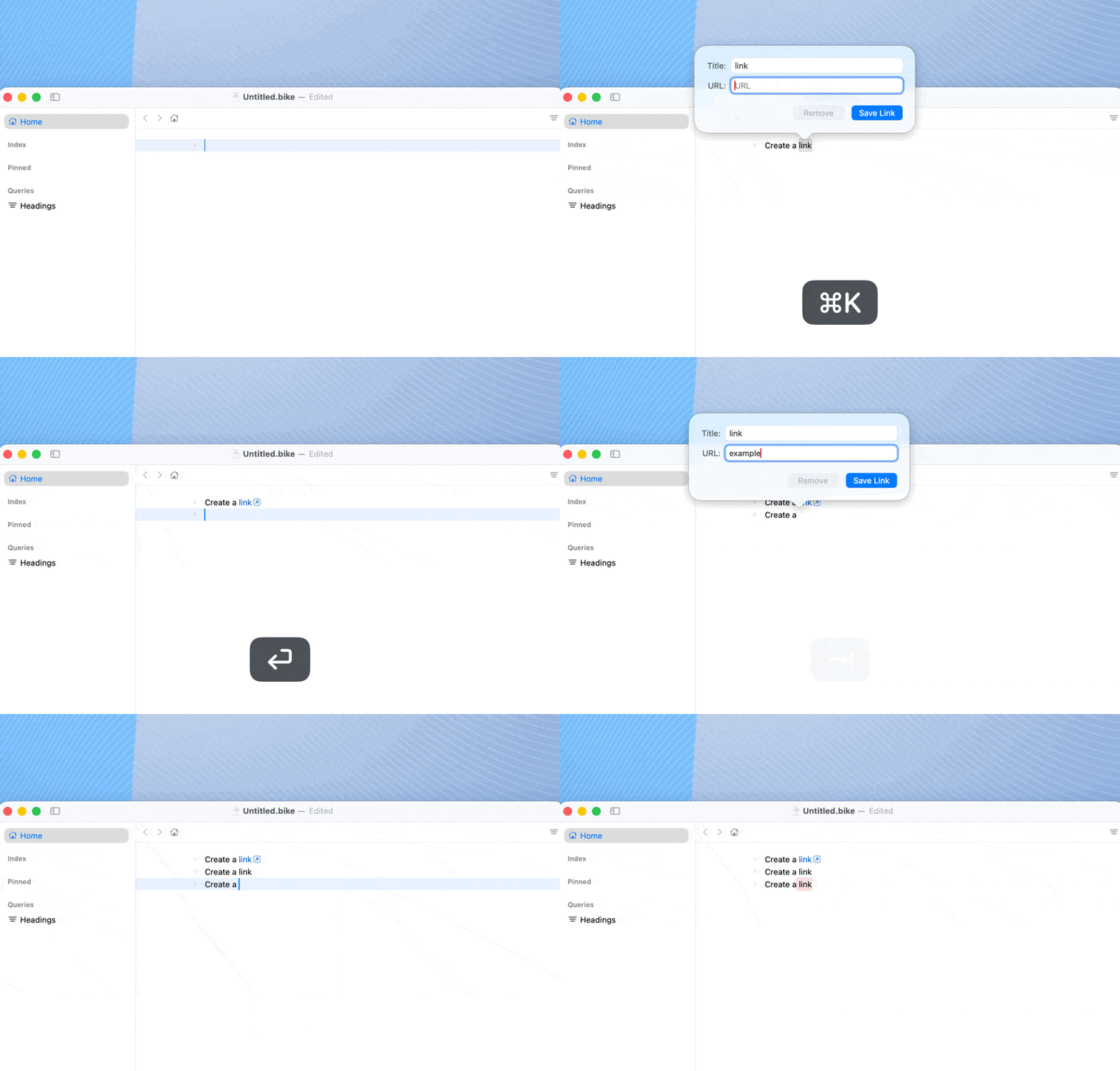
creating a link from scratch using rich formatting palette doesn’t seem to work:
Press cmd+K / cmd+E → l for link
Type in title and address
Click save / hit Return
Link doesn’t save
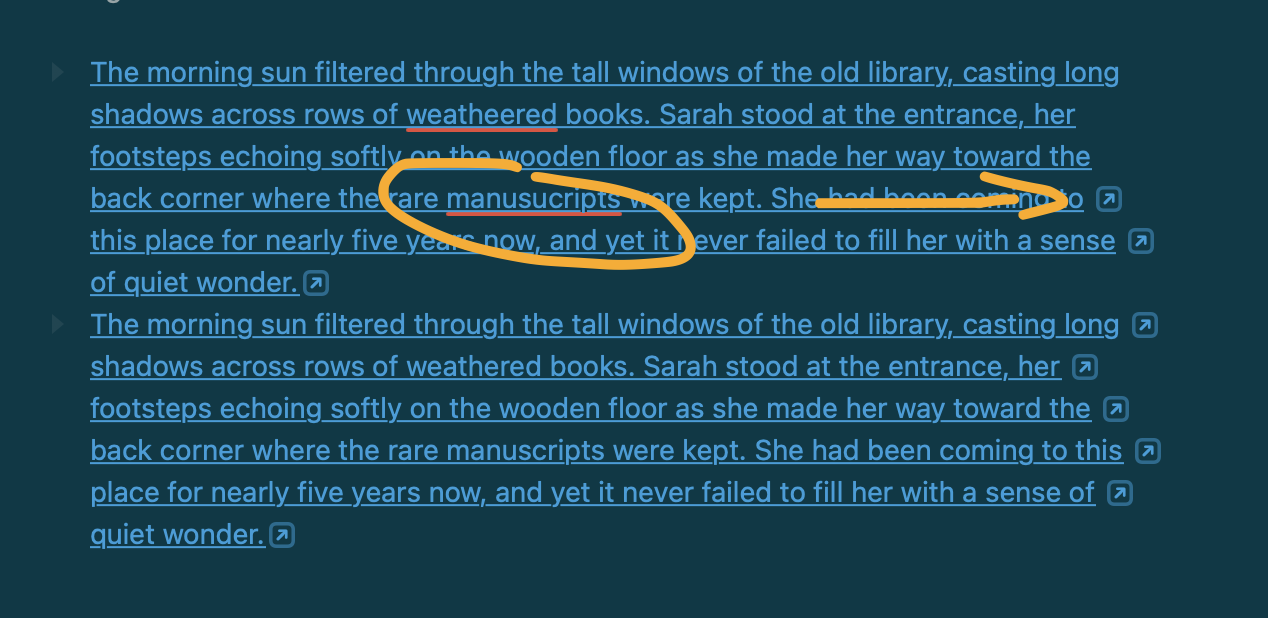
multi-line wrapped-line row links create multiple link arrows but this seems somehow disrupted by autocorrect detecting errors (see image) and cursor inside row
can’t really discern difference between Focus Out and Go Back, seems to do the same thing even when using Focus Index Row to focus on a row n-levels deep (including leaving caret on focused index row when using Go Back)
very minor comment: Writer Day theme appears under Dark themes, and it’s probably not supposed to be there because it looks broken in dark mode
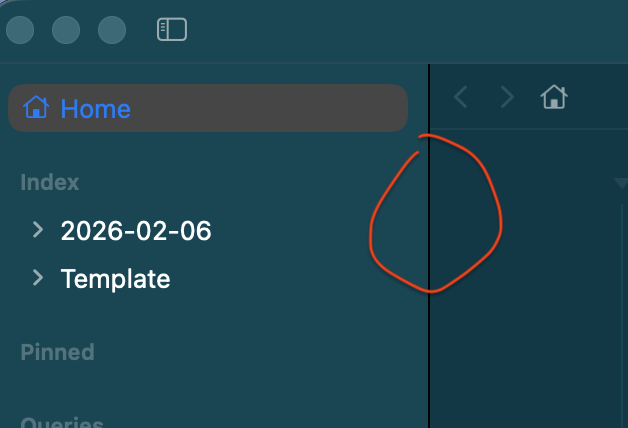
another minor comment: The sidebar divider in dark mode always appears black and looks a little off compared to other UI dividers:
Hi Jessie, I have mixed feelings about the filter as currently implemented. The font of the text that shrinks away is extremely small and very difficult to read so some of that intended context is lost.
I would also like to be able to optionally dismiss the filter with the keyboard once I found what am looking for, and I haven’t found a way to do this yet other than to grab the mouse and click in the filter text box and dismiss it returning all text to a normal size. I can then edit the outline with all text normal size.
On a positive, I do like how hitting return cycles through all matches after entering something in the filter. Perhaps command return might be a way of dismissing the filter and restoring all text to normal size at the location the editor is currently focused on?
I don’t like how omnioutliner implements filtering either. The filter results in a flat list of matching nodes without any context at all although strangely saved filters in the sidebar can optionally show the hierarchy above that level, but not below.
In the case of bike however, I can see why you chose this as a solution, but shrinking to a lesser degree, and/or enabling a keyboard method of dismissing the filter, and restoring normal editing might help.
I would love to see saved filters in the side bar also e.g., list of tasks/checkboxes etc, similar to task paper and ability to use and/or filters for various criteria. Glad you are making such good progress.
I think the direction of your new app is very promising, it’s a pleasure to use, and can’t wait to see tags and other features implemented.
I wonder if there’s more context, this seems to work correctly for me. Anyone else seeing?
Thanks, added to list. I think I fixed this once in stylesheet, but must have broke it again.
Go Back is still a bit buggy, so that’s probably part of the issue. Go Back is same behavior as Focus Out if you just did “Focus In” or equivalent action. On the other hand if you just did a Focus Out action then Go Back should be equivalent to “Focus In”… Go Back should work kinda like a web browser taking you back in history through the locations you have visited. And in Bike a location is mostly defined by:
Editor’s focus row
Editor’s filter state
And when you go back it should also restore your selection and expand/collapse state. (This isn’t all working yet). So the idea is it should always take you back to where you were before. Hope that makes some sense, but not quite working right yet.
Thanks!
Yeah, I’ve noticed that too. It’s just a default divider provided by the Split View. All the other dividers I’m custom drawing. It might be that a different window background color will help. Anyway I’ll try to look into it.
You are not supposed to be able to read that text, it’s just there for context so that you know the shape of the content between the matches. Another option might be to just draw rectangles instead of text.
I’m not sure if that would make things better or worse?
Another thought…
I’ve been toying with the idea of adding back TaskPaper like filtering (where non-matches are completely hidden from view), but showing it in a non-editable “search” sheet. Then you click on one of those results to go to that location in the editor. So this would be an alternative additional mode called “Search” instead of “Filter”. Good / Bad?
I agree that’s needed.
Not working yet, but Go Back (Command-[) will take you back to prev view in the future (also removing filter). But it would also be nice to just be able to cancel current filter. I would also like a way to hide bottom panels (Find, Text Checking) when the outline editor has focus.
Return to cancel the filter seems weird to me. Maybe use Option-Escape or Comman-Escape for both above cases? I think the most standard way would be plain Escape, but that’s already used to toggle selection mode.
This should be possible now. If you right click the filters part of sidebar you can create/edit/delete. You can also drag and drop to re-order.
I’m able to create links if I make a selection and then use whatever command to insert URL.
But it doesn’t seem to work if there’s no pre-existing text to hyperlink:
Themes live in separate folder. On startup themes found in extensions are copied over into the themes folder. So even if you delete extension, you don’t deleted the copied over themes… which is probably something I need to fix.
I just tried alternative fonts and the bold variants of Jetbrains Mono, Maple Mono, and IBM Plex Mono don’t seem to work. Italics is fine, bold just doesn’t show up.
Its main feature is that it should incorporate color reflections from surrounding pixels. It is not expected to show shadow and rounded corners (ie Tahoe sidebar style).
The glass component area needs to be somewhat large for the color reflections to show. So should be able to see in sidebar (if Bike window is near a colorful area of screen). Less likely in titlebar.
It should look have the same look as “Inspectors” in Tahoe. So for example if you open Calendar. Go to “Day” mode. Then the right sidebar should be same… glass material, but without shadow.
Good catch, they were not. In both cases the bug is in bike-stylesheet, not in the theme, which is mostly expected and helps show how themes work in relation to stylesheets… Theme defines the values, responsibility of stylesheet to apply them.
Sadly, my editor style is broken after the updates…
Sorry about that. I think shouldn’t be broken in major ways, but I keep changing tiny details, trying to get everything “right” for the 2.0 release so I can stop breaking things then.
Yeah, I don’t blame you for breaking things in an early beta like this! I’m annoyed — but not at you or the app, if you know what I mean.
Oh, and another issue I’m having: I keep getting duplicates of my themes… I’ve had this problem previously as well.
I have my new themes in the theme folder of the extension that is called Havn_style. And when I started working on stuff again now, I went into Bikes’s theme folder (via the theme settings screen there) and deleted my old themes. Then I built the extension kit — but the theme files I had deleted came back!
I did it again just now:
Went into the theme folder.
Deleted the theme files under Themes → Extension Themes
Deleted the theme files under Extensions → My extension → theme. (I did not to this the last time.)
Checked Bike and saw that my themes weren’t there.
Checked the extension kit repo to see that I only have two theme files there.
Build via npm.
… and I get lots of themes/theme files again!
Maybe something is wrong with my setup?
A theme file called theme_name.bktheme
and one called extension_name-theme_name.bktheme gets created under both Themes/Extension Themes and Extensions/extension_name.bkext/theme. So that’s four files per theme — and I also get duplicates in the menu.
(Oh, and npm run watch always hangs on something called worldexplorer.bkext.)
I am not sure this has been mentioned before but the two extensions “Calendar” and “WordExplorer” that install as part of the extension kit do not show properly when you select a Dark color theme.
 So now I need to find the motivation to fix that, and see how it plays with the theme, heh…

