WriteRoom product page updated (again).
- Added inline Writing Tools in the editor
- Changed DEC Terminal to ship with flat glass
- Changed the minimap to be off by default
- Improved find speed in very large documents (⌘G)
- Improved find to center a distant match in the window
- Fixed Writing Tools missing from the Edit menu on macOS 27
- Fixed the Siri button (macOS 27) rarely showing over selected text
- Fixed heading numbers drawing twice when a title has emphasis
1 Like
Thanks! I have no bugs to report, just feedback regarding the fix-line-width-font-size-scaling. Using 100c for line width, the scaling on my 1440p monitor starts very late. The first jump is at 3/4 of window size in relation to screen width. Actually, I always though this setting was off until testing this extrem case. Maybe the padding should be calculated differently for bigger line width?
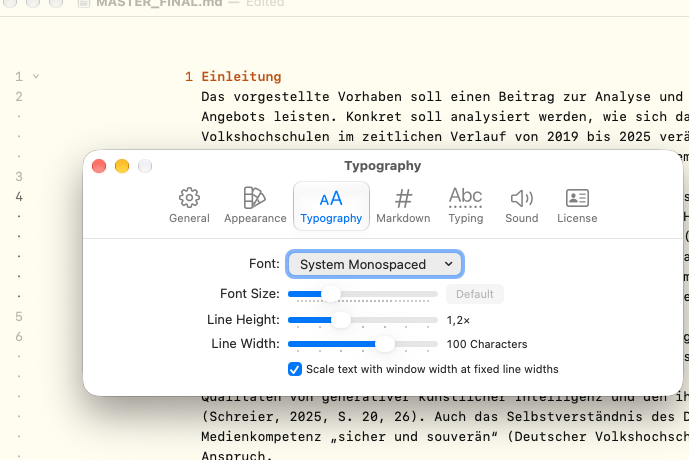
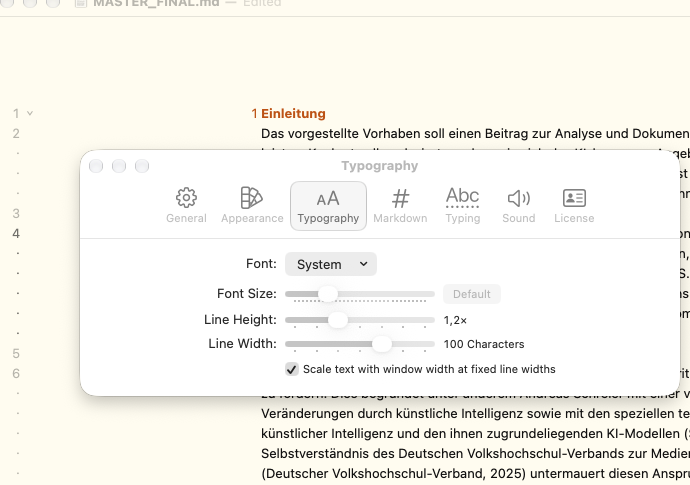
Also changing the font often changes the size and positioniong of the text window. I know this is technically logical, as fonts have individual proper sizes, but the change and its animation still feel pretty strong. Added two screenshots to display the difference just for System and System Mono.
My intuitive expectation for the “text window” in a writer app is that it stays in the same alignment and even size regardless of font choice. I do not know, how this is achieved from design and technical perspectives.
For context: The window takes the full left half of my 2560x1440 screen and I have a 3000c sized doc with default font size, 100c width and line height 1,2. For both pictures I just changed the font.
Just noticed a bug in this release, scroller is broken/flashes when scrolling. Will fix.