Hogbay Software’s Bike 2.0 Outliner (build 294+) lets you flag any row (choosing from 7 flag colors, defaulting to red), via (⇧⌘A) Format > Row Attributes...
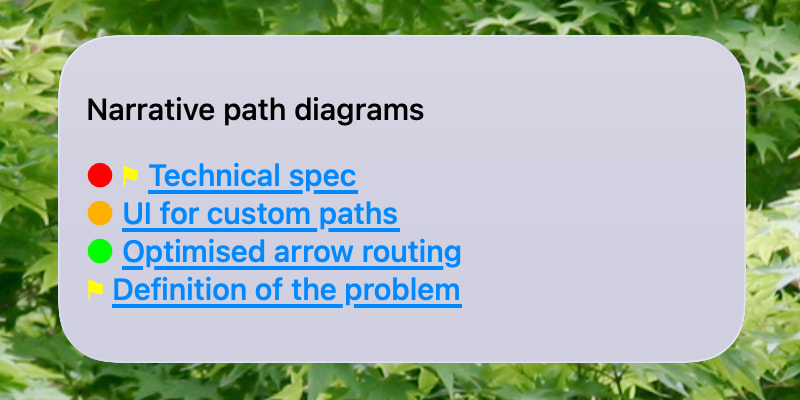
This TerminalWidget script shows hyperlinks to any flagged rows in a Bike outline, using the .bike or .biked filename as the widget title, and prefixing each link with its colored flag.
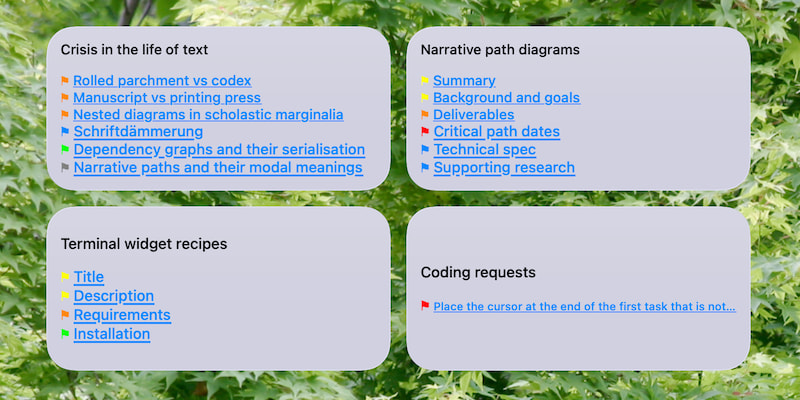
With several, you can build a dashboard which:
- shows where you are, in your various projects, and
- lets you jump straight to the relevant lines.
Requirements
Flagged lines in a Bike.app outline file
- The file doesn’t have to be open in Bike.app
- It must be in
.bikeor.bikedformat – this script relies on X/HTML structure for fast parsing, and will not work with files saved in.mdor.txtformat.
Displaying links to flagged lines
- TerminalWidget
- Hogbay Software Bike 2.0
- jaq (xml-capable jq), which can be installed via Homebrew Homebrew Formulae: jaq
Updates on file change
Installation
Terminal widget with target name matching the file name (minus extension)
- Create a new TerminalWidget with the size you prefer
- Ctrl-click on the new widget, and choose
Edit Terminal Widget... - Set the target name to the Bike outline filename, dropping the
.bike[d]extension
e.g. for ~/Desktop/Project notes.bike the TerminalWidget target name would be:
Project notes
Shell script :: flaggedBikeLines.sh
Expand disclosure triangle to view shell script source
#!/bin/zsh
# Ver 0.6
# Links to flagged lines in a Hogbay Bike 2.0 (294+) .bike outline.
# Output to a TerminalWidget with a target name which matches
# the filename stem of the .bike (or .biked) filepath
# which is passed to the script.
# e.g. for `~/Desktop/Project\ Notes.bike` we use
# "Project Notes" as the widget identifier.
# ---------
# In the case of a .biked bundle containing attachments, the
# xhtml source is expected in a `text.bike` file in the bundle.
local bike_xml_path="$1"
[[ "$1" == *.biked ]] && bike_xml_path="$1/text.bike"
# A message for the case in which no `.bike` file is found at the path.
if [[ ! -f "$bike_xml_path" ]]; then
echo "Error: .bike file not found: '$bike_xml_path'" >&2
exit 1
fi
# Otherwise, a filename header, followed by zero or more lines consisting of
# MD links to flagged lines in the Bike outline, each prefixed by a colored flag
# (color specified by the value of `data-flagged` in the given line)
{
# As a header – the matched file name without its extension
printf "%s\n\n" "${1:t:r}"
# jaq query (xml-capable jq) ( https://gedenkt.at/jaq/manual/ )
# jaq can be installed from brew ( https://formulae.brew.sh/formula/jaq )
/opt/homebrew/bin/jaq -r --from xml '
def get_text:
if type == "string" then .
elif type == "object" then (.c[]? | get_text)
else empty end;
# ANSI codes for Bike flag colors
{
"orange": 208,
"red": 196,
"purple": 129,
"blue": 33,
"yellow": 226,
"green": 46,
"gray": 244
} as $color_map |
# Unique identifier of the .bike document (used in Bike link urls)
( [.. | objects | select(.t == "ul" and (.a.id? != null)) | .a.id] | first ) as $rootid |
# Rows of the .bike outline, paired with their zero-based indices (for line numbers)
[.. | objects | select(.t == "li")] |
to_entries[] |
# ONLY LINES WITH a `data-flagged` ATTRIBUTE
select(.value.a? | has("data-flagged")?) |
# ANSI color code matching any `data-flagged` attribute value,
# defaulting to red (code 196) for empty or unknown values.
(.value.a["data-flagged"]) as $color_name |
($color_map[$color_name] // 196) as $color_code |
# Plain text version of Bike outline row, with XML entity decoding
# falling back to `alt` or `src` of img if text is empty
(
( [.value.c[]? | objects | select(.t == "p") | get_text] | join("") ) as $parsed_text |
if $parsed_text != "" then
$parsed_text
else
# Find the first img tag inside the p element and check its attributes (.a)
( [.value.c[]? | objects | select(.t == "p") | .. | objects | select(.t == "img") | .a] | first
| if (.alt // "") != "" then .alt else .src end
) // "(Line \(.key + 1))"
end
) as $label_text |
# XML entity decoding and bracket substitution
( $label_text
| gsub("""; "\"")
| gsub("'"; "\u0027")
| gsub(">"; ">")
| gsub("<"; "<")
| gsub("&"; "&")
| gsub("\\["; "{")
| gsub("\\]"; "}")
) as $text |
# Unique persistentId of the row if it has one,
# otherwise, its one-based row number.
(if .value.a.id? != null then .value.a.id else "#\(.key + 1)" end) as $focus_path |
# MD link to row, with flag prefix colored by ANSI escape sequence (using \u001b for ESC)
"\u001b[38;5;\($color_code)m⚑\u001b[0m [\($text)](bike://\($rootid)/\($focus_path))"
' "$bike_xml_path"
} | /Applications/TerminalWidget.app/Contents/MacOS/TerminalWidget --target "${1:t:r}" --text - --bg d0d0e0
Command line test
- Ensure that
flaggedBikeLines.shis executable, withchmod +x flaggedBikeLines.sh - Apply it to the full path of a Bike outline file (.bike or .biked) for which there is a TerminalWidget with a
target namematching its file name (minus extension)
Update on file change
- Create a Hazel.app rule for a folder containing a
.bikeor.bikedfile for which you have created a TerminalWidget - Add a rule which applies the script to any newly-changed
.bikeor.bikedfile(s) in the folder.
| If | all | of the following conditions are met | ||
|---|---|---|---|---|
Date Last Modified |
is after | Date Last Matched |
||
| If | any | of the following conditions are met for | the current file or folder | |
Extension |
is | bike |
||
Extension |
is | biked |
||
| Do the following to the matched file or folder: | ||||
| Run shell script | flaggedBikeLines.sh |