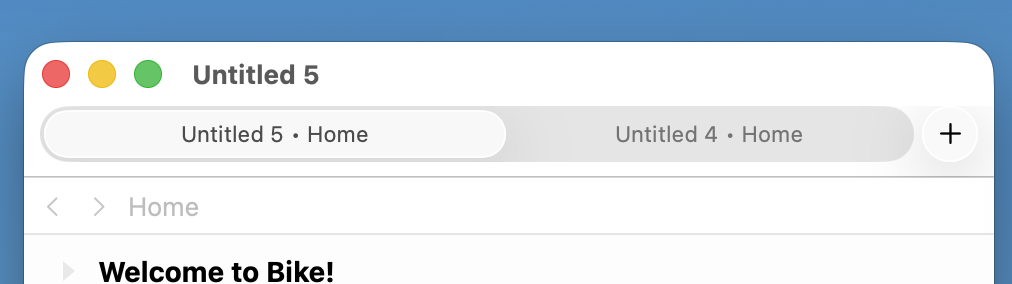
Hi there! I have a license from Nov 2024 and also one through SetApp which is a recent release.
I’m noticing tabs in the navigation menu (“+” sign which lets me open a new bike document) in the older version, whereas it’s not present in the latest release. Was this feature removed?
Thanks,
Hari
This is what I’m seeing in the latest version from SetApp (1.22.2):
I think this is showing the (+) button you are talking about in the right? I’m on Tahoe, I wonder if maybe that makes a difference? Or does anyone know if that button can be shown/hidden with some system setting?
Thanks! I found it on Tahoe by looking up “Tabs” in “Help”. By default I see a “+ New” in File dropdown and that opens a new document, but the shortcut for new tab works.
Another question, since I’m seeing it for the first time in some screenshots on the forum - what is the sidebar on the left with home/today buttons and the calender on the right? How to set it up?
Thanks,
Hari
Ok, so I found the calender extension. Seems the install from Setapp is Bike 1.x (Release 196) and not Bike 2.x? The extension is not showing up for me after downloading Bike 2.0 preview (Release 253), so would a license upgrade resolve it?
Yes, what you are seeing is the calendar extension in the 2.0 preview of Bike. It’s still quite rough in places, but you can download the preview and try it out. Bike 2 isn’t available on SetApp yet because it’s still in preview and not ready to be used by most people due to missing features and bugs.
That extension doesn’t come with the Bike 2 download, you’ll have to build and install it separately from the bike-extension-kit. This build/install isn’t a particularlty easy process, requires some learning or familiarly with javascript build systems. Walkthrough is here.
1 Like