I’m having a hard time with the selection behavior in Bike 2:
Do I really have to press CMD-A three times to get a “Select All”? Or did I mess-up my setup? It looks like I have to go through “Select Paragraph” and “Select Branch” before – although there are explicit shortcuts for those!?
After “Select All” (3 times CMD-A): How am I supposed to get back to normal editing mode (text mode?) at the position where I was before pressing CMD-A? Pressing Escape, I end up at the end of my document.
Why can’t I select half of one branch and half of the next? Bike switches to outline mode (block mode?) and selects both branches completely.
I think I’m having general problems with the changes to the “Edit Mode” behavior and I’m missing the old “Text Mode” where I could use Bike like a text editor, move branches around freely – and switch to outline-mode when I need it.
It is quite different and comes with different tradeoffs.
Bike 1’s selection model was unique and had some great features. In particular pure text editor in text mode, full outliner in outliner mode.
It was also complex and unfamiliar to most users. In particular Bike’s primary feature is being an outliner, and many outline users were confused by Bike’s text mode and wondered why outline commands didn’t work on structure.
In Bike 2 I’ve decided to lean more on the outliner side of the fence. Now outline commands (move, etc) always work on outline structure. There isn’t different behavior in text and outline mode. The selection model is also intended to work like a standard outliner.
At the moment yes, though not sure that design is quite right.
Many outliners do have a two phase Select All. Three phase is probably a bit much. Maybe even two phase is too much. I’m open to suggestion on this. At the moment I’m inclined to change Select All to just select everything.
Shortcuts for “Select Paragraph” and “Select Branch”. Probably those can be removed too. Mostly hold overs from Bike 1, where it was more important to be able to Select a branch quickly.
I don’t think reversing a Select All operation is standard in many editors, and Bike 2 doesn’t currently implement it. But I think it can without too much trouble. In next release you can reverse a Select All with Edit > Selection > Contract Selection. Maybe Escape in that mode should also contract selection. Will have to think on that one.
You can I think select half of one branch and half of the text, and if you apply a formatting operation it will apply only on your selection. But for outline level operations in Bike 2 you are always working on outline structure. Even when you just have a text caret showing. So when you select half of one branch and half of the other, if you do a delete, or move, ext… you’ll be acting on the common outline structure.
That’s understandable, but I don’t expect that I’ll add it back. I made this change a long time ago in the 2.0 schedule and it’s pretty baked in now.
With that said, a big feature of Bike is extension system. It’s possible to add your own outline editing commands that work like Bike 1 text mode commands. You wouldn’t be able to get the old full text selection mode back, but you could implement move/delete/etc commands that act only on directly selected rows.
One more update here… extensions. I don’t necessary mean “you” need to write these yourself. If you think these specialized command would be useful make a request and I might add an extension for them. But with the new LLMs I think it’s quite possible that even if you are not a developer you could just describe what you want and 10 minutes later you might have the feature implemented for you.
I think that is my main problem: I want an editor as nice as Bike and I want folding and structure, but I could live without the outlining behavior. Maybe an extension really is the solution.
I think I would like that. I’m using “Select All” at the moment mainly to expand all branches and I just want to continue typing where I started after expanding.
However, doing that doesn’t do anything now. And hitting backspace and then starting to write doesn’t work either… I have to delete, and then move the cursor to where I want it again.
I think it makes sense that hitting backspace deletes everything, so I don’t really have a block to write into. But just starting to write should just add text to the top selected block, IMO.
I think I will be adding Expand/Collapse All commands soon. So that will take away that particular select all need. I expect I will also change the select all behavior as described above.
I agree, this is a rough case, but I don’t think I like idea of typing in block mode always performing a replace. One cool think about block mode is that typing isn’t expected to insert, and so that means you can have single key shortcuts to commands in block mode. A simple example is now in block mode if you hit Space it will toggle done. I think there are many other interesting behaviors/modes to explore.
Back to the problem, I think my proposed solution would work like this:
Create a command that deletes selection and places caret in first row. (So you wouldn’t actually delete first row), but you would delete all content.
Create a keybinding for this command. (Now possible in settings panel). You can choose a traditional style keybinding Shift/Command/etc Delete. Or you could just choose a single key such as “r”, to replace the selection. I think a single key binding would work well for this case.
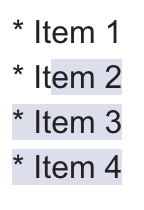
Personally I don’t think single key hotkeys are worth it there — but that’s also because I never think in outlining mode, heh. I would be perfectly fine if that mode wasn’t there. In Bike 1, if I wanted to something with item 2, 3, 4 I would just do shift+arrows and select something like this:
But that doesn’t mean I can’t see the appeal for others! Especially people that are more used to proper outliners. It’s just that what Kallovsky said so perfectly covers the way I think. (“I want an editor as nice as Bike and I want folding and structure, but I could live without the outlining behavior.”)
Another point about the current situation… Let’s say there are two possible outcomes when selecting multiple blocks and hitting backspace:
Outcome A) Delete all content, but leave the first line intact. Outcome B) Delete everything, including the first line.
If the behaviour was A, you could easily get to Outcome B by just hitting backspace again. However, now it’s annoying to get from Outcome B (which is the behaviour in Bike 2) to Outcome A — especially if you have a list or something. After hitting backspace, you need to hit Return, maybe Tab to indent, and then turn it into a list. =/
That said, I don’t mind your proposed solution to the problem! Having a dedicated command/hotkey to get Outcome A.
However, due to personal preference, and the argument above (it’s easier to go from A to B than B to A), I would have Outcome A be the default behaviour for backspace, and have the dedicated hotkey do Outcome B. Or a toggle to swap between them? But I understand prioritising users who think more like proper outliners!
But remember, that single key shortcut can be the Delete key. I’m pretty sure that with commands+keybindings you can get the exact behavior that you want. Alternatively, I think this is less good idea, but possible, you could bind each keyboard key to outcome A and then insert the keyboard key. Thus getting the behavior where starting to type performs the replace.
This is interesting point/idea. I’m not sure, but in my mind now at least.
I do think I’ll start by providing a “deleteText” command. That will implement the behavior that you want. You can experiment with various keybindings and see how it feels. We’ll worry about standardizing behavior later. (reminders welcome, I forget things!)
But remember, that single key shortcut can be the Delete key.
By “Delete”, you mean the same as my “Backspace”, right? (Which is what it’s called on my Norwegian Mac.)
Couldn’t that mess with the regular use of backspace in text mode? Or would it be two different things as the use we’re discussing now is in the outline mode? (I know that things are more hybrid in Bike 2…)
As you now have the keybinding settings, I guess one solution would be to have both “Outcomes” as items there. Something like this (if we keep the default like how it is now):
Delete rows: Delete/Backspace
Delete content: r
In other words, not only add the action I’m missing to the keybinding screen — but also the current behaviour of the delete key. And then user can swap around if they want to. (And, as you said, the default can be decided later.)
Yeah, I think. My keyboards show “Delete”, but probably same thing. The get the keybinding that I want I need to type “Delete”.
No, in settings you can set the keybinding for Text Mode/Block Mode, or both. I am saying you should just set this keybinding for Block mode, so it wouldn’t be active in text mode. And it would also override the default Cocoa keybinding for Delete.
I think so… The current behavior is in there now as “Edit: Delete”. That represents the default delete action. And it is invoked using your default “Cocoa” keybinding system. In most all setups action is bound to “Delete” key… ideally I would have that shown in the Keybinding column, but I don’t have code that reads the Cocoa keybindings at the moment.
Bike’s internal keybinding system will run first, so if you map Delete to some other command, that default Cocoa command will be ignored.
A bit confusing I know. Ask more questions if still doesn’t make sense.
In the latest 268 release Select All immediately goes to select entire document. I have also added a bunch of “like a text editor” commands that allow you to move branches more freely around, not constrained by outline structure.
These are:
Edit: Text Copy
Edit: Text Cut
Edit: Text Paste
Row: Text Delete
Row: Text Indent
Row: Text Outdent
Row: Text Move Down
Row: Text Move Up
By default they have no keybindings, so can’t really be used, except through the Command-P popup. To really experiment with the you’ll need to add keybindings in Bike > Commands Explorer…
And then try them out. Please report back how they work for you and if you have any preferences on how/if they should be integrated into Bike’s standard feature set.
How am I supposed to use the new Edit-commands? I still can’t select parts of a branch when selecting more than one and the new commands are not helping in that case, right? What’s the difference to the normal commands then?
Also, I had a hard time using the new Row-commands, until I realized that I have to switch to block mode and then execute the command to get the expected (non-block-) behavior. Which doesn’t make sense, does it?
What I would like for the row-text-behavior: to be able to move a row as independently as possible with “Tab” and “Shift-Tab” in text mode…
Ah, this is a bug… not doesn’t make sense. All my tests were in block mode. Fixed for next release.
I’m not sure I follow. All selections must still be contiguous, but the new commands should act on just the selected rows and leave the others “in place”. For example if I “Row: Text Indent” b in this case:
a
b|
  c
the result is (minus the disabled in text mode problem):
a
  b|
  c
That’s what I’m going for too, though I admit it is rather confusing due to the bug where they only work in block mode. Two other issues that I’m aware of:
Some of the moves will create odd animations, but the end positions should be good
The other items in the outline might shift location if there is no parent at needed level.
For example (Row: Text Move Up) of b:
a
  b|
    c
Gives worst case I think:
b|
a
  c
Both b and c needs levels adjusted, because they had no parent at level. This could be addressed later I think, but more work.
Edit: Text Copy
Same as copy in text mode. In block mode copy text of selected row only–no descendants
Edit: Text Delete
Same as delete in text mode. In block mode deletes only selected rows–no descendants. Also leaves first selected row in outline (just deletes all of its text content). Places caret in first selected row at position 0.
Edit: Text Cut
Edit: Text Copy followed by Edit: Text Delete
Edit: Text Paste
Edit: Text Delete followed by
Delete will have left first row in place. First pasted row content is inserted in that row
Remaining pasted rows are inserted trying to maintain relative level to first pasted row.
Unselected descendants of original (now deleted) selection are reparented to nearest possible pasted rows.
I have a bunch of tests, but this logic is all quite complex. Bugs likely lurking. Let me know when you run into oddities.
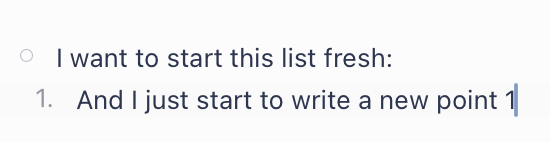
 But I’m trying to learn the new behaviour.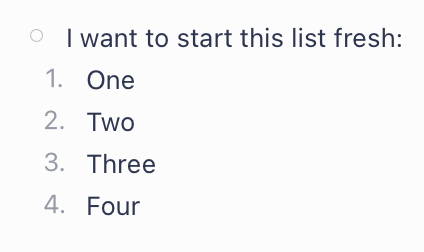
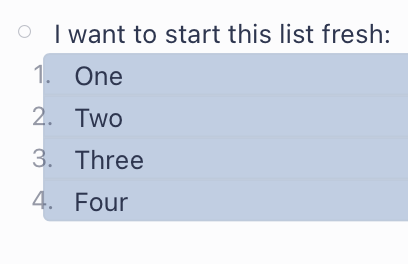
 )
)


 Or a toggle to swap between them? But I understand prioritising users who think more like proper outliners!