Wondering if there’s a possibility for a global ‘toggle attributes visibility’ preference or option?
I worry about adding a full toggle for attributes. I expect some people would enable it while experimenting and then not know where badges went. But throughout there is the idea of things hiding when you are typing, and then coming back when you move mouse:
- Bike > Settings > General > Hide outline controls when typing
- View > Enter Full Window
- View > Writing Focus Mode (not quite same, but somewhat similar idea)
Would hiding badges in a similar way work for you? Easies I guess would be to tie directly into the “Hide outline controls when typing” setting. What do you think?
1 Like
That would work for me!
1 Like
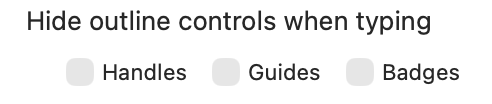
Very elegant, and just what I was looking for. Thank you!
1 Like
This doesn’t go far enough for me i am afraid. I use opml format and use various apps to view / edit the shared file depending on what i am needing to do and as such the opml can accumulate quite a few erroneous attributes that i don’t really need / want to see when i am working with my outline. These can sprawl onto multiple lines so even when the attributes are hidden using this new setting the outline looks pretty ridiculous (with multiple blank lines between some items). Would much prefer the ability to toggle attributes into view when needed. Or perhaps you could keep some ‘reserved’ attributes visible at all times (though a user-controlled setting for that would be good too).
1 Like
I wonder if an opt out list would work? Maybe edit from File > Document Info?
What I’m trying to avoid: User adds a due date, then has option to hide due dates. That doesn’t make a lot of sense to me. But hiding tags added by third party process does make sense.
2 Likes
Yes I think that would be good - I.e. show a list of all attributes in use within the document with a visibility toggle next to each
But it may make sense to them to do so. I’ve not dug into extensions much yet but perhaps someone would color a line different ways as a due date approaches etc.
From the extension system you can already opt out attribute display, for example no extension is shown for the @done attribute because it has opted out of default badge as shown here. I’m just taking about as a general UI mechanism.
1 Like
I ended up adding a way to do this from UI to in Settings > Extensions > Badges
2 Likes
loving that! works great. thank you.
1 Like
I’m somewhat confused by the new status badge for list items.
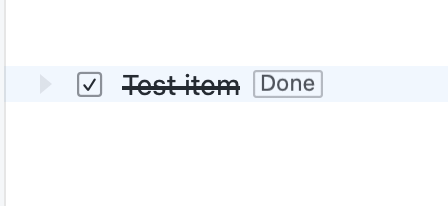
Is there any way to hide ‘Done’ here? It’s redundant information to me (I don’t use the other statuses) but the new Default Badge Exclusions seems to toggle a separate status badge?
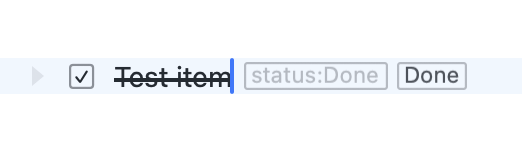
There isn’t currently…
In core bike extension the default “status: Done” is suppressed by default and the standard “Done” that you see is added via a custom badge. And no way to suppress custom badges at moment. (And when you override that default suppression (to show) you’ll see both the default and custom. Hope that explains what is happening.
It is a bit redundant, but to me it’s a good default to show that [Done] badge, even for task rows. Generally I want attributes to be represented by tags and this does that. Makes the system uniform to show it. Even if you are not using the other statuses you can also use [Done] to setup a filter.
With that said if you still want it gone it wouldn’t be too hard to add a settings option in the tasks section. “Surpress @done badge for tasks”. Let me know.
That explanation makes sense to me, thank you! I’m sympathetic to the idea that attributes should not be hidden away (at least by default) but would love the flexibility to suppress custom badges like the existing table. If extensions can also create custom badges (not sure, I haven’t looked at the extension SDK recently) it would be great to have the flexibility to toggle those as well.
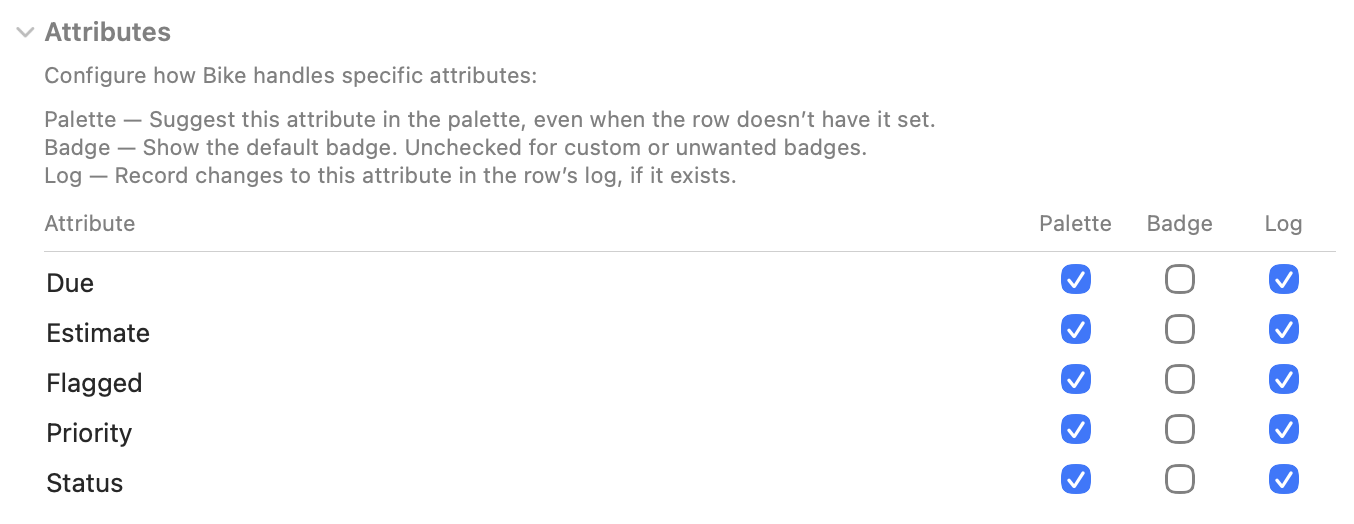
I think it would need own table. Custom badges can read from all row state, so it doesn’t really make sense to enable/disable based on specific attribute.
I don’t think I want to add this yet, though can imagine adding in future.
It also wouldn’t nicely quite solve the “Done” case redundancy you described … because if you completely disabled that badge then it wouldn’t show when you mark a none-tasks row as done. Odd side case, but I think important one.
The redundancy in task case is easier to solve with a checkbox in task settings. I think I’lll add that 
1 Like
Thank you Jesse!
Seconded! Would love to be able to specifically toggle the “Done” badge. I mostly use Bike for checklists, and all the Done badges definitely adds some extraneous clutter.
Alternatively, is there documentation on how we could style specific badges with a theme file? Could see applying done in a much lighter color, vs different colors for Started, Canceled, etc.
1 Like
The latest release also gives option in Bike > Settings > Extensions > Tasks for hiding redundant “Done” badge on task rows. Redundant because that same state is already shown via checkbox. (Still on by default for consistency and ability to check for context menu, but you have the option now to hide) Bike 2.0 (Preview 299)
2 Likes