So close now, I can taste it!
A few small issues remaining
So close now, I can taste it!
A few small issues remaining
Awesome!!
My only feature request is the ability to modify the document while filtered. Is that planned?
Yes, I’ll get to that soon.
Folding and filtering are game-changers.
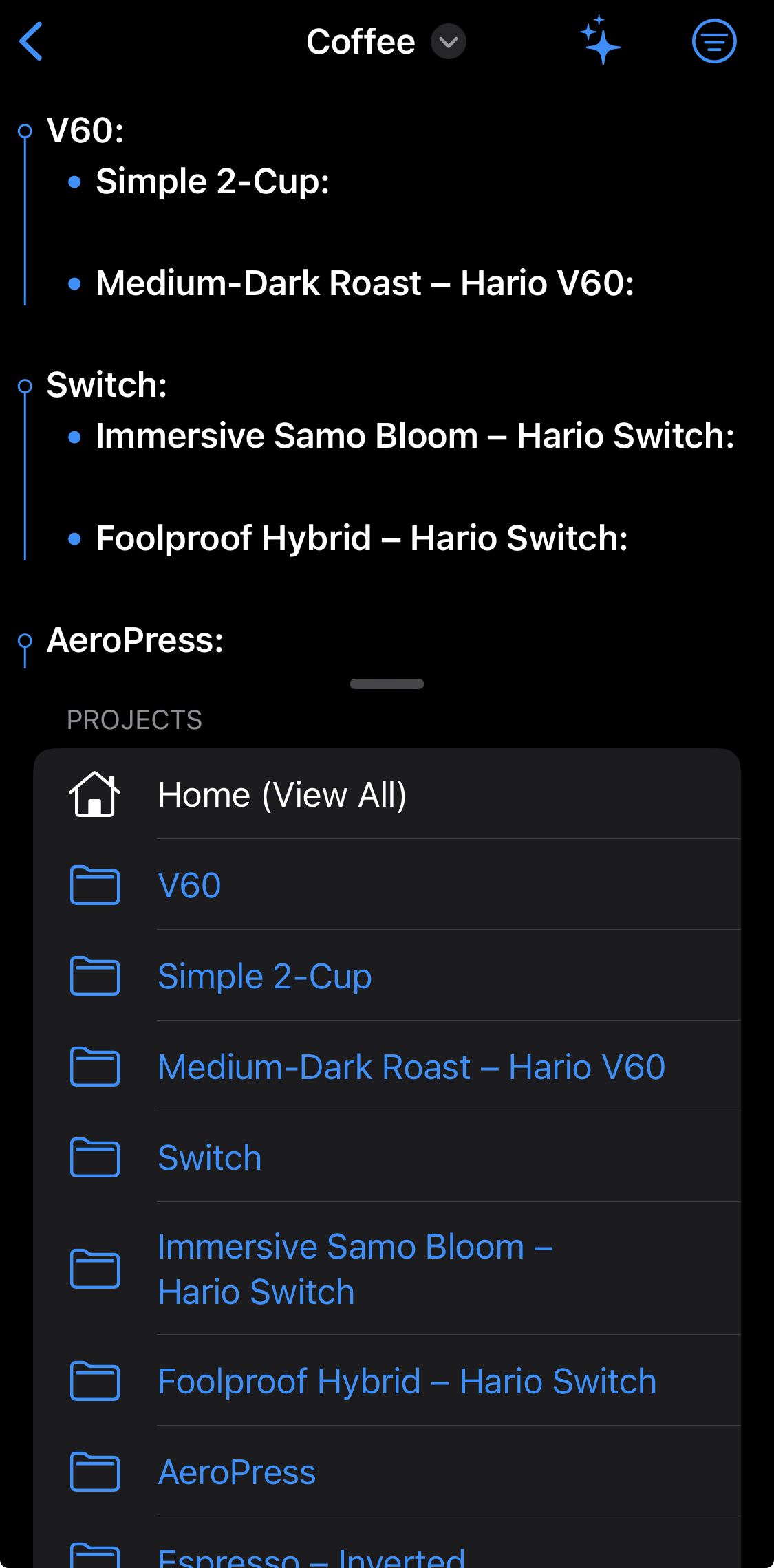
One suggestion regarding project filtering:
Adding a subtle visual indent for nested project levels. A small increase in left spacing would make the hierarchy clearer and help users identify outline structure more easily at a glance.
Keep up the great work!
I’m a visual kind of person so if you could provide a sketch or screenshot to explain this? If TaskPaper does it, or not, you might supply a demo doc. If I can see it I can do it. Or use forum quoting to explain? Anything really. @LeftHandSolution
All indenting is currently manual. Are you suggesting auto indent in some way?
In other news, today’s build as of an hour ago allows editing whilst filtering is active @connor
I think I was not clear enough, please refer to the screenshot below
Those 2nd level projects have the same indent as with the 1st level projects. I’d prefer a bit visually distinguishable project hierarchy in the filter view.
Thanks.
Gotcha! Makes sense. I’ll figure something out.
Somebody on TestFlight left a bug report, but no reply email address, that the Create Document button was not creating a new document. That button is actually provided by iOS so I suspect an app or device restart would solve the issue.
I think it’s time to hook up Search stuff, so that will be in a build releasing later today.
I added a ton of stuff, including all suggestions so far.
And I think I’m about done. So, bug fixes only from this point to public release.
Trying my damnedest to get Quick Actions working.
Fingers crossed my brain engages today.
edit: 2.5h later… done! new build released.
Moby Dick workout?
I think on mobile you only need one chapter and that’s good enough.
And what format do you use?
md or opml?
this is md format
@jessegrosjean i have got things faster with the 5K line version, but will try it with one chapter, and ten chapters, and see how it goes!
The important lesson learned here is optimising the really slow debugging version of the app means everything simply flies when you’re running the release version.
A few more QOL fixes and changes.
5000-line file Moby Dick Workout runs great for me.
But a user with a different 5000-line file reached out, so I added an option to long-press the help toolbar button to copy save a (one way private key) scrambled version of the current note that you might be prepared to send to me. I can’t and don’t want to reverse the scrambled text.
I really need example files to be able to solve any remaining issues. 
If I don’t receive any files then I consider the app is ready for release. 
Added widget support, just for kicks
Received the scrambled version of the 5000-line real tasks file (thanks, anon!) and it was very useful to see real world performance bottlenecks. A dozen or so further optimisations have been made. New build released.
A couple of reports of the Create/Open Document button not working.
This is an iCloud issue, so please check or toggle your iCloud settings.
PaperTrail’s file browser (DocumentGroup) view is provided by the system, similar to Files app integration, so is pretty much out of my control.
icloud drive sucks, moved my file to dropbox folder, everything is fine now.