Sorry, I’m not sure what you mean on this. It does wrap a single paragraph of text to multiple visual lines, to fit window size, if that’s what you mean?
No, you can’t set a paragraph to RTL mode.
Maybe? Alas, I don’t understand any RTL languages. Over the years I have added support to make RTL editing better, but I’m actually not clear on how they work in the latest Bike 2.0 Preview releases. I think your best bet is to download the latest Bike 2.0 preview and give it a try. I know @complexpoint has used RTL with Bike sometimes, they might be best able to report current status.
Bike does support image and file attachments. It doesn’t support sophisticated page layout. So depending on what you mean by (write around them) yes or no. Not like a page layout program, not like Apple’s Pages app. But pretty good for an outliner I think.
No. Bike has fast string based Find. It also has a fairly sophisticated query language. But it does not index rows the way that a full text search index does.
You can certainly paste and display RTL text, and even type it with a standard macOS IME, but it’s not ideal for extensive typing of RTL languages at this stage.
The outline indentation is always LTR – you can’t flip the bullets and expansion controls to the right, and indent from the right.
the cursor is, as we would hope, at the leading left end of the word as you type RTL characters, but temporarily jumps away to the right end of the line at every word boundary, before returning as you start to type the next word. A little distracting.
I tend to just paste in RTL notes prepared elsewhere (from Mellel, for example, which does offer outlining of headings, but not full deep outlining like Bike)
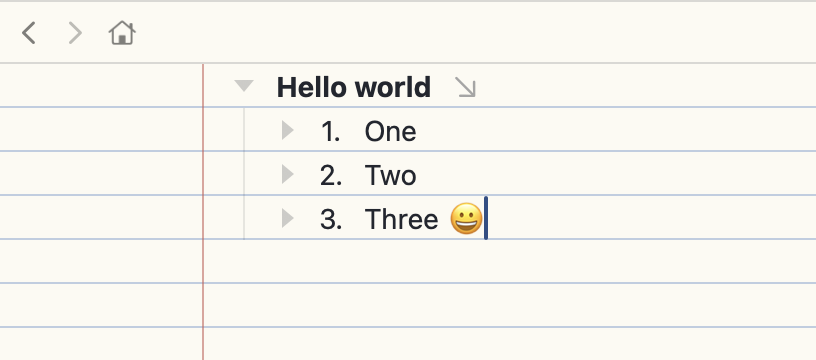
Whoops, I was pretty unclear. I meant, can you change the background of an outline-window so instead of being blank white, it has lines like a lined sheet of paper or any other options. I hope that’s clearer.
Yes, maybe, here’s a start: lined-paper.bkext.zip (8.0 KB), that’s a pre-build extension that you can install directly into Bike’s extension folder using Bike > Extensions Explorer. Then in Settings > Appearance choose the new Light Theme: Lined Paper theme.
This is LLM generated with some prompting from me for the best way to go about it. Bike’s theme system doesn’t support lines, but if I pair a theme with a full extension there are enough hooks to make it mostly work.
I think Jesse may be away for a couple of days. As a place-holder response, one of Bike’s strengths is a clear distinction between structure and decoration. Styling can be defined for structural elements:
rows that have a given type ( drawn from {body, heading, blockquote, code block, note, task list item, ordered list item, unordered list item}),
rows that match a particular outline path query[1]
text runs that have particular structural attributes (drawn from the inline HTML repertoire, and labelled in the UI {Bold, Italic, Code, Highlight, Strikethrough, Superscript}
but styles and decorations can’t be directly applied, in the manner of a paintbrush, directly to arbitrary text selections or row selections.
For structure beyond that defined out of the box, you can define custom attributes, attach them to particular sub-sets of your rows, and define corresponding styles, to be applied to all rows which match an outline path query which refers to that attribute.
Some pre-defined row attributes can be found via shift-command-A, which also allows you to add your own named attributes.
On level-specific bullet styles, I haven’t tried that myself, but in principle you should, I think, be able to do that: the outline path query language used to define the scope of styles does allow for reference to nesting levels.
Thanks so much for all this. It could be pretty simple to do, but it looks above my abilities. I guess my questions (requests) come from word-processing software.
I think maybe you can get the change you want with Settings > Typography Line Width > Window
As @complexpoint says, not really, at least not in the manner of a word processor. You can get at it in other ways, but I wouldn’t really recommend it unless you want to spend a lot of time messing with custom styles…
In Bike you would never be able to really apply arbitrary styles to different rows. But (with some work that I would recommend against at this point) you might say "my outline contains normal rows and it also contains special “person” or “card” or “book” rows that I would like to style differently. And then you could give rows of that type specific styling.
There is no built in choice for this…
Again it would be possible with the style system to say level one rows get a diamond decoration, level 2 get a star decoration, etc. But it will add complexity… I would recommend just trying Bike as it is in default state for a while, and then if you think this styling is essential I can help point you in the right direction.
Thank you. Adjusting line-width works perfectly and is exactly what I had in mind. I will work more in the program and with the documentation.
I ask all these questions precisely because I really like the software. Please feel free to take them as suggestions/requests. In the meantime, here’s one more: being able to divide up a page into quadrants, like four small pages in one. (If it’s already there, I’ll find it in the coming days.)
FYI the gliding cursor is sweet. I haven’t seen that before and it’s a really nice touch.
Thanks for making a great outliner. I’ve been missing this for a long time.