is it possible -when linking a file in Bike- to use link short name? How?
I’m not quite sure what you mean. Can you give an example of the link you are currently getting and what you would rather have.
If you mean providing custom text, you can do so with Cmd+K, which triggers the menu item Format > Add Link.
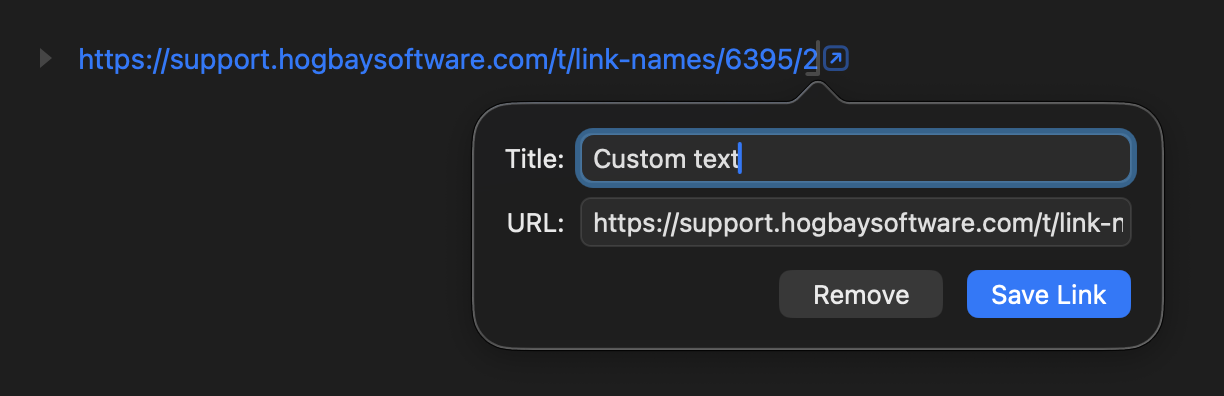

I re-write a conversation we had some time ago…
" Masterlist TP and Bike
amelchi:
Is it possible to have a TP doc as a masterlist where every node can “link” to another TP doc?
jessegrosjean:
Yes, this is possible. Create your master list document and some other TaskPaper documents. Drag one of these other documents from the Finder into your Masterlist. A file link should be inserted. Click that link to open the linked TaskPaper document.
————————————————————
amelchi:
If not would it be possible in Bike?
jessegrosjean:
These sort of linked documents are also possible in Bike with a bit more flexibility. In Bike you can do the same as the above with the following extensions/benefits:
- In Bike you can also link to specific rows (in either another document, or in the row source document.
- In Bike links are based on unique ID’s not file paths. This means you can move/rename file and the links won’t break."
I specifically talk of this last opportunity…
Can I link files from everywhere in Bike? Can I shortname them?
You can, for example, drag a file from the Finder into a Bike document window to create a link, and then ⌘K will, as usual, let you adjust the title of that link.
However, see also Bike > Settings > Sandbox where you can give Bike the right to link to closed files in particular folders.
As Jesse’s GUI message says:
This is only needed when Bike resolves row links to outline documents that aren’t already open. Without access to the containing folder, Bike won’t be able to find the document and the link will fail.
1 Like
@amelchi Thanks, I’m catching up!
You can create links to any file via the method @complexpoint mentions above. But those links will be file path based links, so they will break if you move rename the linked file.
For non-bike files these path links are the only method supported.
For these ID based links to Bike files that I mention you create those via:
- Select a row that you want to link to in an open Bike document
- Edit > Copy > Row Link
- Paste that link into any app, including into another Bike outline
- Those links should survive moves, renames, of the linked document.
Here’s what those links look like:
bike://aAvHQJXahGb9jO8MHFZdJ/E_HP152rZJRlOObBNl8e1
There are two ID’s in the link, the document ID and the ID of the linked row in that document. When Bike resolve these sorts of links it:
- Does a spotlight query for the document ID
- This is where
Bike > Settings > Sandboxthat complex point mentioned comes in. Bike can only see spotlight matches for locations where it has sandbox access. So you should store your link targets inside Bike’s container, or extend that container via sandbox settings to include where you store those linked to documents.
Tip! Once you have a link copied to pasteboard, you can select a word on your outline and then paste. The link will be attached to that word, so you can skip the part where you shorten the link text.
One more tip, the sandbox stuff can be a little confusing… sometimes ID based links will work to files that are stored outside of the sandbox. In particular they will always work if you have the target document open in Bike. I think they will also sometimes work if you have recently had the target document open in Bike. But if you turn off the computer and restart (or maybe just log out) they will break unless Bike has sandbox access to where they are stored on disk.