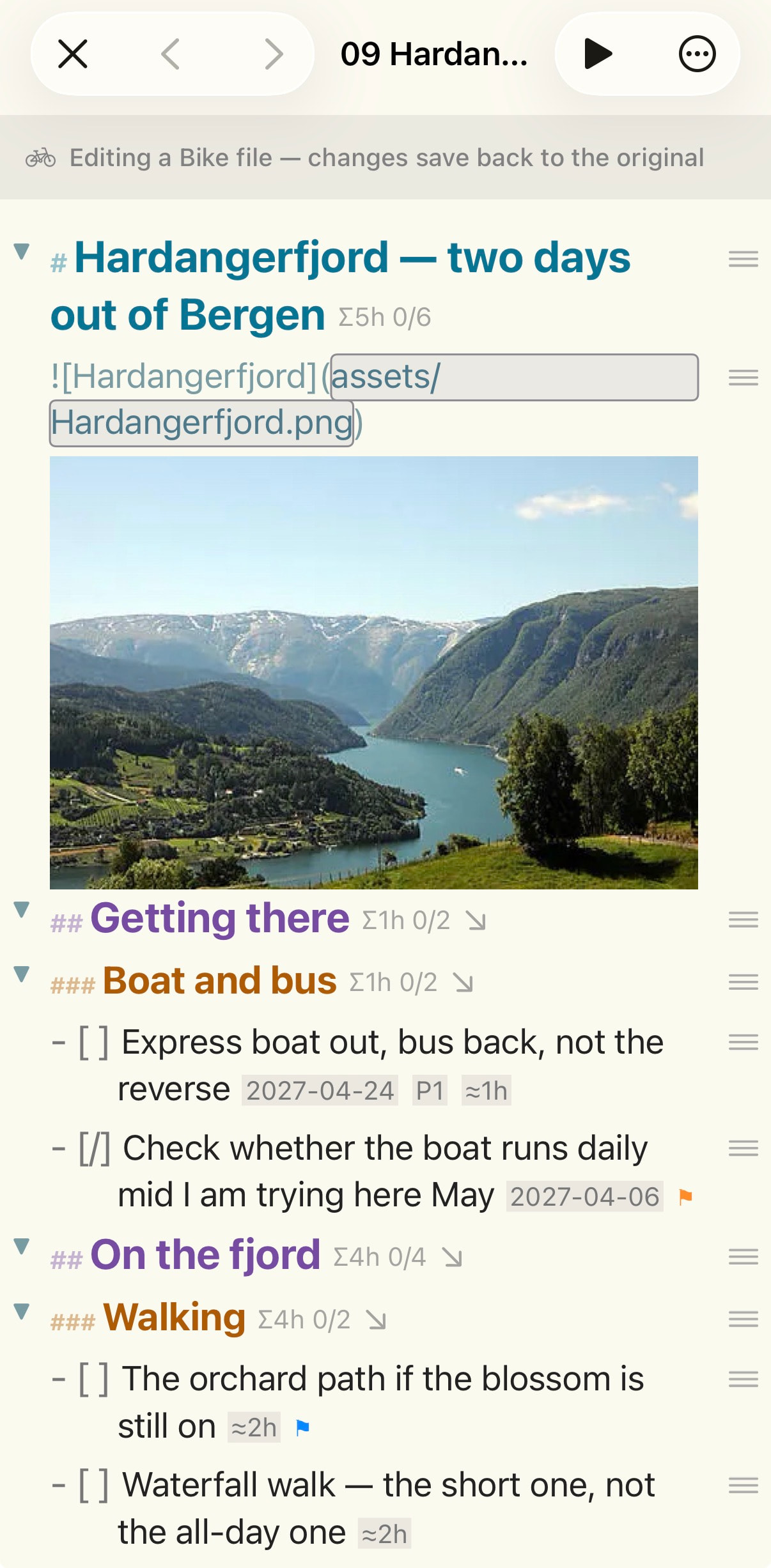
Hello all — I’m the developer of FoldNotes, and I’d like to share something Bike users here may find useful. It’s third-party, it’s native swift - free on iOS, and I’ve tried hard to make it a good citizen of your files.
A little background. FoldNotes is a Markdown outliner: plain .md files, outlined with folding headings and indentation, that stay yours in a folder you can read with anything. Bike is an excellent Mac outliner, and a .bike file is readable HTML — an open format. That openness is what made this possible: FoldNotes edits Bike files directly, in place. No conversion, no import, nothing copied into FoldNotes. The file stays a Bike file the whole time, and everything FoldNotes writes uses Bike’s own vocabulary — its @status values, its priority numbers, its attribute names — so an outline edited in FoldNotes opens in Bike as though it had never left. Where the two apps have different conventions, the file’s format decides: a Bike outline is counted and shown the way Bike does it.
Bike is a Mac app; FoldNotes runs on Mac, iPad and iPhone, and on iOS it is free. Point FoldNotes at your Bike folder — Bike’s own iCloud Drive folder is the usual one — and it becomes a library you can read and edit anywhere. Edit on the train; it’s waiting in Bike at your desk.
Here is what that gives you on iOS:
A library of your outlines. The list shows each outline by name, with its type, when it was last changed, and a task circle for outlines that contain tasks. Create a new outline from the compose button — a plain .bike, or a .biked package if it will carry attachments. Preview any outline and share it as a PDF.
Editing that respects the file. Bike’s task states become FoldNotes checkboxes — cycle one and Bike’s own @status is written. Row attributes (due date, priority, estimate, flags, completion date) show as small badges at the end of the row, in plain sight, and a long press opens an editor that offers Bike’s own value sets. A parent row shows the total of the estimates beneath it, written Σ3h, exactly as Bike shows it — and it counts the way Bike counts: done and cancelled rows leave the total.
Search across the whole folder — including regular expressions. Full-text search over every outline at once, matching the outline as you read it rather than the raw HTML. On iPad (and the Mac) a toggle switches the field to a regular expression, and patterns you’ve got right can be saved and reused — they sync, so a regex written on the Mac is waiting on the iPad. iPhone keeps plain-text search; a soft keyboard is no place for a regex.
A database of your rows. This is the part I’m most pleased with. A database view puts every row from every outline into one table, and you can build and edit it on iPhone or iPad — not just view something made on a Mac. Filter on what a row actually carries: Bike’s own Due, Estimate, Flagged, Priority and Status; the completion date FoldNotes records when you tick a task; whether the row is a task at all, or one of Bike’s log entries; which outline it came from. A due date can be “overdue”, “this week”, “within 7 days”. Group by any field — grouped by status, the groups run in Bike’s own order. Add computed columns: Days Until Due counts down and goes negative once a task is late; Days Since Completed answers “what did I finish this week”. Export the table as CSV. Tap a row on iPhone, or long-press on iPad, to preview it in place in its outline.
Search for FoldNotes on the app Store and download or update to at least version 1.2.10 for the best Bike experience
On the Mac too. All of the above works on the Mac as well, plus a Bike Board — the same rows as a Kanban board, columns by status, drag a card to change it. The Mac app is a paid, direct download; the iOS app is free.
Jesse has known about this from early on and has been generous about it; the round-trip fidelity owes a lot to his answers.
FoldNotes for iPhone & iPad (free): https://apps.apple.com/app/id6784422677
Editing Bike outlines — the details: https://docs.foldnotes.io/features/bike-open-in/
Searching your outlines: https://docs.foldnotes.io/features/bike-search/
Bike rows in a database table: https://docs.foldnotes.io/features/bike-database-views/
FoldNotes for Mac: https://foldnotes.io
Happy to answer questions here.
Iphone editing Bike Outline in place