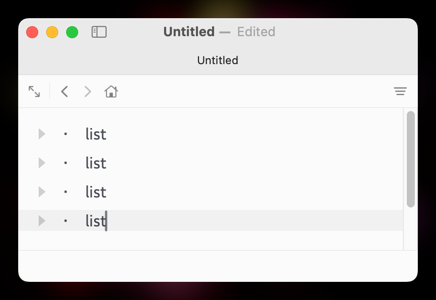
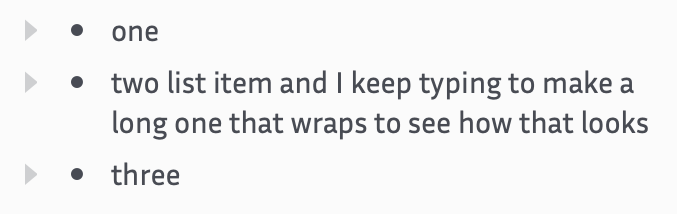
I like to use the Inria Sans font in Bike; I think it’s really legible but unfortunately it has a tiny bullet glyph!
Even the system font’s bullet is a bit small for my liking. For situations like this, it would be nice to be able to style the unordered list’s bullet to set the font, size, and character that are used. I would say character is probably the most useful: I could replace the very small bullet with a different character like arrow → or lozenge ◊ to make the list more visible.
1 Like
This is possible now with a custom style, but not through a theme. Here’s a custom style that will do it:
import { Image, SymbolConfiguration, defineEditorStyleModifier } from 'bike/style'

let modifier = defineEditorStyleModifier('headinglevels', 'Heading Levels')

modifier.layer('row-formatting', (row) => {
  row(`.unordered`, (context, row) => {
    row.text.decoration('mark', (mark) => {
      mark.contents.image = Image.fromSymbol(
        new SymbolConfiguration('diamond.fill').withHierarchicalColor(row.text.color)
      )
    })
  })
})
Replace the existing code in bike-extension-kit/src/headinglevels.bkext at main · jessegrosjean/bike-extension-kit · GitHub with above code and you should be good after building and installing that extension.
Also, I agree the default bullet is too small. I’ll probably fix this in the default style too… but the above is how you could do it! 
1 Like
That’s perfect! I ended up making my own style extension and it overrides the default bullet. I’m a web developer and it was super easy to get started with the extension kit. I’ll have to play with it some more now. Thanks!
1 Like
Oh, that’s great to hear! Do let me know if you see areas that could be improved. Except for this project I haven’t used standard web tooling that much. And for styling willing to share what you came up with?
Sure, here’s what I ended up using:
import { Font, Image, SymbolConfiguration, defineEditorStyleModifier } from 'bike/style'

let modifier = defineEditorStyleModifier('metasyntax', 'Metasyntax');

modifier.layer('row-formatting', (row) => {
  row(`.unordered`, (context, row) => {
    const font = new Font('SF Symbol', 6);
    const bullet = new SymbolConfiguration('circle.fill')
      .withHierarchicalColor(row.text.color)
      .withFont(font);

    row.text.decoration('mark', (mark) => {
      mark.contents.image = Image.fromSymbol(bullet);
    });
  });
});
I went off and learned what SF Symbols are, realized the quickest way to get what I wanted was to just use a small font. Don’t know if that’s the Right Way but it works.
The only thing that tripped me up was at one point when I was messing around, I used a function I hadn’t imported, but there weren’t any errors showing up in the terminal or in the Logs Explorer. So there were a few back-and-forth “it works when I do this, but when I add this nothing changes” before I realized. But I gotta say being able to just npm run watch, edit the code, and immediately see the result is really good.
I’ve change the default theme to make these bullets a bit bigger. Still not as big as what you have, but not tiny little pin pricks either