Is it possible to drag multiple rows without dragging/including the parent row?
Sorry, this isn’t possible currently. It’s on my longterm list, but now sure when I will get to, there are some implementation difficulties. In the meantime I suggest either using the row move commands or using cut/paste to move multiple rows.
1 Like
Thanks for the info. No rush.
It actually came to mind when trying to drag some rows out to another app because I saw that Bike includes the OPML representation when dragging. But then I realized that the app that I was targeting ends up just choosing the plain text representation when dropping anyway, so I would still have to go through a third app like Gladys to get what I wanted anyway.
But exporting and importing works just as well as that. 
From Bike might be able to use Edit > Copy > OPML for cases like this, that will copy only OPML to the clipboard and can help make sure that destination app chooses the OPML.
1 Like
Thanks for the suggestion. I did try that, but it looks like it puts the OPML XML on the clipboard as public.utf8-plain-text. So pasting into the app just inserts the actual XML.
When dragging to an app like Gladys, it also includes a version with the type set to org.opml.opml, amongst others.
It does, presumably by design, in case a user needs to paste OPML source.
If, however, your receiving app – not sure what it is ? – does choose an org.opml.opml pasteboard item when one is available, and it finds no public.utf8-plain-text pasteboard item, then you could try:
- The ordinary Bike 2 ⌘C which places 6 or 7 different pasteboard item types in the clipboard
- Pruning out all of them except
org.opml.opml, before pasting to the target app.
If you happen to have Keyboard Maestro, then you can do that with an action like:
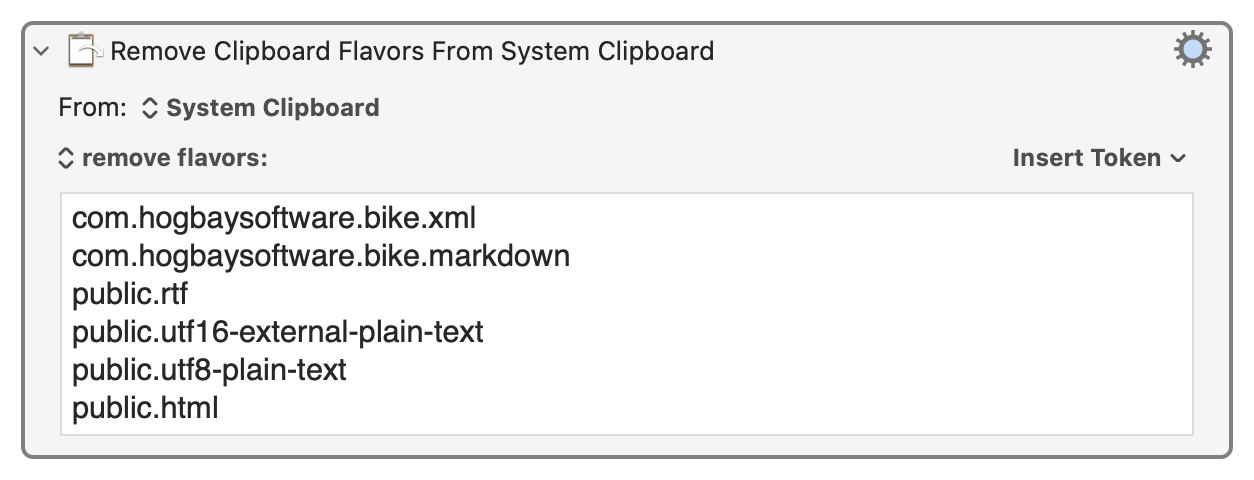
Otherwise, you can do it with JavaScript for Automation (from Script Editor, for example) in a pattern like this:
Expand disclosure triangle to view JS source
(() => {
    "use strict";

    ObjC.import("AppKit");

    // Pasteboard type to retain
    const clipTypeToRetain = "org.opml.opml";

    // MAIN :: IO ()
    const main = () =>
        either(
            alert(`Retain only "${clipTypeToRetain}"`)
        )(
            () => `Clipboard now contains only "${clipTypeToRetain}"`
        )(
            fmapLR(
                setClipOfTextType(clipTypeToRetain)
            )(
                clipOfTypeLR(clipTypeToRetain)
            )
        );

    // ----------------------- JXA -----------------------

    // alert :: String => String -> IO String
    const alert = title =>
        s => {
            const sa = Object.assign(
                Application("System Events"), {
                includeStandardAdditions: true
            });

            return (
                sa.activate(),
                sa.displayDialog(s, {
                    withTitle: title,
                    buttons: ["OK"],
                    defaultButton: "OK"
                }),
                s
            );
        };

    // clipOfTypeLR :: String -> Either String String
    const clipOfTypeLR = utiOrBundleID => {
        const
            clip = ObjC.deepUnwrap(
                $.NSString.alloc.initWithDataEncoding(
                    $.NSPasteboard.generalPasteboard
                        .dataForType(utiOrBundleID),
                    $.NSUTF8StringEncoding
                )
            );

        return 0 < clip.length
            ? Right(clip)
            : Left(
                `No '${utiOrBundleID}' clipboard content found.`
            );
    };


    // setClipOfTextType :: String -> String -> IO String
    const setClipOfTextType = utiOrBundleID =>
        txt => {
            const pb = $.NSPasteboard.generalPasteboard;

            return (
                pb.clearContents,
                pb.setStringForType(
                    $(txt),
                    utiOrBundleID
                ),
                txt
            );
        };

    // --------------------- GENERIC ---------------------

    // Left :: a -> Either a b
    const Left = x => ({
        type: "Either",
        Left: x
    });


    // Right :: b -> Either a b
    const Right = x => ({
        type: "Either",
        Right: x
    });


    // either :: (a -> c) -> (b -> c) -> Either a b -> c
    const either = fl =>
        // Application of the function fl to the
        // contents of any Left value in e, or
        // the application of fr to its Right value.
        fr => e => "Left" in e
            ? fl(e.Left)
            : fr(e.Right);


    // fmapLR (<$>) :: (b -> c) -> Either a b -> Either a c
    const fmapLR = f =>
        // Either f mapped into the contents of any Right
        // value in e, or e unchanged if is a Left value.
        e => "Left" in e
            ? e
            : Right(f(e.Right));

    return main();
})();
( PS could also be done in terms of Bike 2 extension code )
2 Likes
Thanks! I did manage to get KM to remove the other types, but it looks the app I’m targeting unfortunately only does the import on drag and drop, not paste.
I think at this point, it’s probably just easier to do the export as a file and then import it that way.
Thanks again!
1 Like