Are folks using a mobile app to complement Bike 2 when using the .bikemd file format? If so, what?
Bike 2 has become central to my day-to-day life while at my desktop. I know Jesse plans on an iOS version in the future. But, in the meantime, curious what you all are using!
Also curious to hear what apps people like in iOS landscape in general. I don’t use many apps on iPhone, so I’m a bit out of touch. I’ve always liked the list app Clear, not so much for all the gestures (though I don’t dislike those), but more for the “clear” and simple visual presentation. What apps should I be looking at as inspiration as I start thinking about Bike on iOS design?
I suppose an obvious point of reference is OmniOutliner 3, which I do have a license for, and would like to like.
In practice I find that I keep giving up and deleting it, only to try again a few months later, and then delete again.
Hard to put a finger on why – generally, I think, a feeling of too much clutter and ergonomic obstacle, including all those ‘opinionated’ (noisy) triangles, circles, and framed modal boxes.
(I think what I would really like is something visually restrained – like Clear – that is easy to use with the iPad (Pro) Magic Keyboard)
Hard to put a finger on why – generally, I think, a feeling of too much clutter and ergonomic obstacle, including all those ‘opinionated’ (noisy) triangles, circles, and framed modal boxes.
Regarding „clear visuals“, 1Writer, GoodLinks, Overcast, Things come to mind. as a note taking app, I also like Drafts, but it has a less clear interface.
Also curious to hear what apps people like in iOS landscape in general.
A few of my personal favorites —
iA Writer is my place to thing. There is no UI once I start typing. The typography & UI of the app make things feel calm. Bike has this effect on me on desktop, especially when I focus in on a specific node & its children.
Things3 just feels really, really well done. I appreciate the “quick-add” functionality on desktop so I can jot something down really quick, as well as the same on my iOS lock screen.
Day One, which is my “permanent life log/journal”
Clear, though I personally don’t use this. I tend to use Bike 2 & Things 3 to handle my notes & keep information about tasks.
NetNewsWire (I appreciate the simplicity and the system UI).
What apps should I be looking at as inspiration as I start thinking about Bike on iOS design?
I don’t know! My hopes for Bike on iOS are to basically bring the ethos of the desktop app, but in my pocket . Here’s what that means, to me —
An emphasis on focused writing that removing any clutter…
…using system UI by default,
…with a few touches of magic. (i.e. focus/typewriter mode, outline editing vs row editing, etc).
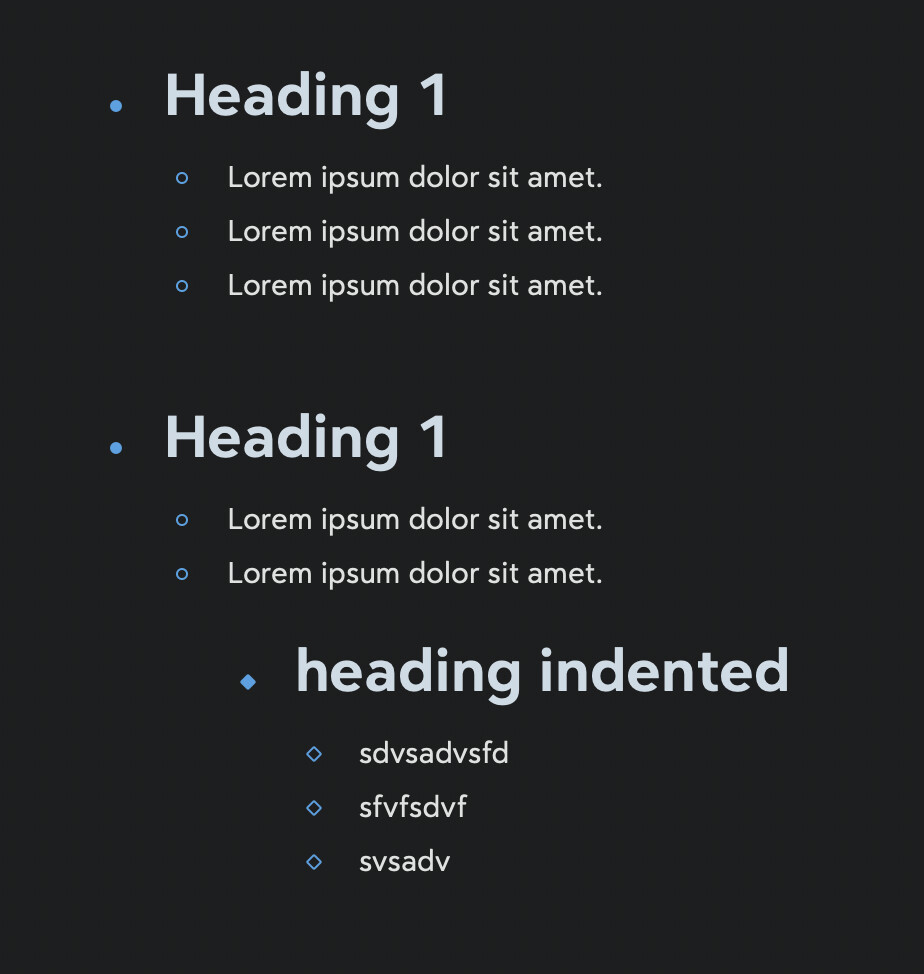
I’m a long time user of NotePlan. Recently I’ve been using Bear as well. But my main driver is NotePlan. Bear stylize indented heading so they look nicer
---
{"root-id":"vafBDekG8423r82owmA3t"}
---


- # Heading 1
	- Lorem ipsum dolor sit amet.
	- Lorem ipsum dolor sit amet.
	- Lorem ipsum dolor sit amet.

- # Heading 1
	- Lorem ipsum dolor sit amet.
	- Lorem ipsum dolor sit amet.
		- # heading indented
			+ sdvsadvsfd
			+ sfvfsdvf
			+ svsadv
One drawback of Bear is that it does not expose the files to the filesystem. So one should automate writing the original bikemd contents to Bear’s markdown file which is not practical. But with NotePlan the user have a direct access to individual files.
It really depends on what the outline is. If I need to make small edits on the go, I’ll use Runestone, because it opens .bikemd directly and recognises most of Bike’s markdown syntax. Otherwise, I’ll rename to .md and throw into Obsidian, but I hate having to do round-tripping.
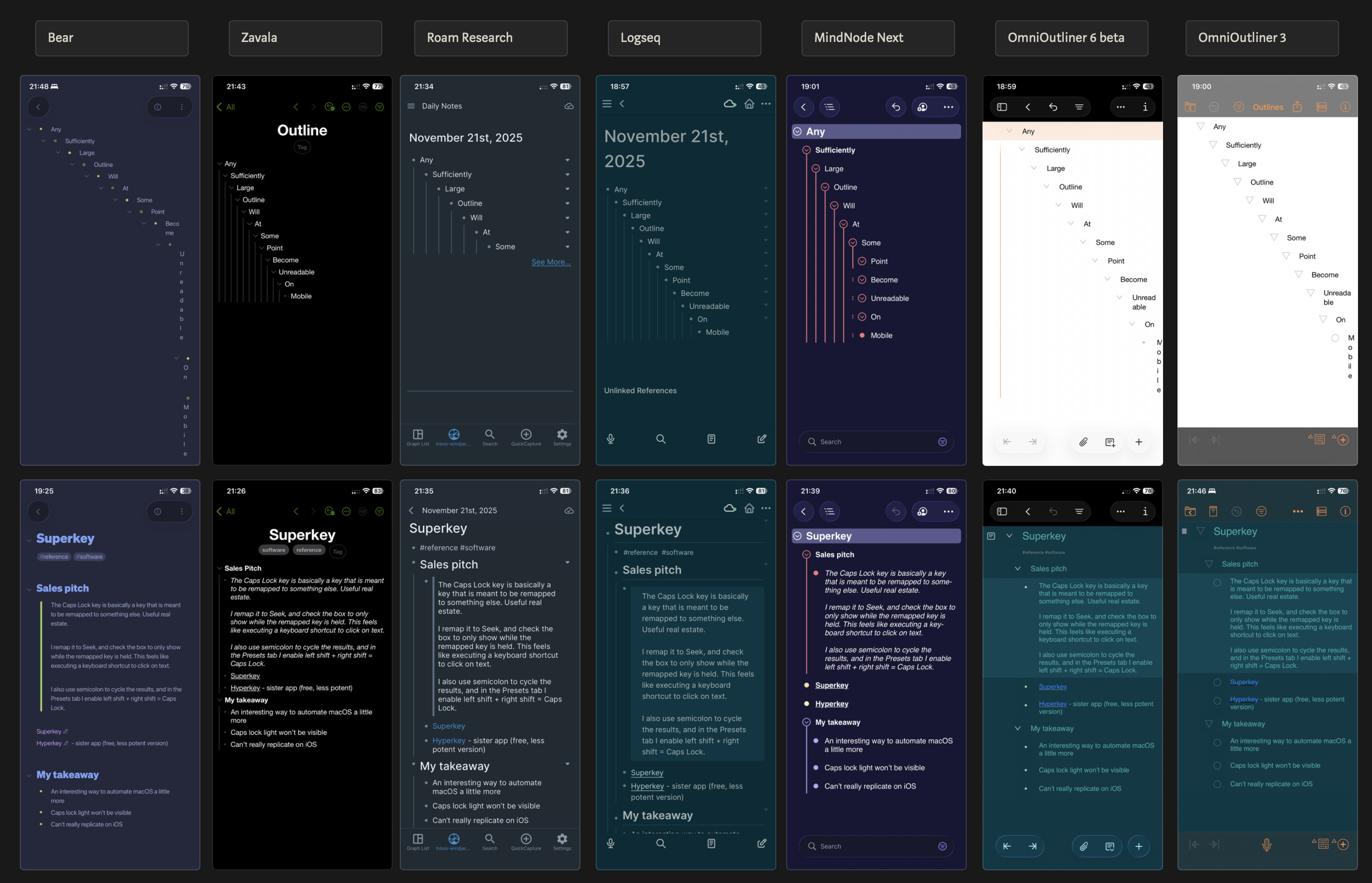
If I need to work on an outline both on macOS and i(Pad)OS for a longer period of time, I’ll skip Bike and use either MindNode Next or OmniOutliner. MN is great but missing some features (like zooming in), OO has all outline features you need but is a complete trainwreck on mobile.
I think Zavala nails it in terms of presentability, minimalism, mobile-friendly features. It has the best data-to-margin ratio among the outliners and still retains good tap ergonomics. Shame it fails in the reliability department.
What I’d look for in a perfect outliner:
clean
Narrow margins but good tap targets
zoom into outline
For mobile: quick actions above keyboard (indent/outdent, up/down, formatting, maybe obvious shortcuts to insert time/date)
For me, outliners are a place for thinking and refining ideas. The general interface of OmniOutliner makes that…difficult…
I’ve tried to use if for many many years, but like Complexpoint I always end up deleting it. I don’t think it’s badly put together, I just think the Omni Group has a very different use case for outliners than I do.
Ugh, I used to love the original version of Clear when it synced with a desktop version, but it became much less useful to me without that feature and ultimately I replaced it with Taskpaper, which I was already using on desktop, synced with Editorial on iOS.
Mostly sync related. I would end up losing data while doing some very basic tests. And while putting together this gallery, I managed to repeatedly crash it by pasting in text from Logseq.
I was. I just loaded it up on my iPhone and it seems to be working fine. Hasn’t been developed for awhile but as long as it works. Think I’ll use it for a bit.
 . Here’s what that means, to me —