I’ve been trying out Bike 2 over the last few months and keep going back to Bike 1 for one major reason. In Text Editing mode in Bike 2, I cannot predict where headings will go when i move them up and down (but i can predict where they will go in Bike 1). Basically, I need Bike to act like Taskpaper in Text Editing mode and only become ‘outline-aware’ in Outline Editing mode. I suspect I’m not the only one who thinks like this?
1 Like
You’re not, but I think Jesse recently introduced a second layer of shortcuts that move rows at same heading level, similar to Bike 1. Shortcut should be cmd+ctrl+opt+up/down.
Thanks, and yes, that is my answer, @Doug does it work they way you want?
ah, i think i remember this from earlier but had forgotten.
I just gave it a try again. it doesn’t work like i would like it to.
In Bike 1, i set the keybindings so that i can use cmd-shift-arrows to move any individual item in all 4 directions without any dragging of child items (cmd-shift-right/left/up/down for indent/outdent/moveup/movedown). This lets me fine tune an outline, which is part of my thinking process. (i’m constantly switching parents and children and moving children to different parents)
Basically, i’d like to switch between a mode where Bike forgets an item’s outline relationships (and just steps it anywhere in the outline with arrow keys) and a mode where Bike remembers outline relationships (e.g. automatically drags all children along when i move an item, without needing to fold or extend the selection). The Bike 2 outline editing mode is great, but its text editing mode is (to me) half text editing and half outline editing.
Basically, i’d like to switch between a mode where Bike forgets an item’s outline relationships (and just steps it anywhere in the outline with arrow keys) and a mode where Bike remembers outline relationships (e.g. automatically drags all children along when i move an item, without needing to fold or extend the selection). The Bike 2 outline editing mode is great, but its text editing mode is (to me) half text editing and half outline editing.
Yeah, this is well put! I absolutely get where Jesse is coming from — but I agree with this. 
Example:
- Item 1
- Subitem 1.1
- Subitem 1.2
- Item 2
- Subitem 2.1
If I’ve selected Item 2 and hit up, to me it feels most natural that it ends up here:
(Let’s call this Variant A for now:  )
)
- Item 1
- Subitem 1.1
- Item 2
- Subitem 1.2
- Subitem 2.1
However, the two options we have in Bike 2 gives us these two variants instead:
(Regular hotkey, Variant B: )
- Item 1
- Subitem 1.1
- Item 2
- Subitem 2.1
- Subitem 1.2
(Or, with the “Maintain level” hotkey, Variant C: )
- Item 2
- Subitem 2.1
- Item 1
- Subitem 1.1
- Subitem 1.2
I think the “maintain level”-thing should be more “literal”…
But this whole thing is difficult, as nothing is optimal! But here’s where I am now:
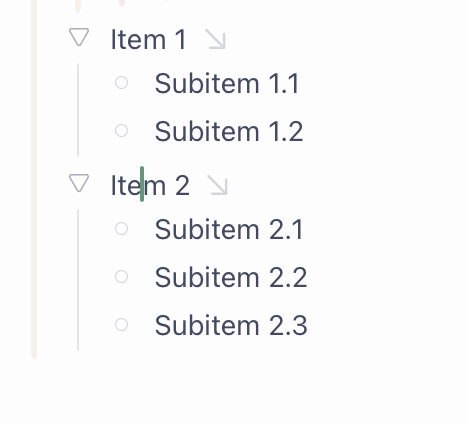
Hitting up (maintain level) only moving Item 2.

To me it makes sense that moving a collapsed item includes the children — however, one issue:
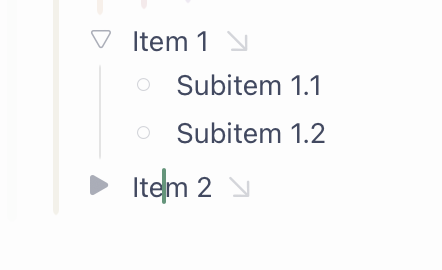
If the collapsed item moves up, and stays collapsed, if would “eat” up the subitems! Because moving it up makes Subitem 1.2 a child of Item 2 — and since it’s collapsed, we’d get this:
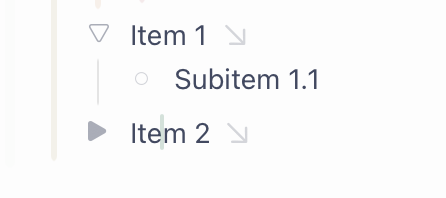
So, I, sadly, think we’d then need to “auto-expand + select” when moving collapsed items.
So that hitting up (maintain level) on the collapsed item would give this:
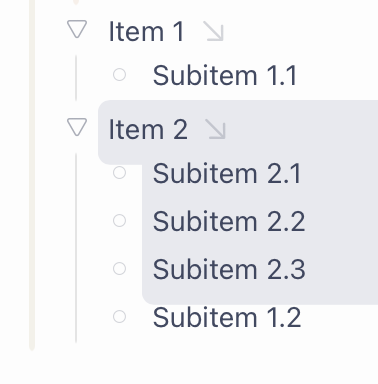
And here’s another important point: If I have selected only a couple of the subitems, I don’t think the unselected one should move!
But oof, this is complicated — and I don’t envy Jesse here! 
But, yeah, I get that the default is the respect the outline — but I think the alternate mode (now called “Maintain level”) should be very “literal”.
And after writing all this, it finally clicked how my mind is thinking when moving items!  I’m thinking of things like a grid. Will post an image soon.
Alas, I don’t think I’ll add this.
This was an area where Bike 1 worked differently than all other outliners. Which could be good if you understood, but was bad if you didn’t. For Bike 2 I decided to just do the simplest thing which is when you move a row it also moves children with it.
Of course with extensions I think you or someone could add these types of move back, but I think I need to focus on other things for now.
2 Likes
Thinking like a grid
OK, so I get that this isn’t how outlines are really structured — but I just understood that I think of navigating items like the whole thing is a grid!
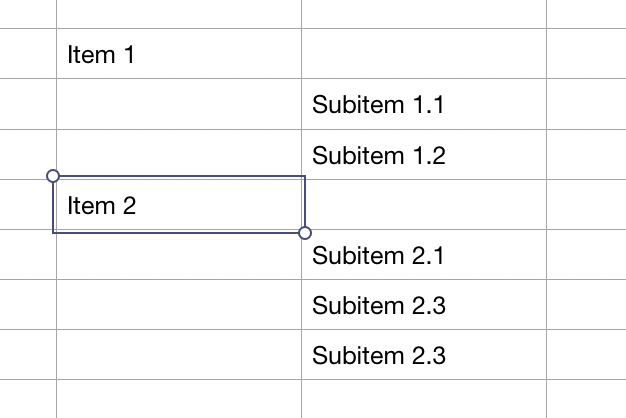
So that’s why the following feels natural to me when moving …
… up:
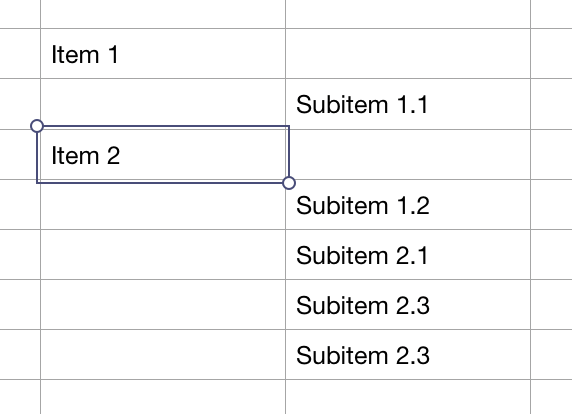
… down: (from the original position)
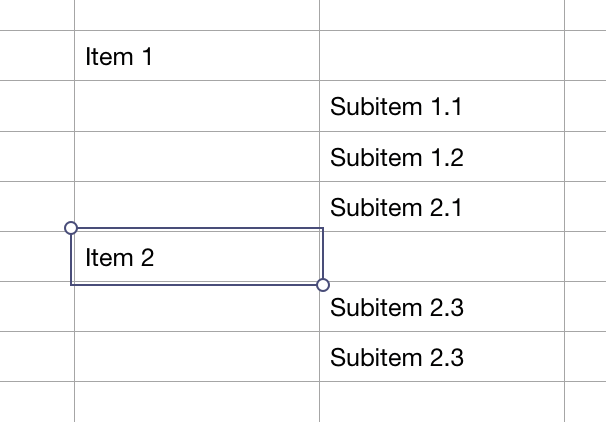
… right:
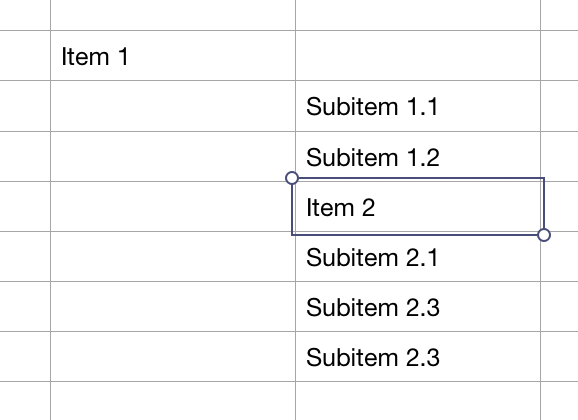
Since only one item can be on each row, moving things into rows already occupied, would make them switch rows. (Oh, and hitting right again would make Item 2 the child of subitem 1.2.)
And if I selected the more items, the same would happen — move on the grid, and swap places as they go.
From this:
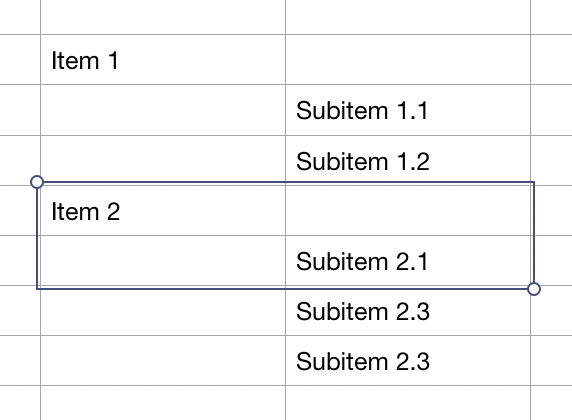
Hitting up, gives this:
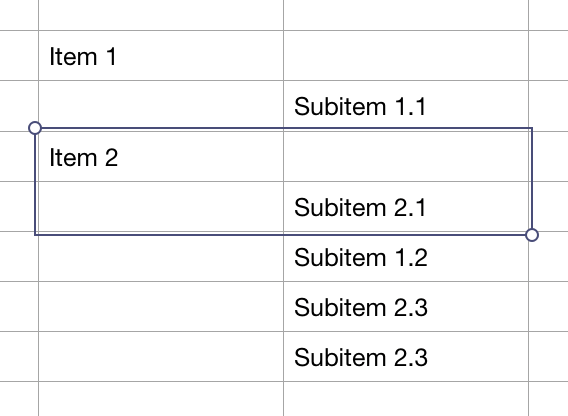
Alas, I don’t think I’ll add this.
(…)
Of course with extensions I think you or someone could add these types of move back, but I think I need to focus on other things for now.
Again, I get that! As I’ve tried to show as well, things get real weird real fast… But as I just now understood why moving things in Bike 2 kinda breaks my mind (because I’m thinking in a grid), I guess I have some motivation to check out the extension route..!
I am willing to help  , so questions welcome. I think if you limit yourself to moving a single row then it shouldn’t be too hard to implement much of Bike 1 experience. Multiple selection of rows isn’t rocket science, but does ad some extra complexity.
If you want the ability to “over indent”, that is indent an item more then one level beyond it’s parent then you will need to add a new attribute to the row to track this extra indentation, and also add extra stylesheet rules to apply that extra indention. Personally I don’t recommend this, but if you want full “grid” behavior you’ll need it I think.
1 Like
Thanks Erlend.
The reason that i like Bike 1’s behaviour is that most of my editing is putting lots of items into outline format in the first place. I put down lots of individual items, and I use the arrow keys to move them around into useful groupings. That’s why it’s helpful for Bike to have a mode that completely ignores existing outline relationships. Also, it’s just hard to predict what happens in moving around in Bike 2’s text editing mode, which takes me out of using Bike to organise my thoughts.
Also, it’s just hard to predict what happens in moving around in Bike 2’s text editing mode, which takes me out of using Bike to organise my thoughts.
Yeah, same… I find myself, quite often, making mistakes and struggling to move items where I want them. Instead of being able to just see where I want it and hit “up, up, right” and get it there.
i can live without being able to ‘over indent’. i only do this by mistake. the question is what happens if I move a subsubheading to under a new heading
In Bike 1, if I arrow down on subsubhead2 here
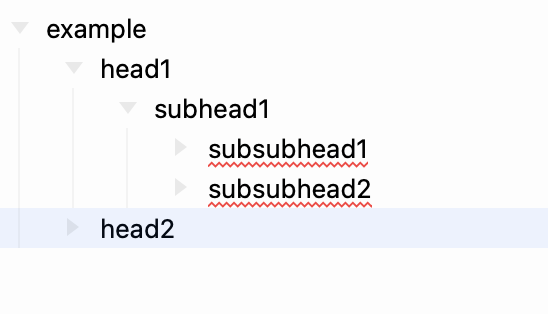
I now get this. subsubhead2 is overindented. that’s Erlend’s grid metaphor at work.
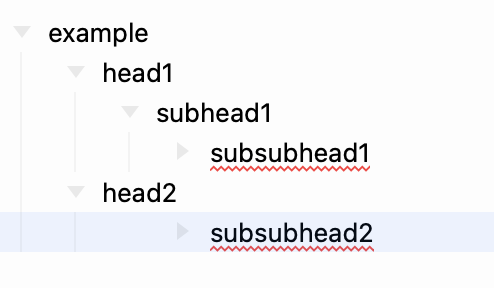
if overindenting is not allowed, would subsubhead2 be promoted one level? I think i would be okay with that, esp. if it means less coding work for you.
1 Like
Yes, I think that’s how I would suggest it work