Hey @jessegrosjean, I have a question about imported markdown tables (preview 301):
Original text:
| Heading 1 | Heading 2 | Heading 3 | Heading 4 |
| ---| --- | --- | --- |
| Row 1 | Test A | Value 1 | Note 1 |
| Row 2 | Test B | Value 2 | Note 2 |
| Row 3 | Test C | Value 3 | Note 3 |
| Row 4 | Test D | Value 4 | Note 4 |
| Row 5 | Test E | Value 5 | Note 5 |
| Row 6 | Test F | Value 6 | Note 6 |
| Row 7 | Test G | Value 7 | Note 7 |
| Row 8 | Test H | Value 8 | Note 8 |
| Row 9 | Test I | Value 9 | Note 9 |
| Row 10 | Test J | Value 10 | Note 10 |
| Heading 1 |
Heading 2 |
Heading 3 |
Heading 4 |
| Row 1 |
Test A |
Value 1 |
Note 1 |
| Row 2 |
Test B |
Value 2 |
Note 2 |
| Row 3 |
Test C |
Value 3 |
Note 3 |
| Row 4 |
Test D |
Value 4 |
Note 4 |
| Row 5 |
Test E |
Value 5 |
Note 5 |
| Row 6 |
Test F |
Value 6 |
Note 6 |
| Row 7 |
Test G |
Value 7 |
Note 7 |
| Row 8 |
Test H |
Value 8 |
Note 8 |
| Row 9 |
Test I |
Value 9 |
Note 9 |
| Row 10 |
Test J |
Value 10 |
Note 10 |
imported into bike:
- Heading 1Heading 2Heading 3Heading 4Row 1Test AValue 1Note 1Row 2Test BValue 2Note 2Row 3Test CValue 3Note 3Row 4Test DValue 4Note 4Row 5Test EValue 5Note 5Row 6Test FValue 6Note 6Row 7Test GValue 7Note 7Row 8Test HValue 8Note 8Row 9Test IValue 9Note 9Row 10Test JValue 10Note 10
Is this an expected behavior?
Generally yes. Bike only understands a nested list subset of Markdown. The idea is Bike can encode its full outline model to Markdown, but it cannot express all of Markdown syntax in its outline. Tables are on aspect of Markdown that Bike knows nothing about.
When Bike encounters markdown structure that it doesn’t understand then it just maps block elements to rows. And in Markdown I think a table is a single block element, so it’s all getting mapped to a single row.
In theory Bike can learn more markdown syntax, but I don’t currently have any plans for that. If tables are important to get into your outlines I think attachments are the route that makes the most sense to me. You could attach as CSV, or maybe even just Markdown table syntax. I think if you do CSV you will get some preview of table structure. Maybe in future could improve that.
Thanks for the explanation.
These could be possible with extensions? Especially for CSV,
No, I don’t think extensions API can do much with attachments.
I mean something like this:
- Drag CSV file to Bike, embed as attachment
- Choose attachment representation file, thumb, actual size). This uses QuickLook to generate preview image… actual size may still be limited.
- When you really want to view the attachment data for real either:
a. Select the attachment and press spacebar, to view file in full QuickLook viewer
b. Right-click attachment and Reveal in Finder, or just Open Attachment to view/edit and more dedicated app.
2 Likes
Saw a minor glitch on the overdue date colour, of my 12 tasks due today, I had 2 show up with the “Today” value but in reverse block colour. Simply fixed by re-applying the :today value, but just reporting in case useful.
This might have been intentional.
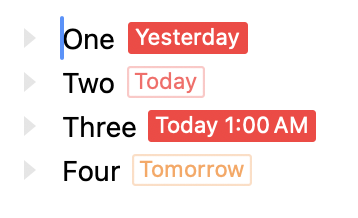
See this example:
When you set a due date it can contain a date & time, or just a date. When it includes just a date (as row “Two” does above) then it’s not considered overdue until the following date. On the other hand when it includes a date and a time then it’s considered overdue after that time. (So overdue “Today” can make sense)
Does that explain problem? Or if not have you figured out how to reproduce the problem?
Thanks @jessegrosjean - it’s not the date/time thing. If anything there seem to be 2 things going on, but only since the latest build so I’m not sure how to pinpoint.
- In some cases, the due date is sticking when I move the task to another date - this could also point to some issue with the extension. When i move those tasks again to any other random location it “resets” the due date (in accordance with the day-inherit extension), and thereafter they respond accurately. I had this happen just this morning when I opened up my task list. (Hmmm come to think of it these were all 3 tasks I moved while using FoldNotes on my iPhone. Something related to that, for sure)
- In two cases so far the reverse colour stayed even when the date was “Today” -
- one of them was a task that I had moved from overdue (“Yesterday”) to “Today”.
- The other is a task that i wouldn’t have reason to move as it was an appointment for this evening. I still have this task and am playing with it - the @due is both sticking to “Today” even when i move it around to different days. Moreover, it is reverse-colour. I can send the task to you in a Bike file, let me know. The only thing I can think about regarding this appointment is that had entered it before i introduced the day-inherit extension, so there may be some irregularity in that line’s meta-data.
I’ll keep an eye on this and advise more concisely if/when anomalies re-appear. Again, since they may be related to the extension I will try to test in that direction if I can but I’m not sure i am capable.z.
When it happens next please copy the effected rows and send to me. Along with whatever the current time was. I want to see what the actual @due values are.
1 Like
Hi Jesse, please find attached. This line has its @duedue value sticky even if i move it to another day.
(Not sure re: your request about current time - but this line has behaved the same since the past day or 2).
I still feel it has something to do with me, particularly because this particular entry was created before I started using my day-inherit extension and there were a couple of hiccups there even with Claude - I had to regenerate all @duey @due values to to get the extension to function properly, and may have overlooked this particular one because it was a static date in the future that I hadn’t had cause to move around.
There’s a little debug routine, it’s bundled into the day-inherit extension as a command - “Debug Selected Row”
When I ran it on the above line, it reported:
Selected row type: task
Selected row text: 18:30 Stick Men concert
Selected row attributes: {"due":"2026-09-13T07:00:00Z","pType":"event"}
Selected row persistentId: 3gYHtwE51eeSz1cyLHfcL
Nearest ancestor day-row: "2026-09-13 Sun" (type: heading, persistentId: 2026/09/13, date read: "2026-09-13")
Every attribute name used anywhere in this document: admin, due, ec27, ecs, fn-done, inherit-due-dates-auto, pType, person, priority, status
BTW the Stick Men show was fantastic. If you like that kind of music, and they are playing in a town near you, I would highly recommend it  www.stickmenband.com
Cheers,
Art
20260914 Sticky Date.bike.zip (2.0 KB)
1 Like
When you say move to another day, do you mean with your extension or move to inspector bar’s calendar? For me it worked (to change due date) when I opened file and moved to inspector calendar.
If it’s with your extension, remind me where to get the latest release please.
1 Like
When I move it to a date on the Calendar, it works fine!
The extension is on this thread:
sorry - use this: How do I get a due date value to auto-update? - #13 by archurhh.
not https://support.hogbaysoftware.com/t/how-do-i-get-a-due-date-value-to-auto-update/6480/10
I’ll also run this past Claude and see if it can find where it snafu’d
If it’s repeatable in that document, I’m pretty sure Claude should be able to find/fix. Let me know how it goes. I’ll take a look if you don’t have luck.
1 Like
Yes, Claude found it and confirmed it had to do with the entry being created prior to the extension. To wit:
“I pulled up the file and found it — this isn’t a bug, it’s the “manually-typed due date always wins” rule doing exactly what it’s designed to do, but on a task that predates the extension tracking it. Notice what’s missing: no data-inherit-due-dates-auto="true" attribute. That marker is the only thing that tells the rule “I set this due date automatically, feel free to keep updating it.” Without it, the extension treats the due date as something you typed in by hand — and a hand-typed due date is deliberately never touched, no matter which day-heading you drag the task under.”
So - problem solved. Thanks for the amazing promptness, and sorry for the bandwidth disturbance!
1 Like
Ha, I’ve just been wasting time watching stick men videos on YouTube
2 Likes