Rows could briefly go blank while type/return quickly
Document windows weren’t being released after closing
Filtered (hidden) rows now stay hidden when printing
Fixed pasting URLs at char 0 should now apply smart link
The filter field’s cancel button now highlights on mouse over
The find/filter current-match highlight (yellow) only shows when editor is not first responder
Extensions + CLI
New lifecycle hooks: window.onClose, document.onClose, outline.onClose.
New Session/CLI observe streams: observeOutlineEditor and observeEditors
Heads-up — breaking API changes: getCommands(), evaluateScript(), and observeOutline()
Added session automation docs to cover bike cli and DOM context session.d.ts. Trying to keep documentation bike -h and man bike and session.d.ts documentation minimal to avoid drift and duplication.
Trying to both add features while keeping the two api consistent. The end result though is that it’s much easier for an extension to keep DOM UI in sync with outline and editor. I’ve updated the d3 example extension to show new behavior.
Previously it just showed a static layout of your outline. Now, with less code I think, it keeps that view in sync with your outline as you edit and it trims the layout to the focused region of your editor. All without needing to define custom protocol between extensions App Context and DOM context.
It (bike.session.observeOutlineEditor) does this relatively efficiently too. It is receiving change events as you edit your outline/editor and then maintains it’s own copy of your outline, updating incrementally as you make changes. So it’s not just sending a debounced snapshot of all state, it’s just applying deltas.
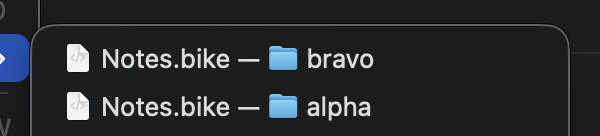
Small suggestion/food for thought: I’ve got a file with the same name (Notes.bike) in two different directories. In the “Open Recent” view, Bike nicely shows the parent folder’s name for disambiguation:
Once I have both files open, though, it gets hard to tell which one is which – the window title just says Notes.bike. In this case the outlines are also similar, so it always takes extra thought for me to tell which is which. I wonder if there’s any way to make it easy to to tell at a glance which is which?
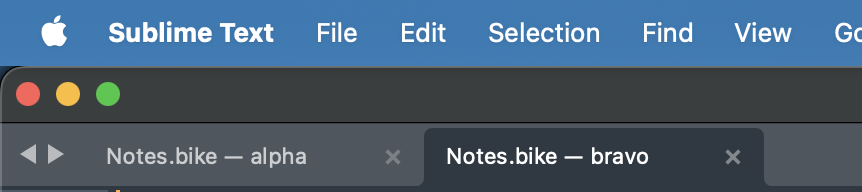
For what it’s worth, Sublime Text does a similar thing in its tab titles:
Good point, but I’m going to table this until after 2.0. I agree something like this is a good idea, but it needs some thought to get right in the code I think.
This still is not working for me on Preview 288 (did not get a chance to test 287 specifically). Pasting links at the start of a line doesn’t make a link, even after typing a space or hitting return. Pasting anywhere else in the line still works.