- Added JSON outline format
- Lots of work/polish on
bikeCLI - Added
man bikefor high-level orientation - Added MCP tool to help you build outline paths
- Autocorrect revert popups age out after 10 seconds
- Changed OPML format to use markdown text formatting
- Changed Commands Explorer override indicator to be less alerting
2 Likes
Previous release got bike out there. This release polishes things significantly. Some locations have changed, you will need to repeat:
- Bike > Install Command Line Tools…
And make sure to start with man bike to get overview. If you are a CLI user I encourage you to explore through the docs and commands. They are what I believe is final form (final last words!), let me know anything that’s confusing or doesn’t work as expected.
1 Like

2 Likes

I want to delete lines row by row, not block by block, so i added cmd-k to Row: Text Delete.
I think this has just started in 282; I now need to press cmd-k twice to delete each row.
The CLI does not run on Intel Macs. Is this correct?
Oops, yes I broke the connection between that command and actual code. Fixed for next release.
1 Like
Yes, though not on purpose. I’ll make the build universal for next release.
Thank you very much. I am still using an Intel iMac and therefore am very interested in that feature.
1 Like
Problem with OmniGroup’s non-standard _note attribute in OPML
I may have reported this elsewhere, but just to document a bit more fully, and provide a test.
If we begin with an OmniOutliner document with a multi-line "note"
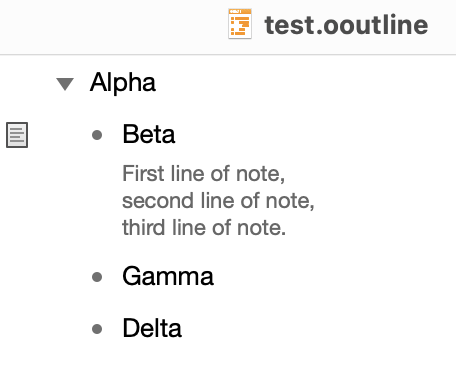
test.ooutline.zip (19.9 KB)
and use their Save As to .opml,
test.opml.zip (1.1 KB)
we find that they serialise the note lines as the ( entity delimited) string value of a _note attribute:
Expand disclosure triangle to view OPML source
<?xml version="1.0" encoding="UTF-8"?>
<opml version="2.0">
<head><!-- <editor inspector-sidebar-visible="yes">
<sidebar visible="yes" width="194"/>
<column name="text" width="248"/>
</editor> -->
<title>test</title>
<dateCreated>Sun, 24 May 2026 10:51:11 GMT</dateCreated>
<expansionState>0</expansionState>
<vertScrollState>0</vertScrollState>
<windowTop>259</windowTop>
<windowLeft>293</windowLeft>
<windowRight>562</windowRight>
<windowBottom>946</windowBottom>
</head>
<body>
<outline text="Alpha">
<outline text="Beta" _note="First line of note, second line of note, third line of note."/>
<outline text="Gamma"/>
<outline text="Delta"/>
</outline>
</body>
</opml>
We can open this without a problem in Bike 2, which then saves in a slightly different pattern – delimiting the _note value with raw \n bytes, rather than escaped XML entities:
Expand disclosure triangle to view Bike OPML source
<?xml version="1.0" encoding="UTF-8"?>
<opml version="2.0">
  <head>
    <title>test</title>
    <dateCreated>Sun, 24 May 2026 10:51:11 GMT</dateCreated>
    <expansionState>0</expansionState>
    <vertScrollState>0</vertScrollState>
    <windowTop>259</windowTop>
    <windowLeft>293</windowLeft>
    <windowRight>562</windowRight>
    <windowBottom>946</windowBottom>
  </head>
  <body id="PBJv6rurZ5GqhubkxmUEY">
    <outline created="0001-01-01T00:00:00Z" modified="0001-01-01T00:00:00Z" text="Alpha">
      <outline created="0001-01-01T00:00:00Z" modified="0001-01-01T00:00:00Z" _note="First line of note,
second line of note,
third line of note." text="Beta"/>
      <outline created="0001-01-01T00:00:00Z" modified="0001-01-01T00:00:00Z" text="Gamma"/>
      <outline created="0001-01-01T00:00:00Z" modified="0001-01-01T00:00:00Z" text="Delta"/>
    </outline>
  </body>
</opml>
I’m not sure whether XML parsers will generally accept the unescaped \n characters in attribute values, but we seem to hit a problem of some kind if we now try, in Bike (282), a Save As.
What I see here is that:
- The
Save Aspanel doesn’t appear, and - we get an apparently indefinite beach ball, while Bike is reported, in Activity Monitor, as “not responding”
PS I notice, FWIW, that the created and modified attributes added by Bike seem to be stamped for a zero-valued date-time – not sure if that is by design.
1 Like
sometimes i cannot type the letter k until i press esc, which i suspect also has something to do with this problem. I don’t think i’m in block mode, and it’s only the letter k.
That’s odd. I guess wait for next release and see if fixed. If not, please report back so I can track it down.
Hi Jesse,
Have you heard of Hookmark? I use it with Bike to connect my documents, websites and something like that. Recently I tried Bike 2, Hookmark would displayed that “No linkable items found in Bike” as the image showed.
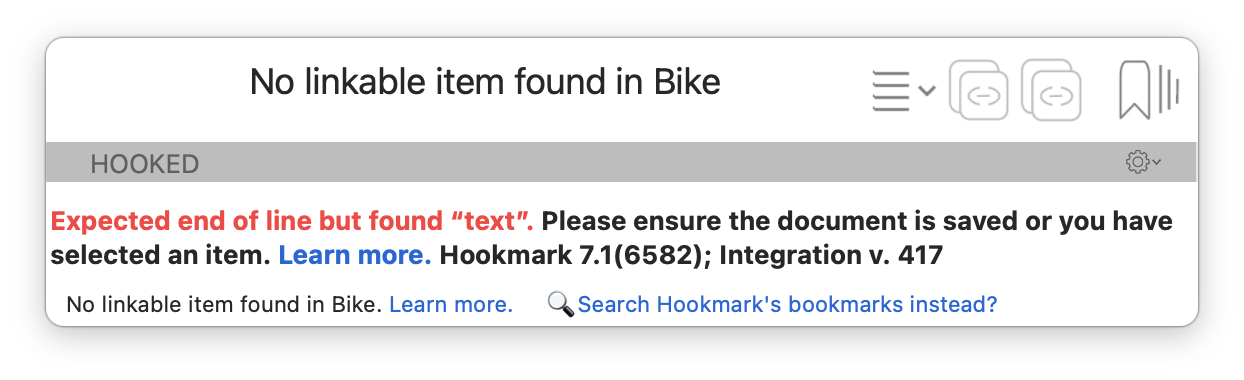
However, everything is normal on Bike 1. Could you please look into it? I would definitely appreciate it. Thanks a lot.
happened again, and i had logs on. I was able to type k by hitting the twice in succession.
[trace] IME: hasMarkedText() → false
[trace] IME: insertText: “k” replacementRange: NSNotFound
[trace] IME: state before: selectedRowRange=Optional(Range(33..<33)), markedRowRange=nil, text=“”
[trace] IME: converted replacementRange: nil
[trace] IME: state after: selectedRowRange=Optional(Range(34..<34)), markedRowRange=nil, text=“”
[trace] ScriptContext: bikeappcalendar_bxkwbgaj app→dom: {
type = clearSelection;
}
[trace] ScriptContext: bikeappcalendar_bxkwbgaj app→dom: {
type = clearSelection;
}
[trace] IME: hasMarkedText() → false
[trace] IME: insertText: “k” replacementRange: NSNotFound
[trace] IME: state before: selectedRowRange=Optional(Range(9..<9)), markedRowRange=nil, text=“”
[trace] IME: converted replacementRange: nil
[trace] IME: state after: selectedRowRange=Optional(Range(10..<10)), markedRowRange=nil, text=“”
[trace] ScriptContext: bikeappcalendar_bxkwbgaj app→dom: {
type = clearSelection;
}
2 Likes
Forgot to mention in release notes. Should run on intel now. Also lots smaller binary size!
Thank you. Works like a charm.
1 Like
Yes, will look into it.
The original cmd-k bug I think is now fixed in 283.
I’m not quite sure how that would cause having to type a double k, but it put the app in a weird state, so maybe. Two options that I can see:
- Do you have any pure letter keybindings. Ie ones that don’t require a modifier key and are in outline mode?
- Otherwise please use the latest 283 release, and report back again if double
kproblem comes back.
I believe Hookmark links are now working in 284.
1 Like
no pure letter keybindings.
so far haven’t seen the k-key bug in 284. will let you know.