Load themes directly from extensions (no copy to themes folder)
Removed .bikemd format-you’ll need to rename to .md
Reworked file format handling (.bike vrs .html etc)
Sync control show/hide to mouse cursor visibility
Work to unify/polish explorer windows
Show proper ids in path explorer
Fixed text commands to work in text mode
Fixed all known crashes (keep sending!)
Extensions
Added extensionURL. Use to generate URLs for files contained in extension’s folder. Common case would be to show images in DOM context or style context.
In the style context, I wonder if it would be feasible to use custom icons to mark the presence of particular data- attributes ?
(I’ve drafted a bike-reader.lua and bike-writer.lua pair for Bike ⇄ Pandoc, and wondered about that while experimenting with Bike-side representations of the Pandoc block types {DefinitionList, Figure, Table}).
More immediately, I’ve written a simple tree-browsing presentation system as a Bike DOM Panel extension, and I would like to be able to display images (rather than just text) in some of the nodes.
I’ve been using SVG source for images, and would like to experiment with ‘compiling’ a more graphic presentation by building an extension which includes some graphic files.
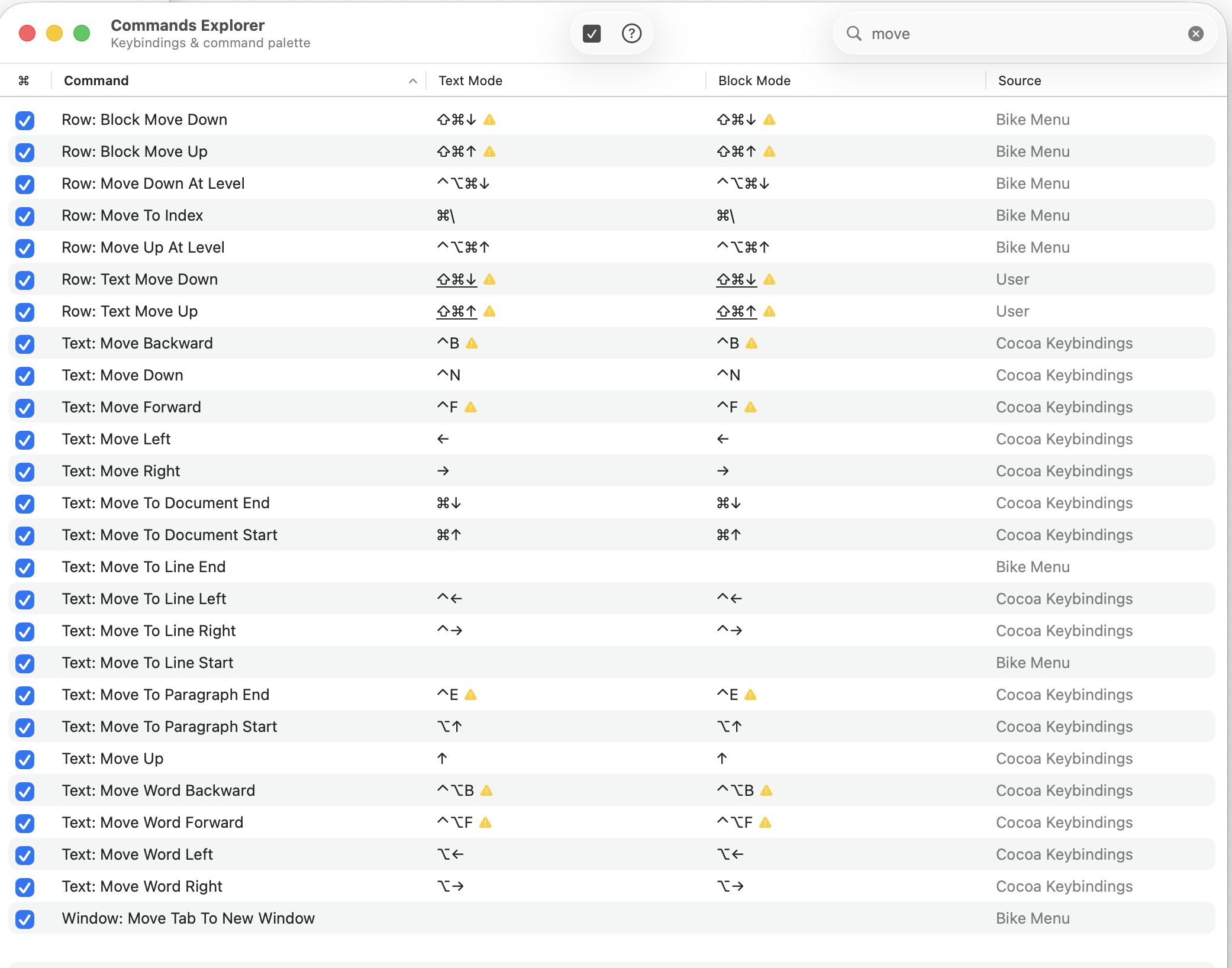
just installed. When i use the cmd-shift-up/down arrows to move text up and down, i get a 3 second delay before the move (cmd-z to undo also gets delayed). The delay doesn’t happen with any of the other keyboard shortcuts that i have tested. I think this might be because i customised the keybindings, and i can see that there is a keybinding conflict. Should I be setting the keybindings differently?
Another use case would be for style extensions. Row handle can be defined as an image. Or row background, etc. Or more generally gives extensions access to data that doesn’t have to be compiled into extensions code.
Pinned rows bug? (slowly learning the sidebar features)
I made two pinned rows then tried to drag-change their order in the pinned rows list. I see the blue circle-line (o—–) appear that indicates movement, but the two rows don’t actually change place. If i delete the top one and repin it, it appears below the other one.
To be clear you are just talking about the ordered displayed in sidebar, not outline? The intention is that the sidebar ordering for pinned rows is independent of outline order.
For me the drag/drop behavior for pinned rows in sidebar appears to be working as intended. For example:
btw, forgot to say that removing the keybinding got rid of the delay, so it’s definitely the source of the problem. but i am confused by the whole keybinding window now.
Do you think this is an unexpected Bike behavior that needs improvement? For me the sidebar drag and drop seems pretty standard, but maybe it isn’t, or maybe you are seeing bug that I am not.
Ok, good (on first part anyway). I haven’t looked at that file yet, but I got it. Will investigate and hopefully be able to explain the mystery sometime later today.
I am not sure I am excited about current behaviour on opening non-Bike-markdown files. I appreciate Bike tries to parse it to its own format and render it the way it renders native BikeMD files, but I think changing the file to conform to that format currently does more harm than good:
Everything becomes UL (expected)
existing ULs stay ULs (not expected, because now there’s no distinction → ULs become body text in Bike)
There are some other edge cases where information (structure) is also lost, but I think this one above warrants at least some thought if current behaviour is OK. ULs are a way to introduce structure/hierarchy into markdown, and since Bike changes everything to UL, any previous structure becomes muddled to the point where it’s impossible to bring it back. You can’t undo an ‘Open anyway’ in Bike with a simple find/replace.
If this stays, I would be very wary with opening any non-BikeMD .md file in Bike, which kind of defeats the point of having that feature. Would very much prefer to have it just open plain text and avoid destructive behaviour, OR really just prepend - to the start of every non-blank line so that I can easily revert back if I need to.
I once had to round trip an entire vault Obsidian → Logseq → Obsidian, which did something similar, and it’s not a pleasant experience.
EDIT: Maybe offer “Open as plain text” as an option if you want to keep it the way it is?
 !!!
!!!