Big, and a bit messy release!
Heavy on features/changes. Docs and some polish still trying to catch up. Fingers crossed it’s mostly docs and polish going forward.
Crashes
I didn’t get many crash repots in last release, then I got a flurry last two days, but by that time I had changed enough code that it’s was a little hard to know what was fixed already and what was not. Please send crashes early and often!
Bike > Interface Explorer
Extensions add unordered features. Use the Interface Explorer to organize them:
(Generally drag and drop and click trailing edge buttons in explorer window)
- Reorder/hide/show location items in the sidebar
- Reorder/hide/show inspector items in the inspector (and group in tabs if wanted)
- Make commands available to click on in titlebar
- Make commands available to click on in statusbar
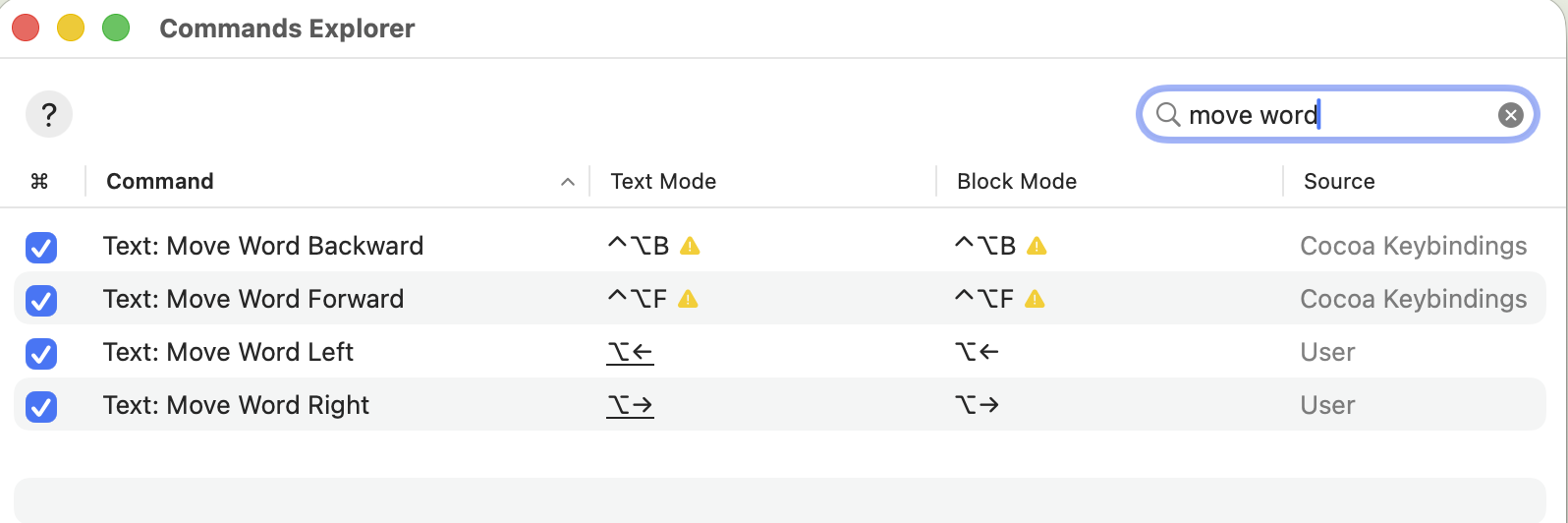
Bike > Commands Explorer
This used to be the Settings > Keybindings.
I also exposed a bunch of new commands from Cocoa keybindings. Things like text:move-to-line-end. The idea is to be able to see all potential commands when assigning keybindings. They might also be useful to extension which can perform commands via performCommand.
The new commands does make the Command-P pallet quite a bit more noisy. Use the new checkbox column in the Commands Explorer to include/exclude commands from the commands palette.
Text commands
There was a discussion in the forums regarding row block vrs row text editing behavior. I’ve added a bunch of new “Row: Text *” commands. Such as “Row: Text Move Up”. Test them out for more text editor like move/delete behavior. If you prefer them over the default behavior you can assign the default bindings to these new commands. I think the full list is:
- Edit: Text Copy
- Edit: Text Cut
- Edit: Text Paste
- Row: Text Delete
- Row: Text Indent
- Row: Text Outdent
- Row: Text Move Down
- Row: Text Move Up
And there should also be a corresponding “Block” version of each command.
Bike > Extensions Explorer
Use the extensions explorer browse/install published extensions, enable/disable installed extensions, delete extensions. You can still manually install extensions by copying them into the extensions folder, but the manager should make the whole process easier I hope. The new extension-kit includes scripts that submit extensions to the registry so they will show up when browsing.
Inspector UI
I’m trying to come up with a good/better inspector (right sidebar) UI. Goal is inspector items added by different extensions will look good together. I think I’ve settled on putting each inspector item in a Disclosure group. You can see that style in the calendar inspector, and in the published “Look Up” extension. This look isn’t enforced, extensions can present any UI they want, but I think it’s a good starting point and encourage sidebar extensions to follow the design unless they have good reason not too.
Building Extensions
I’ve moved all extension related code to:
Last week @complexpoint asked if the extension API was stable to start building on…
I said yes, and then started changing lots of stuff! Sorry! There will likely be a little headache updating to new setup, but actually API isn’t much changed. Lots of changes to extension-kit tooling. Any extension authors please ask dumb questions in the forums guilt free. I certainly would 
Previously the bike-extension-kit was a single git repository with everything in it. The pattern to use it was to create your own fork of the repository. Add your own code. Pull changes from the origin git repository for new releases.
The new bike-outline/extension-kit pattern is a bit more standard. The extension-kit is a package that your own package depends upon. You update using standard npm patterns, not by pulling from a repository that you forked. (The core and example extensions are split out into separate repositories, see below)
You can find the new extension-kit and documentation here:
If you have been developing an extension I think your best bet to update is to re-create the project structure from scratch like this:
mkdir my-extensions && cd my-extensions
npm init -y
npm install --save-dev https://github.com/bike-outliner/extension-kit
npx bike-ext new my-extension
npx bike-ext build
Next copy your existing extension code from the old project into the new project. Then npx bike-ext build --install and you “should” be ready to go, or have some hopefully not too big errors to deal with.
After that headache some nice new features including:
- You can write tests for your extension
- You can build and publish your extension for others to use
Previously the core and example extensions were included in the extension kit. They are now in separate repositories here:
In those repositories some useful things to look at:
- In core bike.bkext has testing for much of the extension API (see how it’s used)
- In examples tutorial is simplified and I added a new kitchensink.bkext with many examples