“Focus Heading” is implemented in latest 2.0 previews, but it’s named “Go > Focus Index Row”. I changed from “heading” to “index” to match sidebar. And also if you right click on “index” in sidebar you can modify the query which is used to generate the index, so it might be other row types.
License share… this should already be working for Bike 1.x and 2.x licenses. There is only one Bike license type and it is time based, not version based. If you have an active Bike 1.x license, it should work for Bike 2 already.
I’m currently on Mac App Store subscription. Previous l was using a 1 year license, after it expired, I switched to Mac App Store subscription now I cannot share the license with Bike 2.0 preview
I think the tabs should still be visible in the hide interface. I only use simple outlines to take notes and rarely have to zoom in to a row, etc. so it just adds clutter. In addition, I can’t see the name of the file I am working on in the hide interface mode so I can’t just open up multiple windows.
For me Hide Interface is all about the feeling of “just outline”. Showing tabs and window titles would break that feeling in my opinion. For your goals can you just hide sidebars?
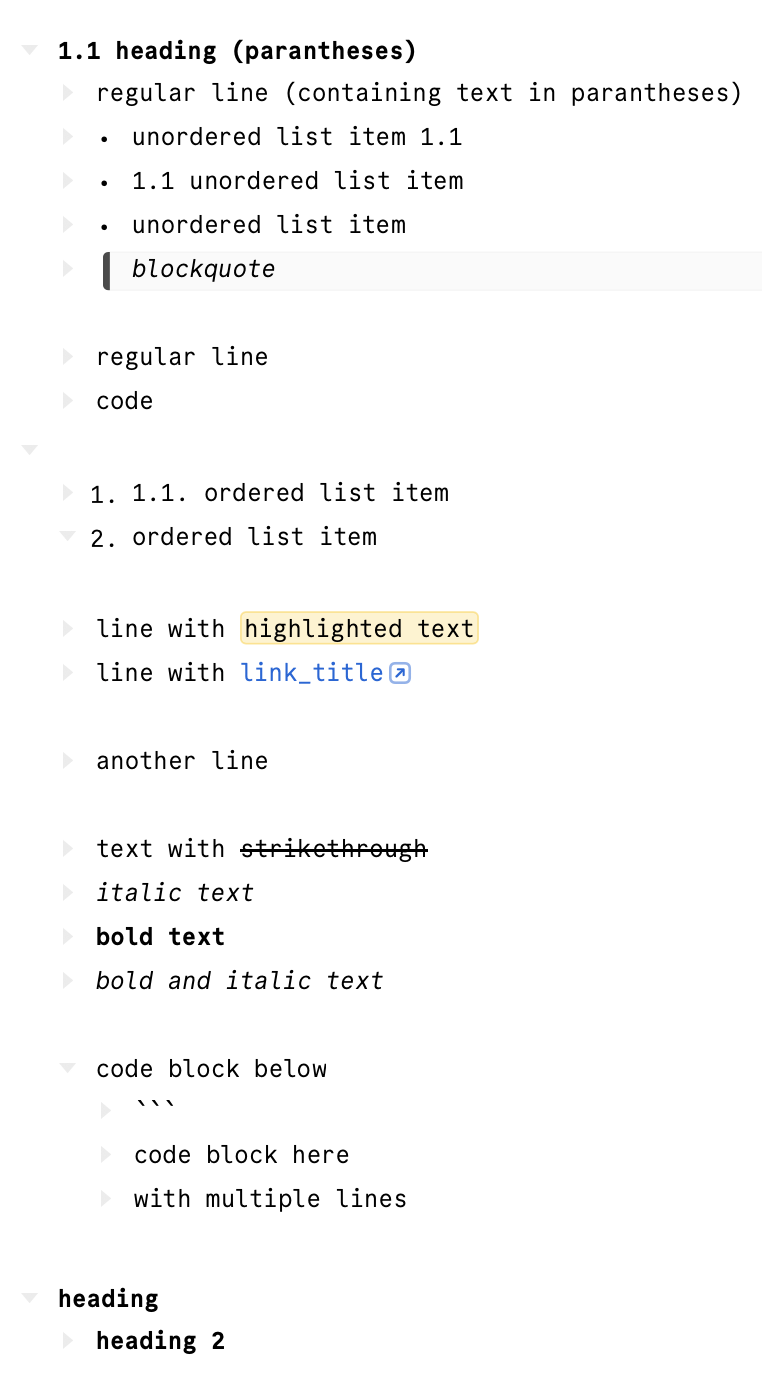
I have an issue with bikemd-formatted text. Strangely, when I save a .bikemd file in Bike 2 (262), some parts of the actual files are modified with the markdown escape (\) character. Below is the screenshot of the file and the text content of a sample file.
---
{"bikemd":true,"root-id":"hXijO9EnIJb_1RxVDGVwH"}
---

- # 1\.1 heading \(parantheses\)
	- regular line \(containing text in parantheses\)
	+ unordered list item 1.1
	+ 1\.1 unordered list item
	+ unordered list item
	- > blockquote

	- regular line
	- `code`

	1. 1\.1. ordered list item
	2. ordered list item

	- line with [highlighted text]{mark}
	- line with [link\_title](url)

	- another line

	- text with ~~strikethrough~~
	- *italic text*
	- **bold text**
	- ***bold and italic text***

	- code block below
		- \`\`\`
		- code block here
		- with multiple lines

- # heading
	- # heading 2
EDIT: When saving a .bikemd file, Bike automatically escapes special characters (e.g., *, _, (, ), >, etc.) even when they are clearly used as plain text and not as Markdown syntax.
Additionally, numbers at the beginning of a line (after -, +, # or 1.) are also escaped, even when they are not intended to represent ordered list items.
Characters and numbers that are clearly used as literal text are escaped, and the added backslashes reduce readability and make editing .bikemd files in other text editors more difficult.
Could you clarify whether this is intentional round-trip protection, or whether the escaping rules could be made less strict?
It is intentional, but could also be made less strict. For example ( are escaped because they might be recognized as link syntax. Currently it’s erring on the side of escape everything, making sure that what you type in Bike is preserved when you reload document. But much of this could be relaxed and I expect will be eventually.
Auto-escaping adds a bit noise and makes files harder to edit files outside Bike, especially since there’s no native Bike app on iOS and Markdown editors are the only option there. It would be great if escaping could simply be left to the user. Will be waiting for the update. Thanks.
That’s probably a good idea, but just to be clear. That would mean you type **hello** into your outline. And it works and looks as you typed it. You save and reopen the document and it’s been replaced with hello. Probably some weirder cases too.
regardless of its position in the line, any opening and closing bracket is escaped, whether it is paired or unpaired
> is escaped if it is not the first character in the line
any number followed by . at the beginning of the line is escaped: 1\.
Below is the original test block for demonstration:
- # Escape Behavior Test
- baseline non-problematic characters
		- plus sign inline +
		- minus sign inline -
		- hash inline #
		- mixed safe symbols + - # inside text
		- hash mid-line example text # example
		- plus mid-line example text + example
		- minus mid-line example text - example
	- unpaired asterisk cases
		- trailing star *
		- leading star *text
		- mid star text * mid
		- multiple unpaired stars * * *
		- paired stars *paired*
	- unpaired underscore cases
		- trailing underscore _
		- leading underscore _text
		- mid underscore text _ mid
		- multiple unpaired underscores _ _ _
		- paired underscores _paired_
	- bracket tests (paired and unpaired)
		- parentheses paired (text)
		- parentheses unpaired (text
		- parentheses unpaired text)
		- square paired [text]
		- square unpaired [text
		- square unpaired text]
		- curly paired {text}
		- curly unpaired {text
		- curly unpaired text}
		- angle brackets <text>
		- mixed brackets ( [ { < text > } ] )
	- greater-than tests
		- mid-line greater-than text > text
		- trailing greater-than text >
		- leading greater-than but not blockquote >text
		- proper blockquote
			- > blockquote line
	- number-dot at beginning tests
		1. intended ordered item
		- 1. not intended ordered item
		+ 1. not intended ordered item under +
		- 2. another numeric line
		- 10. double-digit number
		- 1.2 decimal-like number
		- 1.text no space after dot
		- 1 . space before dot
	- number-dot mid-line tests
		- text with 1. inside sentence
		- example A1. test inside word
		- version v1.2 number pattern
		- word1. nextword without space
		- text1.text with dot pattern
	- regular markdown link tests
		- simple link: [example](https://example.com)
		- link with number: [item 1. test](https://example.com/1.2)
		- link with asterisk in title: [star * inside](https://example.com)
		- link with underscore in title: [under_score_text](https://example.com)
		- link with brackets in title: [[brackets]](https://example.com)
		- link with parentheses in title: [(parentheses)](https://example.com)
		- link with mixed symbols: [* _ ~ ` # + - > ( ) [ ]](https://example.com)
	- link URL special character tests
		- url with parentheses: [test](https://example.com/test(1))
		- url with underscore: [test](https://example.com/test_value)
		- url with dash: [test](https://example.com/test-value)
		- url with number-dot: [test](https://example.com/1.2)
		- url with greater-than sign: [test](https://example.com/a>b)
		- url with multiple symbols: [test](https://example.com/*_~`#-1.>)
	- mixed combinations
		- text with * and _ and (brackets) together
		- text with [square] and > symbol mid-line
		- text with number 1. inside sentence
		- 1. text with *unpaired and (unpaired
		+ 2. text with _unpaired and > mid
		- complex mix * _ ( ) [ ] { } > 1.
The following is the escaped version of the original test after it is saved in Bike 2:
- # Escape Behavior Test
- baseline non-problematic characters
	- plus sign inline +
	- minus sign inline -
	- hash inline #
	- mixed safe symbols + - # inside text
	- hash mid-line example text # example
	- plus mid-line example text + example
	- minus mid-line example text - example
	- unpaired asterisk cases
		- trailing star \*
		- leading star \*text
		- mid star text \* mid
		- multiple unpaired stars \* \* \*
		- paired stars *paired*
	- unpaired underscore cases
		- trailing underscore \_
		- leading underscore \_text
		- mid underscore text \_ mid
		- multiple unpaired underscores \_ \_ \_
		- paired underscores *paired*
	- bracket tests \(paired and unpaired\)
		- parentheses paired \(text\)
		- parentheses unpaired \(text
		- parentheses unpaired text\)
		- square paired \[text\]
		- square unpaired \[text
		- square unpaired text\]
		- curly paired {text}
		- curly unpaired \\{text
		- curly unpaired text\\}
		- angle brackets
		- mixed brackets \( \[ \\{ < text \> \\} \] \)
	- greater-than tests
		- mid-line greater-than text \> text
		- trailing greater-than text \>
		- leading greater-than but not blockquote \>text
		- proper blockquote
			- > blockquote line
	- number-dot at beginning tests
		1. intended ordered item
		- not intended ordered item
		+ not intended ordered item under +
		- another numeric line
		- double-digit number
		- 1\.2 decimal-like number
		- 1\.text no space after dot
		- 1 . space before dot
	- number-dot mid-line tests
		- text with 1. inside sentence
		- example A1. test inside word
		- version v1.2 number pattern
		- word1. nextword without space
		- text1.text with dot pattern
	- regular markdown link tests
		- simple link: [example](https://example.com)
		- link with number: [item 1. test](https://example.com/1.2)
		- link with asterisk in title: [star \* inside](https://example.com)
		- link with underscore in title: [under\_score\_text](https://example.com)
		- link with brackets in title: [\[brackets\]](https://example.com)
		- link with parentheses in title: [\(parentheses\)](https://example.com)
		- link with mixed symbols: [\* \_ \~ \` # + - \> \( \) \[ \]](https://example.com)
	- link URL special character tests
		- url with parentheses: [test](https://example.com/test(1))
		- url with underscore: [test](https://example.com/test_value)
		- url with dash: [test](https://example.com/test-value)
		- url with number-dot: [test](https://example.com/1.2)
		- url with greater-than sign: [test](https://example.com/a>b)
		- url with multiple symbols: [test](https://example.com/*_~`#-1.>)
	- mixed combinations
		- text with \* and \_ and \(brackets\) together
		- text with \[square\] and \> symbol mid-line
		- text with number 1. inside sentence
		- text with \*unpaired and \(unpaired
		+ text with \_unpaired and \> mid
		- complex mix \* \_ \( \) \[ \] \\{ \\} \> 1.
In my opinion, any user working with markdown text should expect this behavior. But any unpaired * or _ should be treated as literal text. Maybe live rendering of bold and italic with * and _ could be introduced in to Bike 2 so there would be no surprises. In Bike user starts typing **hello and any time they add pairing ** it will be rendered as hello. What do you think about this?
Hello! @jessegrosjean Just wanted to follow up on this. Should we be able to use a Mac App Store subscription to share the license with Bike 2 preview?
The recover license button in the license manager works, but I receive an email which says: “You have no order history for Hog Bay Software. “ (which makes sense).
Do I just need to wait for Bike 2 to be released on the App Store to use the license controlled features?
Thanks in advance!
Yes that’s still the case. Sometime I hope to allow licensing of direct download through App Store, but unlikely to get that done before 2.0 is release. So for now have to just wait.
(Though if you just want to play with things the direct download version does have a 1 week trial period)