Hey everyone,
I’ve been looking for a way to visualize my Bike outlines in a more horizontal, Kanban-like layout, where top-level items appear on the left and their children are nested to the right.
With a lot of helpful iteration, I’ve ended up with an AppleScript that does this automatically. It reads your outline, generates an HTML file with the new layout, and opens it in your browser. The top-level items are in boxes, and all their children are formatted as a clean, bulleted list. here is a screenshot. left the html and right the original bike.
Now the question arises for me, would additional views be a potential possibility?
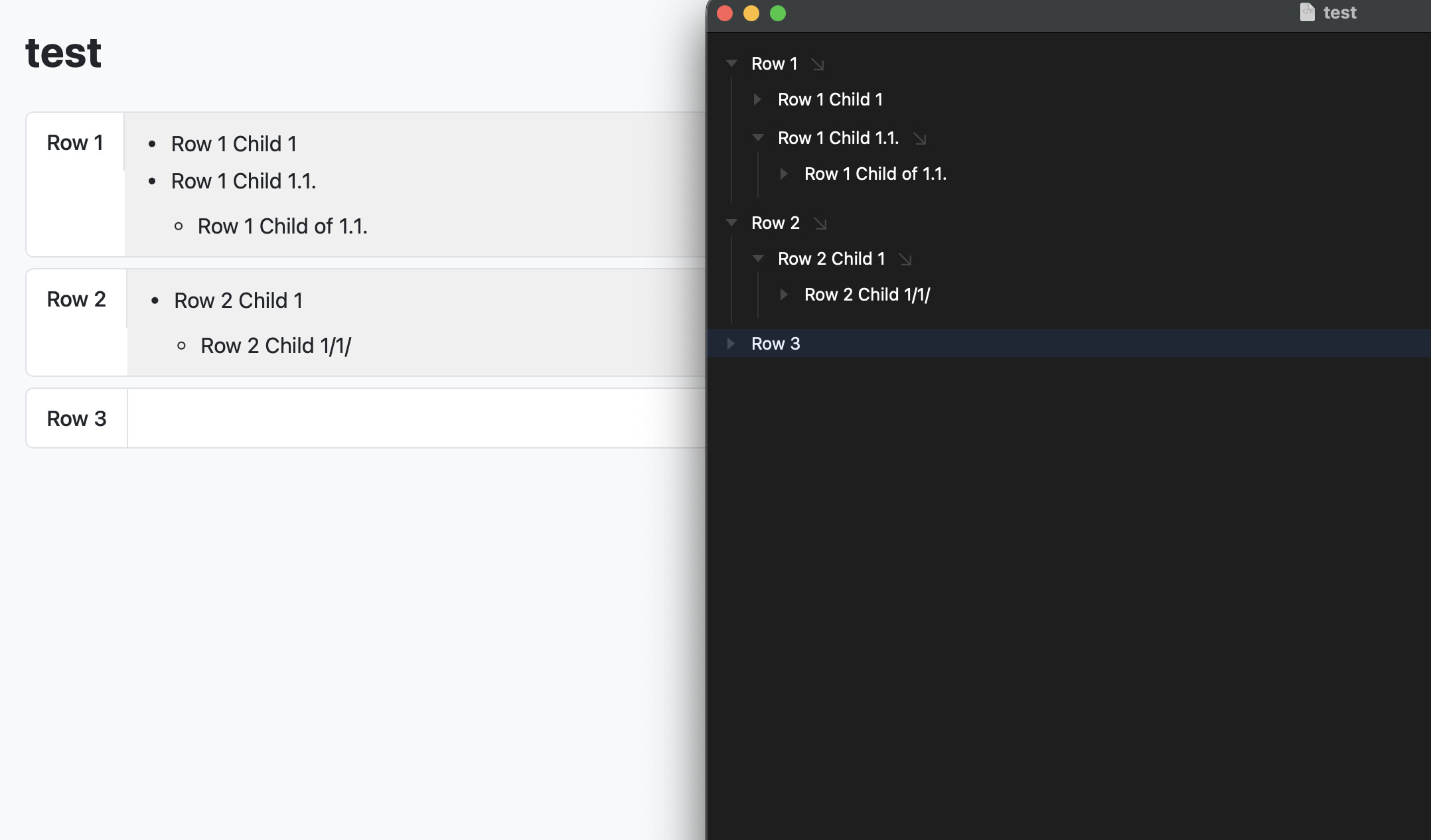
Here is the final script if anyone else finds this useful!
-- AppleScript to convert a Bike outline to a nested column HTML file with bulleted lists for children
-- --- SCRIPT CONFIGURATION ---
property backgroundColor : "#f8f9fa"
property rowBackgroundColor : "#ffffff"
property rowBorderColor : "#dee2e6"
property rowTextColor : "#212529"
property fontFamily : "-apple-system, BlinkMacSystemFont, \"Segoe UI\", Roboto, \"Helvetica Neue\", Arial, sans-serif"
-- --- END CONFIGURATION ---
try
tell application "Bike"
if not (exists document 1) then error "No Bike document is open."
set frontDocument to document 1
try
set docPath to file of frontDocument
on error
error "The Bike document must be saved before running this script."
end try
set docName to name of frontDocument
set allRows to rows of frontDocument
set childRowIDs to {}
repeat with aRow in allRows
set childRows to rows of aRow
repeat with aChild in childRows
set the end of childRowIDs to id of aChild
end repeat
end repeat
set htmlBody to ""
repeat with aRow in allRows
if id of aRow is not in childRowIDs then
set htmlBody to htmlBody & my processTopRow(aRow)
end if
end repeat
end tell
set htmlContent to my buildFullHtml(docName, htmlBody)
my saveAndOpenFile(docPath, htmlContent)
on error errMsg number errNum
display dialog "An error occurred: " & errMsg & " (" & errNum & ")" with icon stop
end try
-- --- SUBROUTINES ---
on processTopRow(aRow)
set html to ""
tell application "Bike"
set rowName to name of aRow
set childRows to rows of aRow
set html to html & "<div class=\"row-container\">"
set html to html & "<div class=\"row-text\">" & my escapeHtml(rowName) & "</div>"
if (count of childRows) > 0 then
set html to html & "<div class=\"children-container\">"
set html to html & my processChildrenAsList(childRows)
set html to html & "</div>"
end if
set html to html & "</div>"
end tell
return html
end processTopRow
on processChildrenAsList(childRows)
set html to "<ul>"
tell application "Bike"
repeat with aChild in childRows
set html to html & "<li>" & my escapeHtml(name of aChild)
if (count of rows of aChild) > 0 then
set html to html & my processChildrenAsList(rows of aChild)
end if
set html to html & "</li>"
end repeat
end tell
set html to html & "</ul>"
return html
end processChildrenAsList
on buildFullHtml(docName, htmlBody)
set html to "<!DOCTYPE html>
<html lang=\"en\">
<head>
<meta charset=\"UTF-8\">
<title>" & my escapeHtml(docName) & "</title>
<style>
body { font-family: " & fontFamily & "; background-color: " & backgroundColor & "; color: " & rowTextColor & "; margin: 20px; line-height: 1.5; }
.row-container { display: flex; align-items: flex-start; border: 1px solid " & rowBorderColor & "; background-color: " & rowBackgroundColor & "; margin-bottom: 8px; border-radius: 6px; overflow: hidden; }
.row-text { padding: 10px 15px; font-weight: 500; border-right: 1px solid " & rowBorderColor & "; flex-shrink: 0; }
/* MODIFIED: Added gray background for diagnostics */
.children-container { padding: 1px 15px; flex-grow: 1; background-color: #f0f0f0; }
.children-container ul { list-style-type: disc; padding-left: 20px; margin-top: 10px; margin-bottom: 10px; }
.children-container ul ul { list-style-type: circle; }
.children-container li { margin-bottom: 4px; }
</style>
</head>
<body>
<h1>" & my escapeHtml(docName) & "</h1>
" & htmlBody & "
</body>
</html>"
return html
end buildFullHtml
on saveAndOpenFile(originalPath, htmlContent)
set originalPathStr to originalPath as text
if originalPathStr ends with ".bike" then
set newPathStr to (text 1 thru -6 of originalPathStr) & ".html"
else
set newPathStr to originalPathStr & ".html"
end if
try
set fileRef to open for access file newPathStr with write permission
set eof of fileRef to 0
write htmlContent to fileRef as «class utf8»
close access fileRef
tell application "Finder"
open file newPathStr
end tell
return true
on error errMsg
display dialog "Failed to save or open the file: " & errMsg
return false
end try
end saveAndOpenFile
on escapeHtml(txt)
set AppleScript's text item delimiters to "&"
set a to text items of txt
set AppleScript's text item delimiters to "&"
set txt to a as text
set AppleScript's text item delimiters to "<"
set a to text items of txt
set AppleScript's text item delimiters to "<"
set txt to a as text
set AppleScript's text item delimiters to ">"
set a to text items of txt
set AppleScript's text item delimiters to ">"
set txt to a as text
set AppleScript's text item delimiters to "\""
set a to text items of txt
set AppleScript's text item delimiters to """
set txt to a as text
set AppleScript's text item delimiters to ""
return txt
end escapeHtml
