Split editor. View ▸ Split Editor (⌥⌘S) shows one document in two panes, so you can write in one while keeping another part in view.
Export. File ▸ Export writes HTML and Rich Text, and Edit ▸ Copy ▸ HTML and Rich Text put the same on the clipboard.
Tables. Format ▸ Table ▸ Insert Table starts one. Columns align as you type, Tab and Return move between cells and create rows, and the same menu adds and removes rows and columns.
Right-to-left text. Arabic, Hebrew and Persian paragraphs now run right to left. Format ▸ Text Direction sets a document’s direction when the automatic choice is wrong.
Footnotes and reference links. Add Footnote (⌥⌘K) inserts the next numbered note. Add Reference Link (⇧⌘K) does the same for links. Typing [^ or ][ completes labels. When things get messy, Format ▸ Clean Up ▸ Tidy Links and Footnotes renumbers them and gathers the definitions at the end.
Hard-wrapped Markdown. Opening a file that looks hard-wrapped shows an alert pointing to Format ▸ Clean Up ▸ Unwrap Paragraphs. ⇧Return inserts a Markdown hard line break, and Settings ▸ Markdown ▸ Line Breaks keeps every break on export if that’s how you write.
Smaller changes:
Added Open in New Tab and Open in New Window
Added Insert and Update Table of Contents
Added per-window Line Numbers, Sticky Headings, Minimap
Added pasting a URL over selected text to make a link
Added double-click on a bracket or quote to select its pair
Added option to float the word count over the editor
Added ⌥Return and ⌥Tab to insert raw characters
Added Background Brightness slider to DEC Terminal
I find if I create 2 windows, and split editor in one of them, I can use ctrl+tab to cycle between editor panes. I can also use cmd+backtick (or my § equivalent) to cycle between windows.
But if I then make one of the windows full-screen, and use cmd+backtick, I can’t switch between WriteRoom windows anymore. However, shift+cmd+backtick works, BUT that disables ctrl+shift to cycle between editor panes. I find I can however still use ctrl+tab and shift+ctrl+tab alternatively to cycle back and forth between panes.
So, to replicate:
Create two windows
Split editor in one or both windows
Verify ctrl+tab cycles split editor panes back and forth
Make one window full-screen
Use shift+cmd+backtick to go back to the other (non-full-screen) window
Attempt to use ctrl+tab to switch editor panes. Should only cycle panes once and then refuse to go in the other direction. Can still use shift+ctrl+tab to switch back.
In case anyone else is using @ttscoff’s Marked 3 for previewing WriteRoom MD files, and applying styles to them, the setting there, for preserving the alignment of RTL paras is at:
Marked 3 > Settings... > Style > Detect and style RTL text
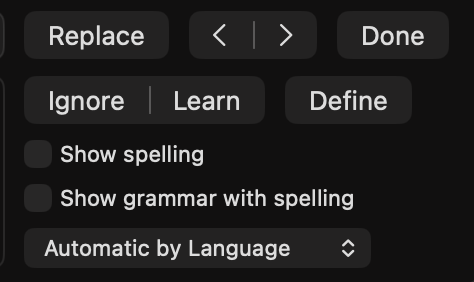
I am seeing odd underlines occasionally of a few words in the editor view. I think it is spell checking related, as the words that I have noted (Pandoc, intraword, blockquote) may not be in the dictionary. I have auto-correct turned off. If I copy the same lines to a new file, I do not see the underlining.
I just opened the Moby Dick file and now am almost positive it is spell check related. Lot of odd words are underlined. So there is still a bit of mystery why this behavior is not consistent, but more importantly, shouldn’t there be an option to turn off spell check? And if this is spell checking, a mark that is more obvious, like a squiggle underline, would be helpful.
If you change to the System theme you should see a more traditional red squiggle underline. For the DEC theme I’m trying to restrict the formatting/display to DEC-y style graphics, so that’s why the underline. Eventually I’ll open up themes (post 4.0) and then you’ll get to pick and choose and combine verious theme styles.
I do think there is some unpredictability on when spell highlights run/highlight. The system is viewport only, unless you requires next spelling error, then it will search forward. But I think I’ve noticed it doesn’t always engage properly. It’s been on my list to investigate, but not there yet.
Got it. Having multiple homes for checking settings, with some at the system level, some at the application and (I think) some at the document level, made this one tricky for me at least. There seems to be an actual bug about the consistency, so that should stay on your list. I was also thrown because when I intentionally misspelled some words, they were not underlined.
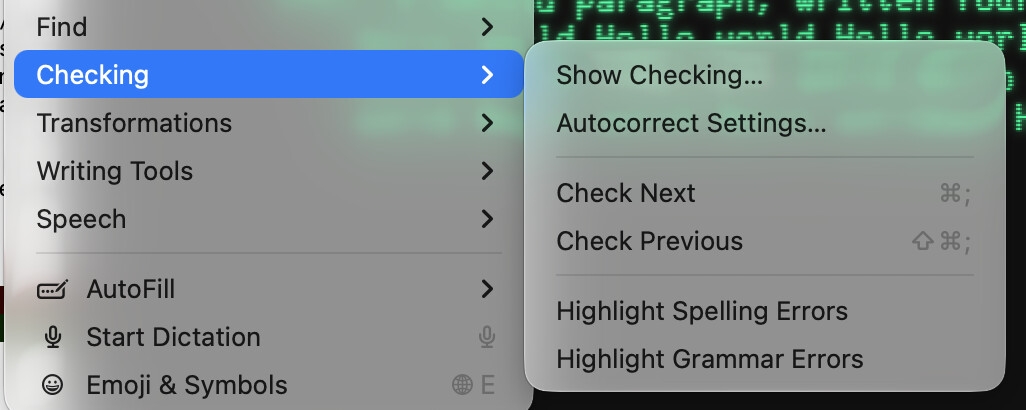
The word “Checking” didn’t register for me in the edit menu as opposed to the “Spelling and Grammar” submenu, which I think is what the system calls it. I never thought of the complexities to get something like this right, but I am sure you will land it in way that works for your users generally.
I’ve changed to “Spelling and Checking”. I’m keeping terminology a bit open because I expect to eventually add other checking rules, not just spelling. I think the checking UI, with a list of checkboxes for what to check, works well for various text linters. I actually have had this UI built in one for or another since around 2020. Yipes.
If I press Edit → Lists → any one of lists, I’ll get a list marker, but caret will stay at start of line (on an empty line). Would be smoother if caret moved to end of the line if the line was otherwise empty.